
Indie game storeFree gamesFun gamesHorror games
Game developmentAssetsComics
SalesBundles
Jobs
TagsGame Engines

Try the instructions as written on the repo and tell me if you have any trouble. I’ve written buildSystem.sh, refined, and reused it for quite a few projects at this point. And others hasn’t had any problems. One person didn’t install the prerequisites, but they figured it out. It’s pretty battle-tested at this point. But please try it for yourself and let me know how it goes! If you have any trouble, it’ll be worth learning what happened to further refine the buildSystem.

Really, anyone trying to use this tool is likely trying to publish on Steam or similar. They’re gunna NEED to codesign for themselves.

I apprentice the offer to build it for me, but I have no way of knowing if what you built was really what I sent. This itch build is compiled on GitLab. Anyone could audit the log (I should install install checksums if anyone was concerned). Ultimately though the project does get updates pretty regularly and I don’t think people will want to have to call someone else to get them builds.

I could pay for GitLab to use one of their Mac build machines, but this project already makes less then nothing, so I can’t invest in a Mac build pipeline when I get Windows, Linux, and Android for free.

Really the best way is to refine buildSystem as much as possible. If you find any pain points, I’d love to hear about them.
(-1)

OK! I hear what you're saying and I'll give it a shot and let you know if I have any issues

How has it been going?

(-1)

I haven't been able to do it yet. I looked for the instructions and found it inscrutable. I was planning to look again relatively soon

What part of it was “inscrutable”? It’s outlined very simply: install rust and run the build script. Not sure what part your caught on.

(2 edits)

Not saying you're being inscrutable, just saying I don't really understand this stuff so the instructions are complicated to me.

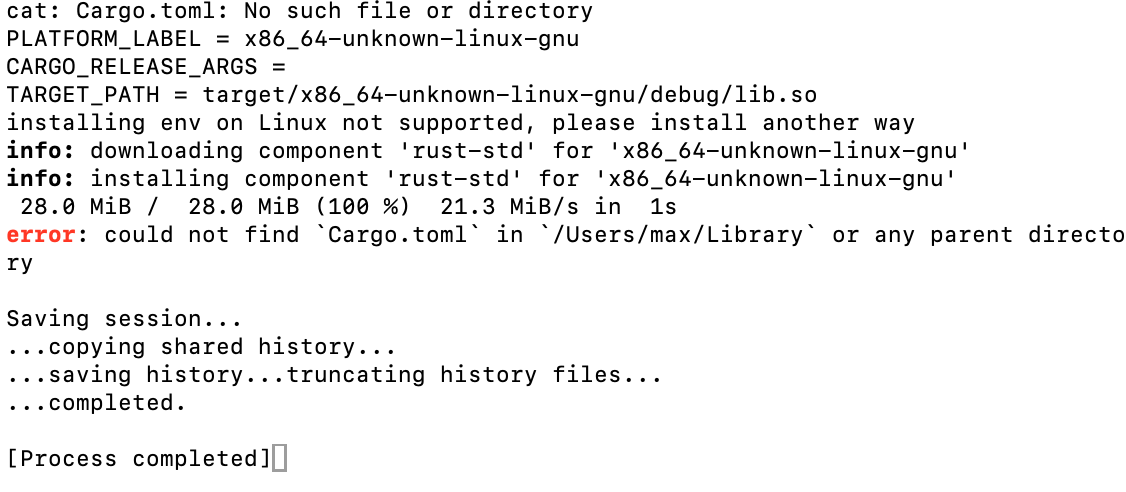
I installed Rust and Cargo is installed but when I run BuildSystem.sh I get the error:

could not find `Cargo.toml` in `/Users/max/Library` or any parent directory

Which is confusing since it's in the same folder as the build script. I'm going to see if I can figure out what's going on

Edit: OK, so I tried putting the Cargo.toml file in my Library folder and now I'm gettinga new error:

error: failed to parse manifest at `/Users/max/Library/Cargo.toml`

Caused by:

  can't find library `godot_boy`, rename file to `src/lib.rs` or specify lib.path


Did you do a git clone of the whole repo or just download the single files? You need the whole repo.

Oh OK. I didn't know that!

I cloned the repository but I'm still getting the same error 

Clone or download the repo and run the builder in the cloned copy.

(2 edits)

That's what I did

Edit: I noticed the error indicated looking for the .toml file in my ~/Library folder so I tried copying all the items in the repository there and it worked quite a bit better until coming to this error: 

   Compiling thiserror-impl v1.0.59
error: failed to run custom build command for `alsa-sys v0.3.1`
<span class="s2"></span>
Caused by:
  process didn't exit successfully: `/Users/max/Library/target/debug/build/alsa-sys-e1a28c965dd1a6bc/build-script-build` (exit status: 101)
  --- stdout
  cargo:rerun-if-env-changed=ALSA_NO_PKG_CONFIG
  cargo:rerun-if-env-changed=PKG_CONFIG_ALLOW_CROSS_x86_64-unknown-linux-gnu
  cargo:rerun-if-env-changed=PKG_CONFIG_ALLOW_CROSS_x86_64_unknown_linux_gnu
  cargo:rerun-if-env-changed=TARGET_PKG_CONFIG_ALLOW_CROSS
  cargo:rerun-if-env-changed=PKG_CONFIG_ALLOW_CROSS
  cargo:rerun-if-env-changed=PKG_CONFIG_x86_64-unknown-linux-gnu
  cargo:rerun-if-env-changed=PKG_CONFIG_x86_64_unknown_linux_gnu
  cargo:rerun-if-env-changed=TARGET_PKG_CONFIG
  cargo:rerun-if-env-changed=PKG_CONFIG
  cargo:rerun-if-env-changed=PKG_CONFIG_SYSROOT_DIR_x86_64-unknown-linux-gnu
  cargo:rerun-if-env-changed=PKG_CONFIG_SYSROOT_DIR_x86_64_unknown_linux_gnu
  cargo:rerun-if-env-changed=TARGET_PKG_CONFIG_SYSROOT_DIR
  cargo:rerun-if-env-changed=PKG_CONFIG_SYSROOT_DIR
<span class="s2"></span>
  --- stderr
<span class="s2"></span>
  thread 'main' (7404970) panicked at /Users/max/.cargo/registry/src/index.crates.io-1949cf8c6b5b557f/alsa-sys-0.3.1/build.rs:13:18:
  pkg-config has not been configured to support cross-compilation.
<span class="s2"></span>
  Install a sysroot for the target platform and configure it via
  PKG_CONFIG_SYSROOT_DIR and PKG_CONFIG_PATH, or install a
  cross-compiling wrapper for pkg-config and set it via
  PKG_CONFIG environment variable.
  note: run with `RUST_BACKTRACE=1` environment variable to display a backtrace
warning: build failed, waiting for other jobs to finish...


It also had this text at the start of the build:

PLATFORM_LABEL = x86_64-unknown-linux-gnu
CARGO_RELEASE_ARGS =
TARGET_PATH = target/x86_64-unknown-linux-gnu/debug/libgodot_boy.so
installing env on Linux not supported, please install another way
info: component 'rust-std' for target 'x86_64-unknown-linux-gnu' is up to date

So it looks like for whatever reason:

  • The build script is only able to find the files in my home library folder
  • It thinks MacOS is Linux and can't build for it. Or it's just going down the Linux build path for some other reason