On Sale: GamesAssetsToolsTabletopComics
Indie game storeFree gamesFun gamesHorror games
Game developmentAssetsComics
SalesBundles
Jobs
TagsGame Engines
(1 edit)

i cant get it to work :( i think i have Pillow installed in the correct path.Or am i missing something. I also tried copying the PIL and Pillow- modules to the blender instal folder, didn t work.

C:\Windows\System32>"C:\Program Files\Blender Foundation\Blender 4.5\4.5\python\bin\python.exe" -m pip install pillow

Requirement already satisfied: pillow in c:\program files\blender foundation\blender 4.5\4.5\python\lib (11.3.0)


  File "C:\Users\ado_o\AppData\Roaming\Blender Foundation\Blender\4.5\scripts\addons\PSX tools\psx_addon.py", line 187, in invoke

    return self.execute(context)

           ^^^^^^^^^^^^^^^^^^^^^

  File "C:\Users\ado_o\AppData\Roaming\Blender Foundation\Blender\4.5\scripts\addons\PSX tools\psx_addon.py", line 213, in execute

    temp_image = Image.new("RGBA", (resolution, resolution))

                 ^^^^^

NameError: name 'Image' is not defined. Did you mean: 'image'?
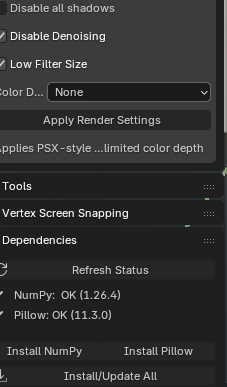
Deleted 132 days ago

Try it!

https://fawkek.itch.io/psx-retro-tools/devlog/1008531/psx-tools-dependency-insta...

i did, still the same error :(

(1 edit)
  1. Restart Blender after installing Pillow

    • Pillow may be installed, but the add-on was loaded before installation.

    • Either completely restart Blender, or in Edit → Preferences → Add-ons, uncheck the add-on and check it again to reload it.

  2. Verify Pillow in Blender’s Python Console In Blender: Scripting → Python Console, run:

    import sys, importlib print(sys.executable) print(sys.path) import PIL; print(PIL.__file__, PIL.__version__) from PIL import Image; print(Image) 
    • The last line should print something like <module 'PIL.Image' ...>.

    • If it errors here, Pillow is still not available to Blender’s Python.

  3. Possible reasons it still fails

    • Pillow is installed into the wrong Python (system Python, not Blender’s built-in).

    • Pillow was installed into another Blender version.

    • The add-on’s code didn’t import Image (from PIL import Image) before using it.

  4. If Pillow shows as installed in step 2 but the add-on still fails

    • This means the add-on module is still using the “old state” from before Pillow was available.

    • Reload the add-on (disable/enable it) or restart Blender so it imports Image properly.

(1 edit)

double check that you have them copied to:

c:\program files\blender foundation\blender 4.5\4.5\python\lib\site-packages

and not:

c:\program files\blender foundation\blender 4.5\4.5\python\lib\

It looks like you may have copied them one directory to high.

thanks for the replay! i have PIL and pillow-11.30.0 dist in the correct folder. keep getting the same error.i think for some reason, the add on is not getting the right path to the install site-packages. 

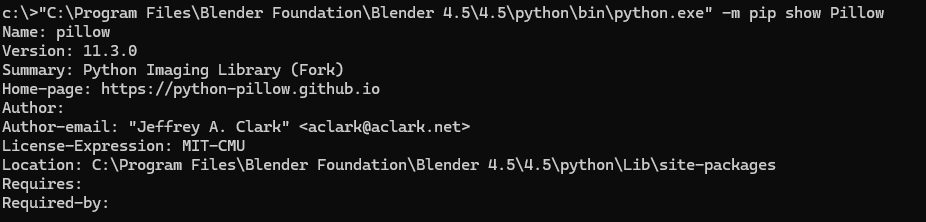
Could you run this from the command prompt:

"<Path to Blender>\4.5\python\bin\python.exe" -m pip show Pillow

It should give you info about the library including the install location:


This is the output from mine. I just want to see if there is a conflict with the install location from the pip command side of things.

I feel like you are super close to getting it working!