
On Sale: GamesAssetsToolsTabletopComics
Indie game storeFree gamesFun gamesHorror games
Game developmentAssetsComics
SalesBundles
Jobs
TagsGame Engines

PressnButtons

8
Posts
3
Following
A member registered Jun 22, 2022

Recent community posts

Could you run this from the command prompt:

"<Path to Blender>\4.5\python\bin\python.exe" -m pip show Pillow

It should give you info about the library including the install location:
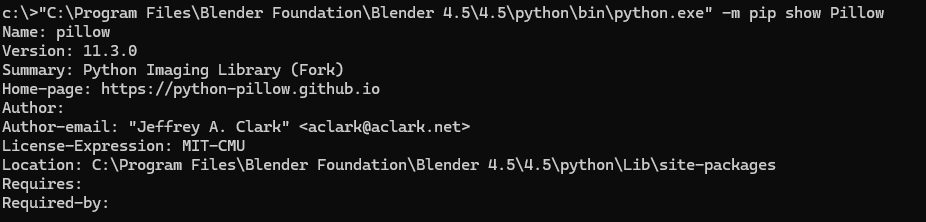


This is the output from mine. I just want to see if there is a conflict with the install location from the pip command side of things.

I feel like you are super close to getting it working!
(1 edit)

double check that you have them copied to:

c:\program files\blender foundation\blender 4.5\4.5\python\lib\site-packages

and not:

c:\program files\blender foundation\blender 4.5\4.5\python\lib\

It looks like you may have copied them one directory to high.

Sorry you are still having some trouble, did you try moving the library folders from the Users install location to Blenders yet?

just to verify, your Pillow is installed here?

C:\Users\*****\AppData\Local\Programs\Python\Python313\Lib\site-packages

If you open this location  on your computer there should be a folder named "PIL" and another named "pillow-11.3.0.dist-info"

No worries, and no need to apologize. Just glad to help figure it out. Keep the the awesome work! 

(2 edits)

Quick tip for anyone in the future installing this. You need to make sure you install Pillow as administrator from the command prompt or it will install to the incorrect library folder location and you will get this error when trying to generate a texture:

File "C:\Users\****\AppData\Roaming\Blender Foundation\Blender\4.5\scripts\addons\PSX tools\psx_addon.py", line 213, in execute
temp_image = Image.new("RGBA", (resolution, resolution))
                     ^^^^^
 NameError: name 'Image' is not defined. Did you mean: 'image'?

You can verify the install location by running the show command:

"<path-to-blender>\4.5\python\bin\python.exe" -m pip show Pillow

This is the incorrect install location:

C:\Users\****\AppData\Roaming\python\python311\site-packages

The correct install location should be:

C:\Program Files\Blender Foundation\Blender 4.5\4.5\python\lib\site-packages

Newer versions of Blender no longer look in the users path for python libraries. I believe this was changed in Blender 4.2 so if you are running a later version this is most likely the problem.

If the install location is wrong, you can either move the "PIL" folder and the "pillow-11.3.0.dist-info" folder from the users install location to Blenders install location.

Or you can run the original install command again as admin

"<path to blender>\4.5\python\bin\python.exe" -m pip install Pillow

 which should correctly install to Blenders library location.

 This worked for me on Blender 4.5. Be sure to replace any version numbers in the examples with your version of blender and any **** with your user name.

(1 edit)

Just a heads up if you are still having this error after the install and reboot, I found i had to install Pillow as administrator from the command prompt or else it gets installed into the incorrect library folder and Blender doesn't know where to look. 

I work with substance pretty often so that perfect.  This is great for a reference, thank you for taking the time to post the image.  Can't wait to see what you come up with next!

Really awesome atmosphere! I'm curious about the moldy/bloody faced corpse and what you did to get that look? Any tips you have for recreating that texture style would be amazing! keep up the good work!