

based on my testing, the alpha channel works even using lossy compression (unless I’m misunderstanding something). here’s a comparison
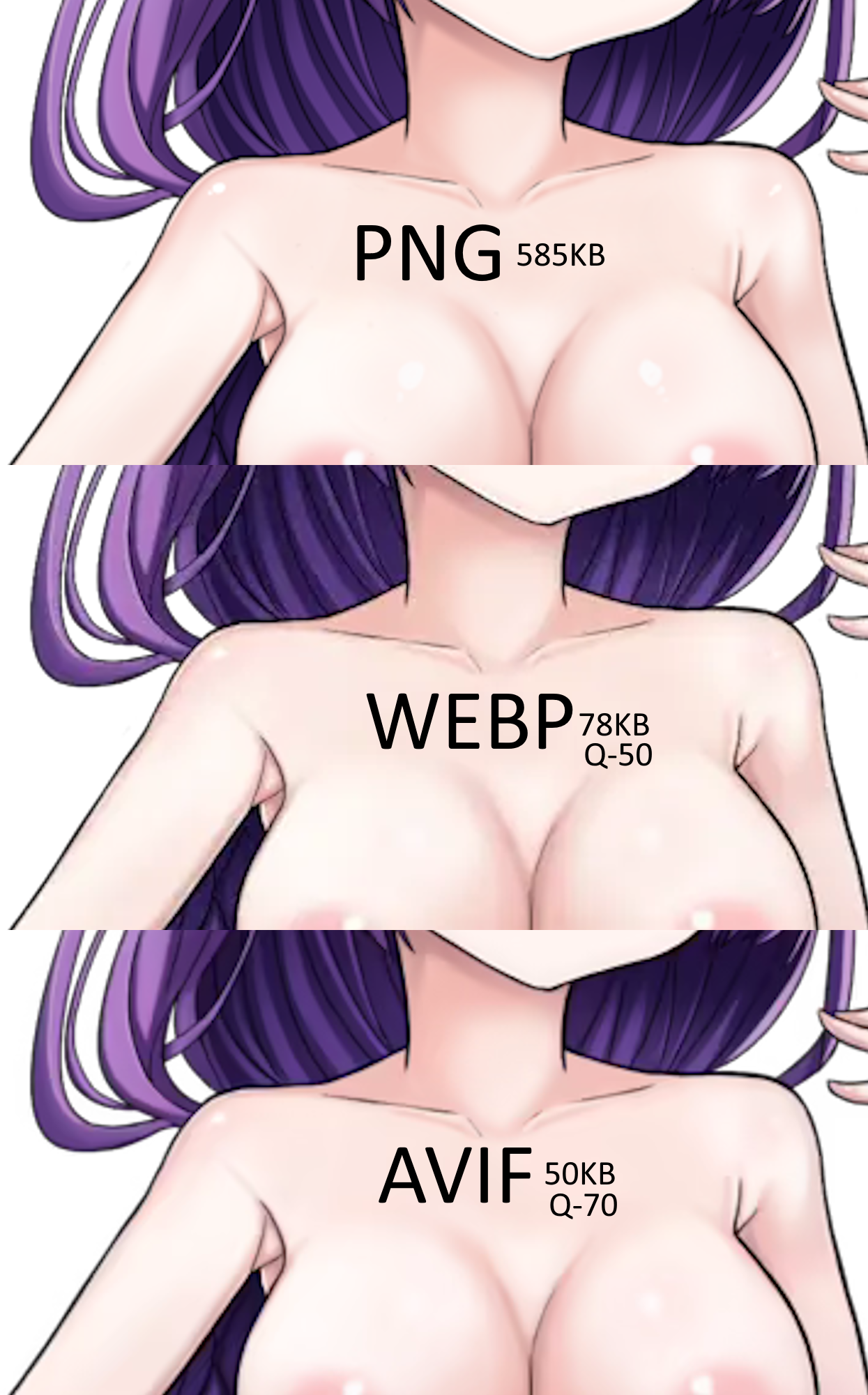
based on my testing, the alpha channel works even using lossy compression (unless I’m misunderstanding something). here’s a comparison
I mean:
AVIF supports transparency for lossless images but doesn’t support transparency for lossy images. On the other hand, WebP is the only image format that supports RGB channel transparency for lossy images.
And yet:
AVIF supports alpha but instead of using a pixel format like most other codecs, it uses a second video stream as an alpha matte.
Maybe this is old info, or incorrect or something :P
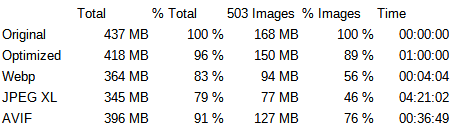
I tried comparing encodings myself too, though in my case I tried lossless compressions, in case you decide to to reduce the size of the offline files without loosing the quality:
Edit: Forgot to mention, I used the 0.1.1 version in this test, in case you want to reproduce.
| | Total | % Total | 503 Images | % Images | Time | | ——— | —— | —–– | ––––– | –––– | –––– | | Original | 437 MB | 100 % | 168 MB | 100 % | 00:00:00 | | Optimized | 418 MB | 96 % | 150 MB | 89 % | 01:00:00 | | Webp | 364 MB | 83 % | 94 MB | 56 % | 00:04:04 | | JPEG XL | 345 MB | 79 % | 77 MB | 46 % | 04:21:02 | | AVIF | 396 MB | 91 % | 127 MB | 76 % | 00:36:49 |
Edit: Damn, looks like the markdown engine doesn’t support tables, using an image instead:
Notes:
cjxl (the tool used to encode to jxl) didn’t seem to use more than one core even though I told it to use 32 threads, next time I’d parallelize jobs manually, e.g. using ForEach-Object -Parallel.Commands used:
cwebp -preset drawing -lossless -z 9 -m 6 -pass 5 -quiet IMAGE.png -o IMAGE.webpcjxl IMAGE.png IMAGE.jxl -a 0 -q 100 -e 10 –num_threads=32 --quietavifenc --lossless -q 100 –qalpha 100 -s 0 --jobs 32 IMAGE.png IMAGE.avifTakeaway: Even though AVIF generally has the best compression ratio when using lossy compression, it’s only a bit better than an optimized PNG when using lossless compression (and it’s not actually 100% mathematically lossless, since AVIF doesn’t support the same color space that PNG uses, so there’s some change during color space conversion). The best format seems to be JPEG XL, unfortunately Google really wants to push WEBP and AVIF, which are both fully or partially designed by Google, so support for JXL is not good (EDIT: google is thinking about supporting JXL), so with that said, the best all around for lossless compression seems to be WEBP with almost half the space of PNG while still being 100% lossless, but also the fastest to complete the encoding due to the maturity of the libraries.
Thanks a lot for doing all of this! I don’t think I can do lossless rn, but this is really useful information! If my budget gets high enough, I do plan to increase the quality of the web assets in accordance. I am committed to the web as a platform, so it really hurts me to provide a compromised version on the web. It does seem like WebP for lossless and AVIF for lossy is the way to go. Optimizing the PNGs is also something I should do…
I’ve rewritten a ton of code to abstract away all the “.png”s in the code base already, so I should be able to quickly move to and deploy different image formats easily now. All the legwork is basically done. I did actually look at JXL, but yeah, the browser support is a non-starter. I wish I had investigated AVIF more earlier though
I didn’t mean to use lossless for the web version, but for the offline downloads. If it’s lossless, it’s the same quality, but saves the user download time and disk space. Again, not at all important, especially not this early in development, but you yourself mentioned that there would be a lot more in the future, so might be something to consider at one point. (Edit: Also, optimizing PNGs took a lot longer that converting to lossless webp, and only reduced sizes a little, so I don’t think it’s really worth it)
In my personal opinion, reducing asset quality for the web version is completely reasonable, so don’t sweat it too much 😁 (Edit: I’m on Android so I see no difference in quality really, the screen is too small for that 🤷, and even on desktop, unless you try to find faults, reasonable quality loss should be fine)
JXL situation really sucks, could’ve been something great.
Lastly, webp has a setting called preset which you can set to drawing. According to the docs:
Specify a set of pre-defined parameters to suit a particular type of source material. Possible values are: default, photo, picture, drawing, icon, text.
Since -preset overwrites the other parameters' values (except the -q one), this option should preferably appear first in the order of the arguments.
Did you use that when converting to lossy webp? Could that improve the quality a bit?
I wasn’t aware of that, I used imagemagick and I didn’t see that option when I checked the docs, but maybe that’s what image-hint was for…
Optimizing the downloadable versions is a good idea.
In my personal opinion, reducing asset quality for the web version is completely reasonable, so don’t sweat it too much 😁 (Edit: I’m on Android so I see no difference in quality really, the screen is too small for that 🤷, and even on desktop, unless you try to find faults, reasonable quality loss should be fine)
It’s probably just because I know what to look for, so it sticks out to me. But yeah, that’s a good point, especially on mobile there’s no way you’d be able to tell.
Would it be possible to dynamically detect screen size/platform and fetch assets of slightly lower quality on mobiles (Android and IOS), and stightly higher on desktops? That would be the best of both worlds kind of approach, though it would take twice as long and as nuch effort to encode in 2 different quality settings.
Just an FYI, since Firefox and Safari both support JXL, and there’s a lot of interest in it being universally supported, google opened discussion about reintroducing it to chromium (“reintroduce” since they removed it in 2022 🤦), so it could be something to consider in the future.