

For some reason, I can't stop a proximity sound after I start it. I'm using the stop plugin command, but it just keeps playing.
Hi, thanks for the bug report! Unfortunately (as is the norm lol) "it works on my machine", I know that doesn't help you even a little bit.
There might be other plugin incompatibilities. Could you send me a list of stuff that's running on top of the proximity plugin? How big the the file you are playing (in kb)? In what context do you try to use the plugin command (via button triggered event? in a common event? etc)
I'll try to help as much as I can. If we can't make it work, I'll send you the full source for free and you can try on your own.
Hello again!
I just published a huge update. Me and my testers couldn't see the bug you reported anymore - please try the new version and see if it solves your issues~
https://battleprogrammer.itch.io/proximityeventsounds/devlog/908636/bwg-proximit...
There might be other plugin incompatibilities. Could you send me a list of stuff that's running on top of the proximity plugin? How big the the file you are playing (in kb)?Could you try setting up a new project with just this plugin and see if it works there?
I'm 99% sure its either a wrong setup or a plugin conflict.
if you take a look at this video, it works:
 Those three plugins heavily influence the base mechanics of RPG Maker MZ, and are untested with this small plugin. Compatibility can't be guaranteed. I tested CGMZ core with this, works fine, but couldn't get the demo of MZ3D to run. A quick glance in the source code reveals heavy influence on the events...
I only guarantee compatibility with Visustella. The rest is up to you - if you get the full source, you can try creating a compatibility or ask the devs of those plugins to please adhere to the standards RPG Maker MZ set out. I can't create perfect synergy to all and every plugin, I'm sorry.
Have you tried everything in the post above?
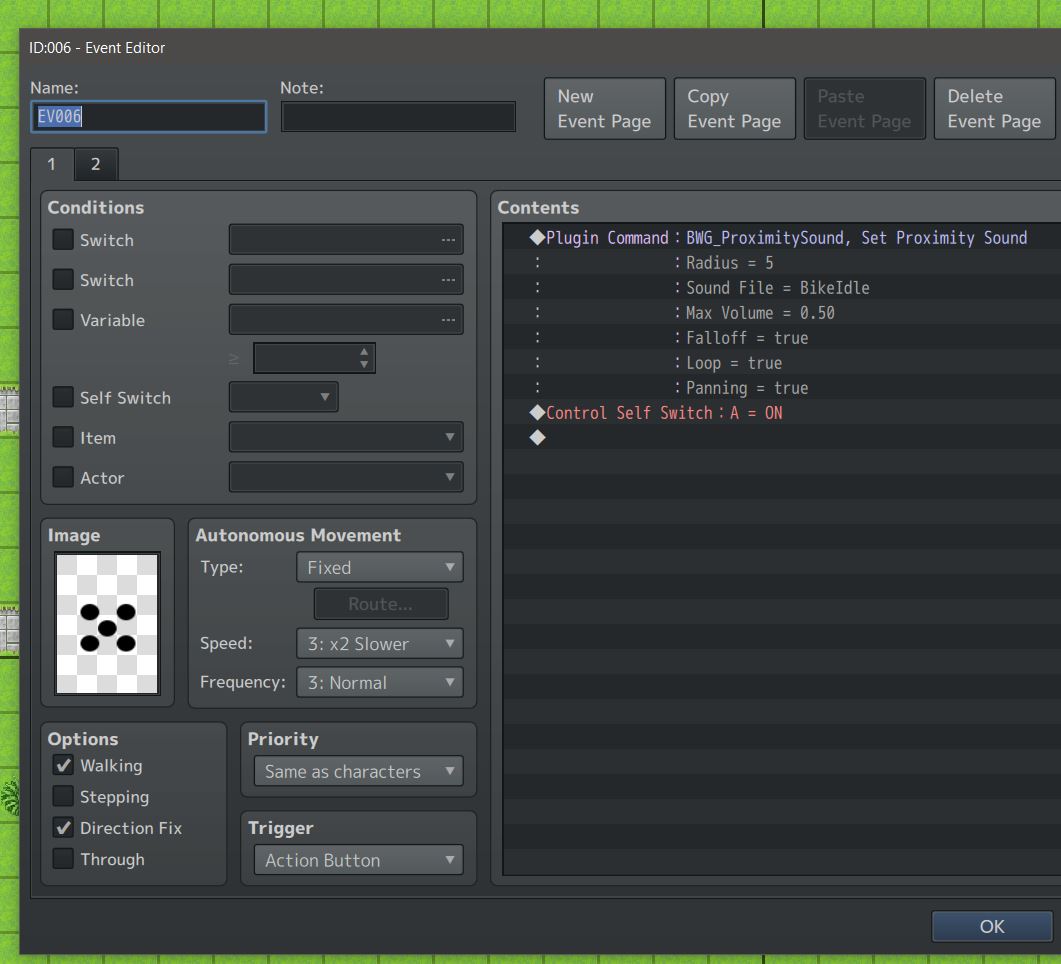
That aside, maybe it's a setup issue. I attached a screenshot. The second page is just the switch off event, and switching the self switch off.