

If you're having trouble or run into any bugs with the code, post a comment here! I will try to get back to you within a few days. Be sure to check the Controller Support Expansion section on my website too for documentation.
Comprehensive set of features to improve controller support in Ren'Py. · By
Ooh I see! Yes I had not accounted for that. For now, can you see if this change to the FocusManager class in controller_functions.rpy will fix it?
def __init__(self, screen, layer=None):
    if isinstance(screen, tuple):
        self.screen = screen[0]
        self.layer = screen[1]
    else:
        self.screen = screen
        self.layer = layer
    self.is_showing = renpy.get_screen(self.screen)
    self.displayable_lookup = dict()
    self.refresh_triggered = False
    super(FocusManager, self).__init__()
And then adjust `RESTORE_FOCUS_SCREENS` to be a list of pairs like ("game_menu", "MY_GAME_MENU_LAYER") e.g.
define pad_config.RESTORE_FOCUS_SCREENS = [ ("main_menu", "my_menu_layer"), ("game_menu", "my_menu_layer"), "controller_remap" ]
I'll run some more tests and such, but try that for now. That, or if you're not using a game_menu screen/standalone like the template does, just remove "game_menu" from RESTORE_FOCUS_SCREENS altogether.
Sadly, that didn't change anything. It still throws the same error (just with different line numbers, due to the few that were added).
I can only get the game to boot up by removing the "main_menu" AND "game_menu" part from RESTORE_FOCUS_SCREENS.
It also works if I remove [layer "game_menu"] from my "main_menu" screen and do:
define pad_config.RESTORE_FOCUS_SCREENS = [ ("main_menu", "game_menu"), "controller_remap" ]
So it seems like it doesn't really care what I put in the tuple?
If your layer is called `game_menu`, renpy.get_screen is interpreted first as a tag and then as a screen, so regardless it wouldn't work with a screen *and* a layer called game_menu. So, I recommend either changing the tag name or the screen name so they're different if you want to use the save-and-restore focus features for the in-game menu screen. Otherwise, it's fine to just not have that screen in the RESTORE_FOCUS_SCREENS.
Huh, I had not noticed this! You are correct. The solution is to update the visit method in 01_controller_cdsl.rpy:
def visit(self):
    return list(self.displayables.values())
to wrap the return value in a list. I'll add this to the next fix release. Thanks!
Sorry for the slow reply! The code you've created is completely untouched - I reverted all the changes after messing around (even replaced the 01_virtual_cursor.rpy file with an untouched version just to make extra sure). The place I'm seeing this behavior in-game is during an investigation segment which uses image buttons inside a screen. This code is in screens.rpy and it looks like this:
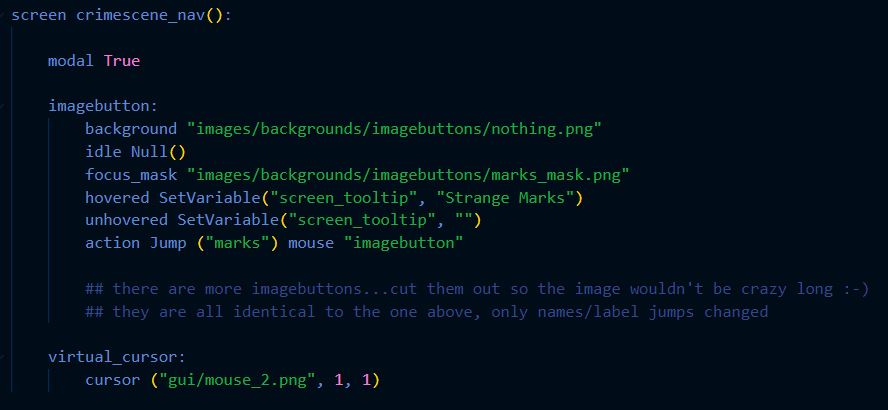
I'll then call the screen in-game and use a series of labels to jump to each event like this...which I'm just now realizing is exactly my problem!!! When the event jumps back to the broom_nav label, the screen is called again, resetting the position of the cursor.
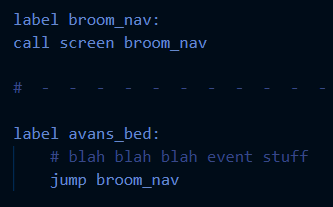
Clearly there's a better way to code this that I didn't come up with the first time around (I'm self taught okay...) so I'll look into that! If you have any pointers you'd like to share, I'd really appreciate it. Otherwise, no pressure! You've helped me enough by making the perfect expansion :-)
No worries! I will look into adding a built-in feature so that the screen language version can save its position between being shown - there is already a property to indicate the starting position, so the only addition would be to save the current position somewhere so that it can be re-applied when the screen is shown again. In the meantime however, you can declare the cursor in Python with default, which will save it! e.g.
default vc = VirtualCursor(cursor=(Transform("gui/window_icon.png", xysize=(50, 50)), 0, 0))
screen investigation():
    vbox:
        spacing 100 align (0.5, 0.9)
        textbutton _("Hello") action Notify("world")
        textbutton _("Jump") action Jump("bedroom")
    add vc
The `add vc` bit adds the cursor to the screen, just like the `virtual_cursor` line. You can add whichever properties you like in the vc declaration e.g. `VirtualCursor(cursor=<...>, snap_to_center=True, which_stick="left")`
Hope that helps!
No worries! This is something I'm looking to update the files to make it a bit easier to understand - by default, the controller pack sets the game_menu screen to be opened when you hit the game_menu shortcut button (e.g. Start/ESC/right click). In the template, this is made possible by setting `title` as a keyword argument rather than a required argument, hence the error complaining about requiring the title argument.
You can remove or adjust this line `_game_menu_screen = "game_menu"` and/or adjust `screen game_menu` to have `title=""` instead of just `title` as an argument.
As for the error, you can put this into the my_controller_event function:
try:
    cda = CONTROLLERDEVICEADDED
except NameError:
    ## Probably reporting some other error
    return rv
put it just above the `if ev.type == CONTROLLERDEVICEADDED:`
To be fair this may not solve all problems with error reporting - the main issue is just that Ren'Py tries to make an error message and skips over various other steps like declarations, which means it then gets caught on otherwise normal parts of the code. So that check is an attempt to ignore that particular problem if it arises, but it's possible it'll try throwing an error somewhere else instead.
And for the viewports, `controller_viewport` does not handle `side_` properties or automatically adding scrollbars unfortunately, so you'll need to explicitly set that up/add it instead. Notably, the following are equivalent (aside from the controller_viewport bit being a controller-compatible viewport obviously):
viewport:
    scrollbars "vertical"
    side_yfill True
side 'c r':
    yfill True
    controller_viewport:
        id 'whatever'
    vbar value YScrollValue("whatever")
Hope that helps!Hmm, are you certain that was the cause? Double and single quotes are interchangeable in Ren'Py in most cases for denoting strings, and I pasted the code into script and didn't have any problems running it. If you got an error, feel free to post it!
Happy to hear your other problems were resolved as well ✨
The first one is really out of the scope of what I can help with for this tool. You can potentially look into nearrect for positioning the new screen appropriately, or style your buttons instead of opening a new screen.
For your second question, you can use buttons that have the Scroll action, if I understood you. Generally if they're using the mouse though, it won't make sense to have buttons which set focus elsewhere. You might be better served having a variable keep track of what button is "selected" and style it based off of selectedness rather than hover state. Then you can execute the appropriate button action based on which button is selected.
If anything, this sounds like it would be a "situational"-category event, given that it's only active during minigames. You're also welcome to add your own categories and define their compatibilities when you add new events. Or, if you don't need your minigame keys to be remappable, it's fine to just hardcode it with pygame events.
Have you tried this with a general viewport? Ren'Py doesn't pass ATL events to displayables inside containers, so that may be what you're seeing. Otherwise, if it works with a regular viewport and not the controller viewport, if you can make me a short reproducible code section I'll look into debugging it.
after just testing with a non-controller viewport, the atl transitions actually DID work to my surprise! so this might actually be an issue with controller support expansion! I've made a Google Drive folder with both the classic viewport and controller viewport versions of my full chapterselect script. figured that a more in-depth look might help better for debugging than a short extract. there's also a folder containing all of the necessary image assets, so that should help as well.
SMALL UPDATE ON THIS!
I've found that this bug ALSO applies to tooltips. For example, if you have a button in a controller viewport, and that button uses both an ATL transform and a tooltip, the tooltip will override the ATL for some reason, and cause it to (again, the same with the previous problem) immediately complete the animation. It seems to skip over the ease/linear arguments specifically.
I also made sure to test this without the tooltip, in which it worked fine, and with the tooltip in a regular viewport, and that, too, works fine. Not sure if this will be helpful to your debugging process or not, but I thought it to be worth mentioning.
I'm not really concerned about this, no. Ren'Py's developers value backwards compatibility, so it's unlikely we're going to lose functionality. If some parts need tweaking following the change, I'll simply make an update to the tool, and you would be able to continue using this initial version on any earlier Ren'Py engine releases. In general I try to avoid modifying engine internals wherever possible, and if I do (often to fix bugs) I always ensure that if I need to change how the tool accesses that part, your "front-end" code using my tool won't have to change. So, I wouldn't be worried about it.