A downloadable tool for Windows.
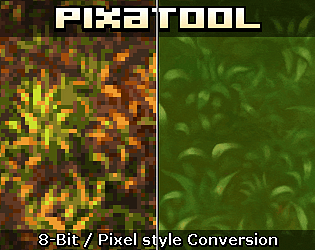
Whenever I needed to start certain pixel art projects from high-res images, it used to be laborious and time-consuming. With PixaTool, you can rapidly customize the resampling and processing of an image in real-time.
No need to jump into Photoshop or Affinity Photo just to manually scale down an image, eyball the results, go back, resample again, try a bunch of filters etc. Sure, you could still do that, but I find it way faster to use PixaTool for crunching down an image to use as a starting point in Aseprite. It's especially good for complex projects like portraits and enviromental art!
However, I'm giving PixaTool only four stars mainly due to a complete lack of proper documentation - considering this is a commercial product, I was expecting at least a brief manual.
As of July 2024, there are only a couple of videos on the creator's personal YouTube channel (buried underneath a myriad of unrelated videos) that explain the very basics of the app (things I figured out on my own), and maybe one or two "tutorials" by way of captured videos in GIF format here on Itch. That's... Not very helpful.
For example, I wanted to know more about how exporting really works. It was immensely confusing, and I had to either eyeball the image in the app, or do extra work outside of it to guess the output resolution. Hopefully, these issues will be resolved in the future!
It's also good to note that while pretty robust in itself, PixaTool is best used in conjunction with other pixel art editing tools like Aseprite. It's not a one-button solution to render out perfect finished pixel art pieces, but something valuable to have in your pixel art toolbox.