Indie game storeFree gamesFun gamesHorror games
Game developmentAssetsComics
SalesBundles
Jobs
TagsGame Engines

Bug Reports! Sticky

A topic by Mackerel Sky created 31 days ago Views: 801 Replies: 45
Viewing posts 1 to 17
Developer

If you run into anything weird, please let me know in this thread and I will do my best to figure out what the hell I did to cause it.

To help me in this endeavour, please be as detailed as possible regarding how you encountered the bug, and what you need to do to reproduce it!
Encountered an severe issue with the controls, mostly with not being able to do anything except press the survey button in the menu

I use a DualShock 4 running thru DS4Windows to make it work on my pc, and this works for other unity games too but yeah for my case its not quite working.

Things I've already tried which didnt work:

-Turning off steam so that am sure steam input isnt interfering

-playing the game with the pad disconnected then connecting it when the game is on

-playing the game with DS4windows off so it uses just the raw x input

-using the keyboard (this also doesnt work for me some reason apart from enter)

So yeah I'll let ya work on finding a solution on this, def bugged me but hey its still a early development project so at the very least I understand how this can slip by.

Developer (1 edit)

Hey there. Thanks for reporting! This bug is normally caused by having some kind of joystick or other peripheral plugged into the PC. Can you confirm if you have like a HOTAS or something connected? If so, try running the game with it unplugged.

Nope, dont have any hotas plugged into my pc, I do own one and have the software, but i dont have it physically plugged. Also yeah the software isnt on either

Developer

This is concerning! If there is truly nothing but the keyboard, mouse and gamepad plugged into the computer, can you see if the same bug comes out in v0.10b?

slr, but yeah in 0.10b its the same issue as well

Developer (1 edit)

Understood - would you be willing to join a Discord working group I'm setting up to look at this problem? If so, please send your handle to asemail00@proton.me and I will reach out.

Slr again, I wouldnt mind yeah, Idk if our timezones will line up but I'll try to send later

Developer

Hello. I ended up making a debug build of the game. It has a visualiser on the main menu that tells you what is sending the input. If you could send a screenshot of it I may be able start investigating where to look.

https://drive.google.com/file/d/1LTbVn9qcQ-77nz0g76Y1H0V9hu54O2iC/view?usp=shari...

okay, I'll report back in a bit what I see

(1 edit)

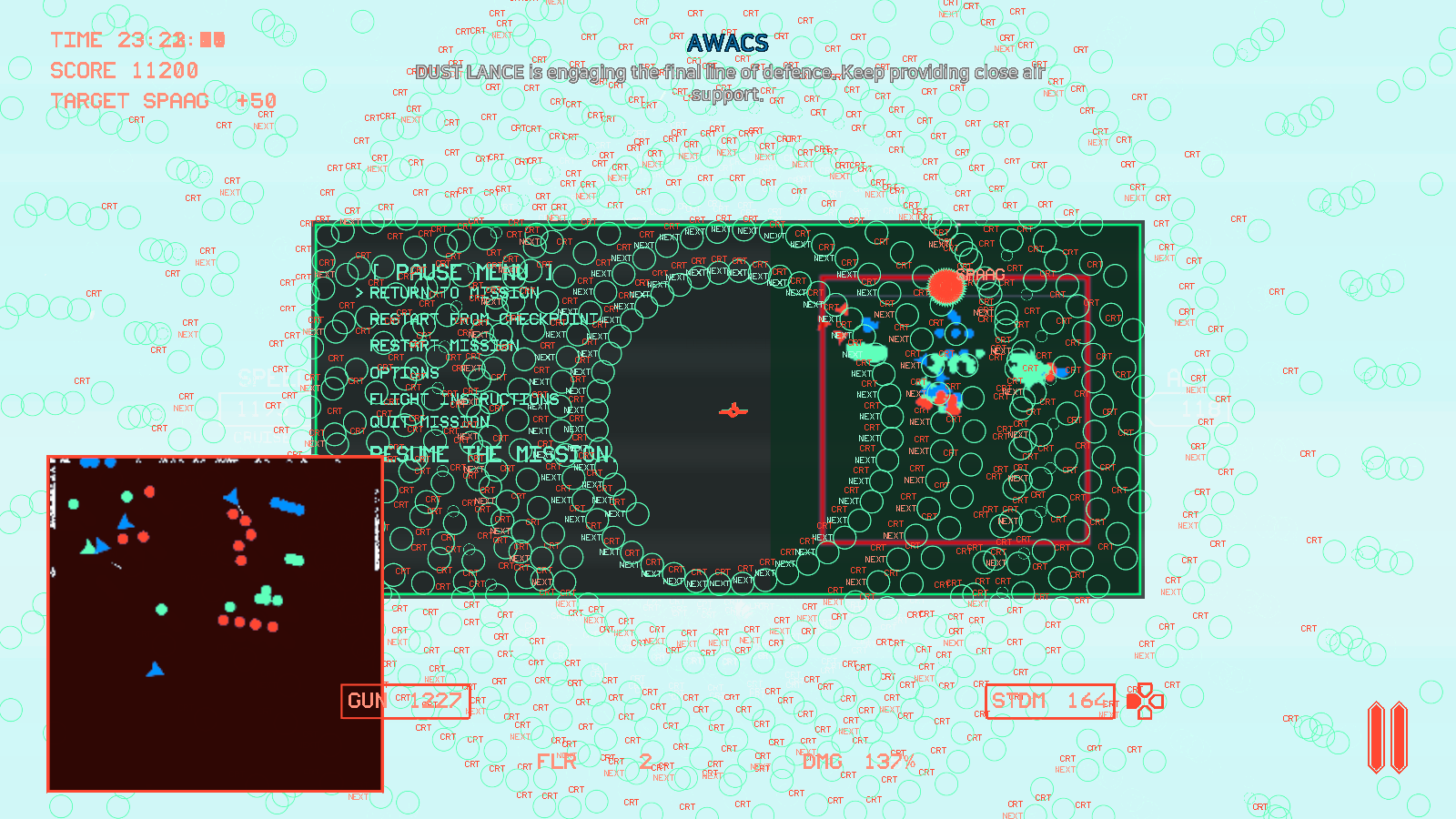
In playing the second mission, after defeating all the critical targets in the middle area (in the fourth, and I assume, final phase in that area), I think I got one or two more voicelines from that area indicating continued combat before all voicelines cut out completely, including AWACS callouts, lines related to other operations, etc. I received no indication that the operation in that area was successful other than that no more critical enemies appeared. When I went to the West area, the operation there proceeded as normal, but still without any voicelines playing. Neither the audio nor the subtitles appeared. All other audio (music, SFX) continued working like normal. After restarting the mission, voicelines were working again. I suspect I defeated all the critical enemies before the scripted voicelines for that phase finished playing and that caused the bug.

(1 edit)

Got the same bug at the same point; this time I watched as an ally destroyed the final enemy in the phase at which point all voicelines immediately stopped. In the first instance I was in the F. GR.-4 and the second time I was in the KF. 21.

Developer

Hey buddy, thanks for reporting. Is this in the Ogre/Grendel operation? I think I'm beginning to see a pattern which I can use to debug what causes the problem.

No, both were on the Dust Lance operation.

I also encountered the same bug in the Dust Lance operation. On the final airfield assault, all targets are destroyed, but then no further voice lines are given and the airfield is not marked as "friendly" like it should when that operation completes. I have completed that operation before, and didn't see any of the usual indications that it "completed" this time.

One thing I did notice is that the last red marked enemy tank was destroyed by an ally. I do not know if that was the cause - I will need to try the mission out a few more times to see if I can replicate this.

Also got this issue, or something similar. Cleared all the enemies on the Dust Lance section, then everyone went silent. Even after I cleared every red enemy from the map, I'm still getting nothing.

The second mission keeps breaking. Sub-missions won't finish properly (all CRTs destroyed and everything stops in place, no objective achieved), a mission fails unexpectedly (all allied units and CRTs vanish), the dialogue sometimes stops entirely

(1 edit)

Being destroyed in survival mode leads to a blackscreen (edit, saw the post, this also happened to me in an I-29)

Stall warning from flying too high never turns off the audio alert (happens on all the planes)

If taking only guns, can't lock onto enemies at all (and therefore no leading pip), on grand slam with the FGR guns only, can't even shoot at all

Developer(+1)

Thanks for reporting! The first two bugs have been fixed. I will probably need more time to work on the guns-only thing.

Yeah I'm having the same problem as SubarashiZeo and caffetiel. None of my Thrustmaster software is running, I restarted my machine, and I tried this with both mouse and keyboard and my Dualshock 4 controller. the only way to get past the survey button is to spam the selection key (enter on keyboard or X on DS4) while the menu is loading, and even then the only button that can be selected is the return button to go BACK to the main menu after entering the mission selection screen.

Developer

Would you be willing to join a Discord working group I'm setting up to look at this problem? If so, please send your handle to asemail00@protonmail.me and I will reach out.

sure thing.

Sadly though it says your domain couldn't be found for the email i sent.
however not all is lost as my Itchio username is the same as my Discord.

It's fully possible I'm missing something, but in the second mission, upon clearing the centre lane all the way through to the airfield and getting the friendly airfield, I was able to land successfully in the not-Mig-29 but nothing seemed to happen. Not sure if there's meant to be ATC voice lines but I heard nothing from them, and after trying to hit a dead stop in a few places including inside the 'R' circle on the minimap nothing seemed to happen.

Super impressed with the level of polish for how early this is otherwise, I have to say.

The area required to land and stop in at Mizra Regional Airfield is a bit unclear. I've found that coming to a complete stop closer to the ATC tower tends to yield a more consistent refuel/rearm, but it's hard to say if that's actually helping or I'm just getting lucky.

Not sure if this is just me but I feel like the scripting in the second mission isn't working properly. It took me a few tries to actually get Dust Lance to the airfield, but when I did and killed all the targets all the dialogue stopped and the mission failed automatically at 14:10 to go. I'll try and replicate what I did/swap aircraft to see if it's tied to a specific aircraft/weapon or something. I tried it with the F 4 using double small bombs, standard missiles, and Saams. 

Yeah it seems like the health or timers for the two land-based objectives aren't quite working right at the moment. I just lost the city because in a perfect run after getting Dust Lance to the airfield I missed a single SPG and had to take the time to go around for a second gun pass, apparently that was enough to force Grendel into retreat after a dream run through the city, and I've had similar happen to Dust Lance down the middle.

This was on version v0.11b.

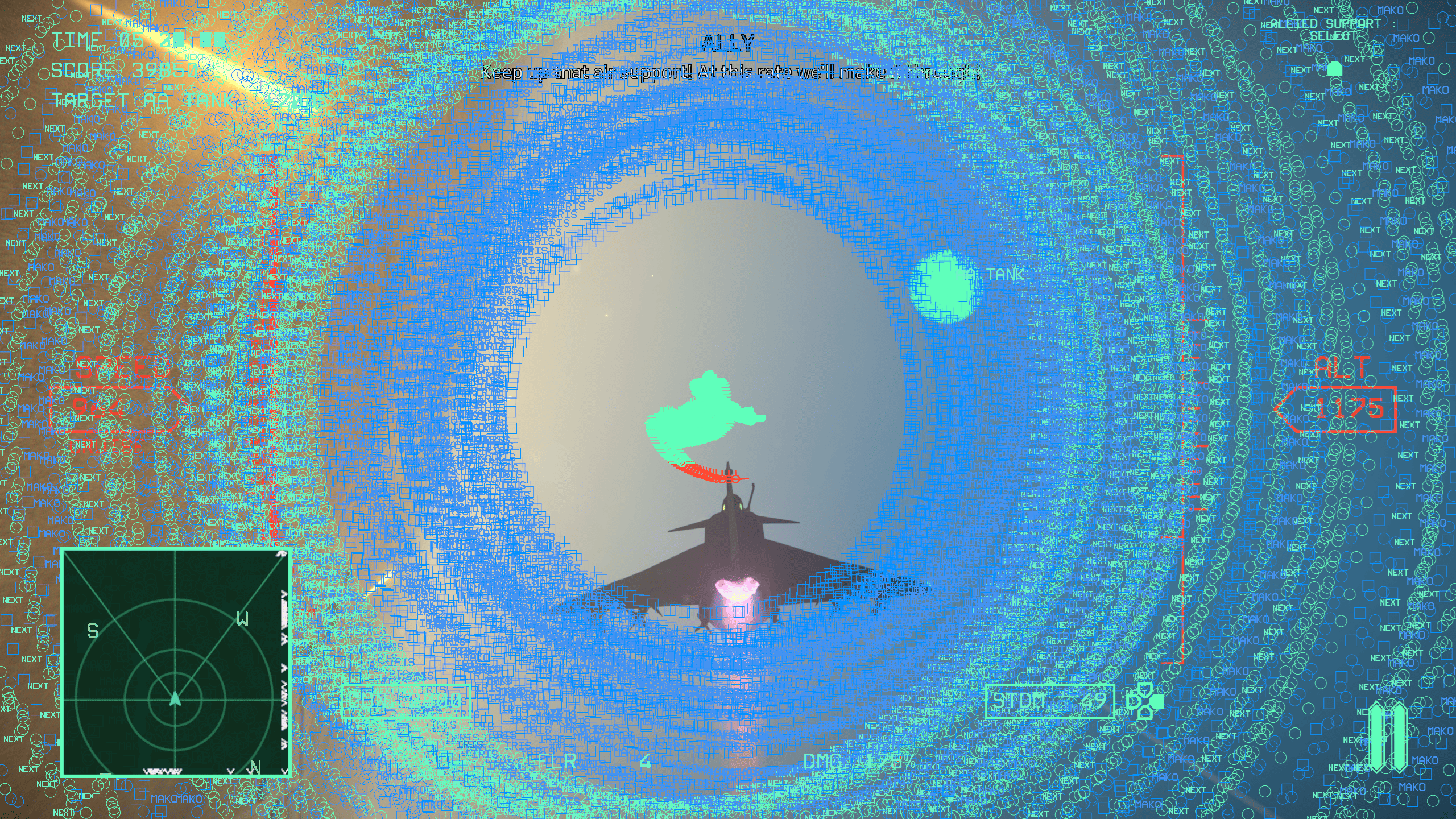
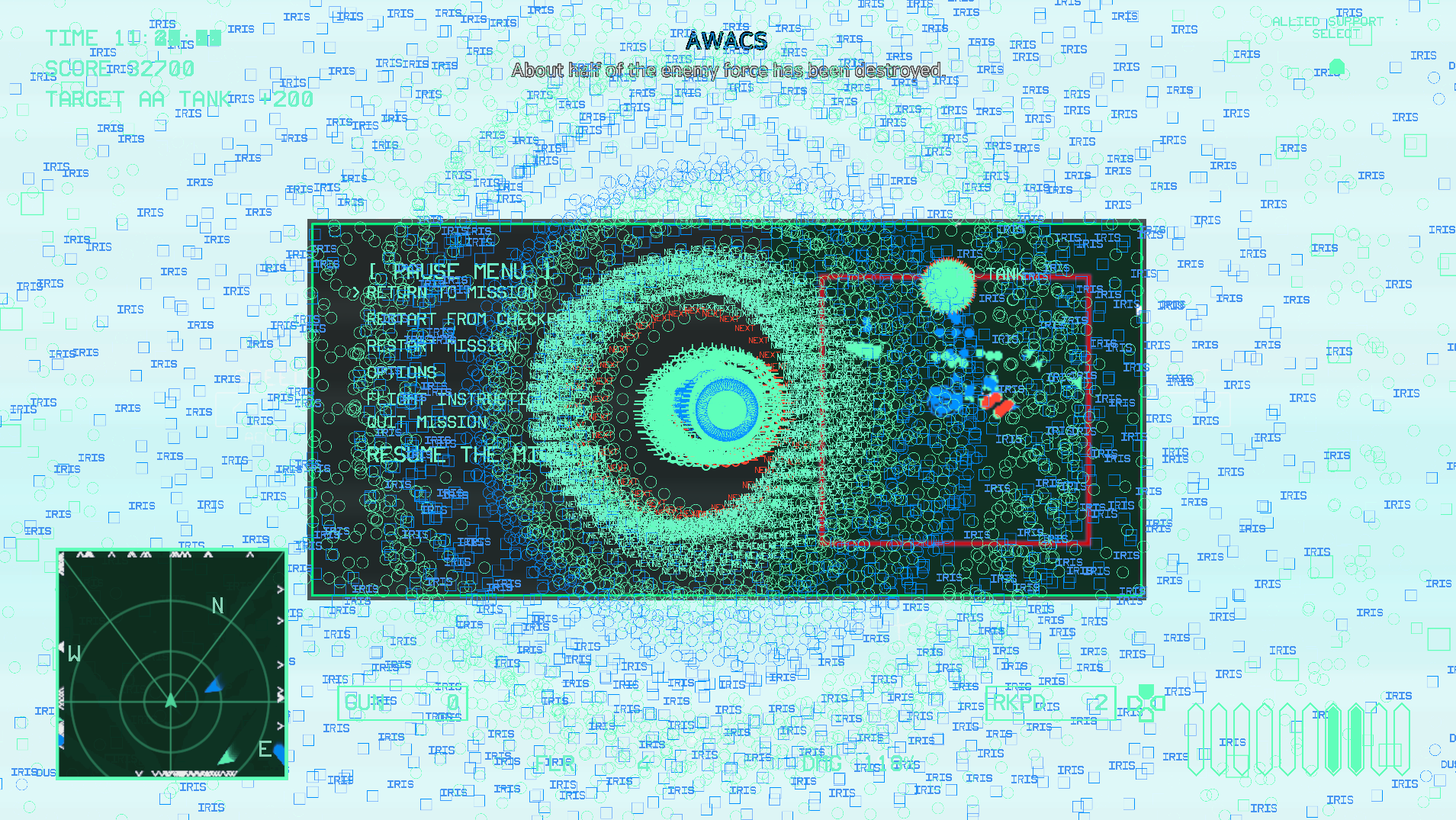
I ran into a bug on the second mission, Grand Slam. I successfully completed two operation areas, Dust Lance and Ogre/Grendel, and had moved on to the enemy attack on the airfield.  I had a few enemies left and almost no ammo, so I decided to use the "Allied Support" option by pressing down on the controller D-Pad. I then encountered a visual error where all HUD elements started to draw on the screen in a recurring spiral pattern. The dialogue and game noises continued to play as normal, but my screen was quickly filled and I couldn't see anything. This kept up for at least a minute or two until the mission failed. I do not know if the mission failed because my plane crashed or for another reason; if it was because my plane was still "flying" and it crashed, I would have expected the mission to fail a lot sooner. It almost seemed like the game and flight model froze during this, but I can't be certain.

I've attached a screenshot of the issue below.


had the same issue

(1 edit)

Got a similar issue too, Also happened when fighting off the counterattack on Mizra airport (seems to happen when getting hit? not sure)

Made a copy of the log file if you want me to send it anywhere

Also some HUD elements seem strangely big, it's hard to see in this image but in particular the throttle indicator is overlapping the radar

I tried to replicate this issue today, but did not succeed - although I may have found a different bug. I had managed to complete the fleet defense operation and Dust Lance and had moved on to the counterattack phase. I then crashed my plane and retried from a checkpoint. In this, I still had the Allied Support Select option. I pressed down on the D-Pad, but nothing happened. The visual bug from before did not happen, but I also did not notice any allied support occurring.

Minor dialogue bug in v0.11b: in Mission 6 (Grand Slam), I successfully completed two objectives and then made it to the final enemy counterattack. I had crashed my plane and failed the mission, and I then selected to retry from checkpoint which brought me back to the enemy counterattack. Most dialogue worked fine, but I noticed a few lines from the beginning of the mission. One was the AWACs informing that there were three areas of operation to choose from (this happened right as the screen was fading to black after mission completion), and another was the Enemy commander telling the 2nd defense line to prepare for combat (from the Dust Lance operation).

Bug with changing the controls. So I changed my accelerate button to L1 and brakes to R1 but accidentally set my yaw in reverse so R2 goes to the left and L2 goes to the right. I load up the first mission and I notice this problem so i go back and change it to be  R2 goes to the right and L2 goes to the left. However, when I go back to the first mission, nothing had changed and R2 still goes to the left and L2 goes to the right. I edit it again and when I went back to the menu I opened the options again and the change I made to the yaw controls are gone, back to being R2 for left and L2 for right. I reset the controls and this fixed it but it was an annoying problem.

Grand slam seemed to bug out for me, helped the left side ground units first taking out the reds for three waves, no more spawned there so i went to help the airport center forces, on the second or third wave there the rest of the targets there vanished, thought it was odd went to help the ship and like 2 or 3 min after i got mission failed eventhough least on comms it sounded like i was doing a good job helping my units out. dunno why 

Controls and options changes aren't saving properly.

1. Options changes, specifically the music volume(haven't tried changing other settings), sometimes get reset after each mission.

2. Controls settings cannot be changed when using the "simple" scheme, even the ones unrelated to controlling the plane itself. Even if you change them, they seem to reset to default once you hit "return". (After this, if you go to options/controls again, they will visually appear to have been reset to default. Then when you change one of the controls again, all the other controls visually appear to suddenly change back to the ones you changed earlier. But this is deceiving, since once you hit "return" they will all reset to default again in the background.) This reset includes going back to the "normal" scheme and disabling "invert pitch", although if you change these in the pause menu after starting the mission, that will be saved properly for some reason.

since no one else seems to have mentioned this one. sometimes missiles just wont lock onto a selected target despite being in range or will not fire when lock is achieved, reselecting targets and/or weapons fixes it.

Bug with the circle button and missiles. When playing Grand Slam, I was supporting the tanks on the left side. Everything was normal but suddenly when tried to fire my multipurpose missiles it wont work. I had to switch to another weapon, then back to use them. This problem went away after a few minutes.

(3 edits) (+1)

Ran into the dialogue bug multiple times trying to replicate what causes it.  My only idea is that I'm going through it too efficiently, breaking the dialogue sequence.  I captured a couple of videos of it happening but not sure how much it'll help.

Developer(+1)

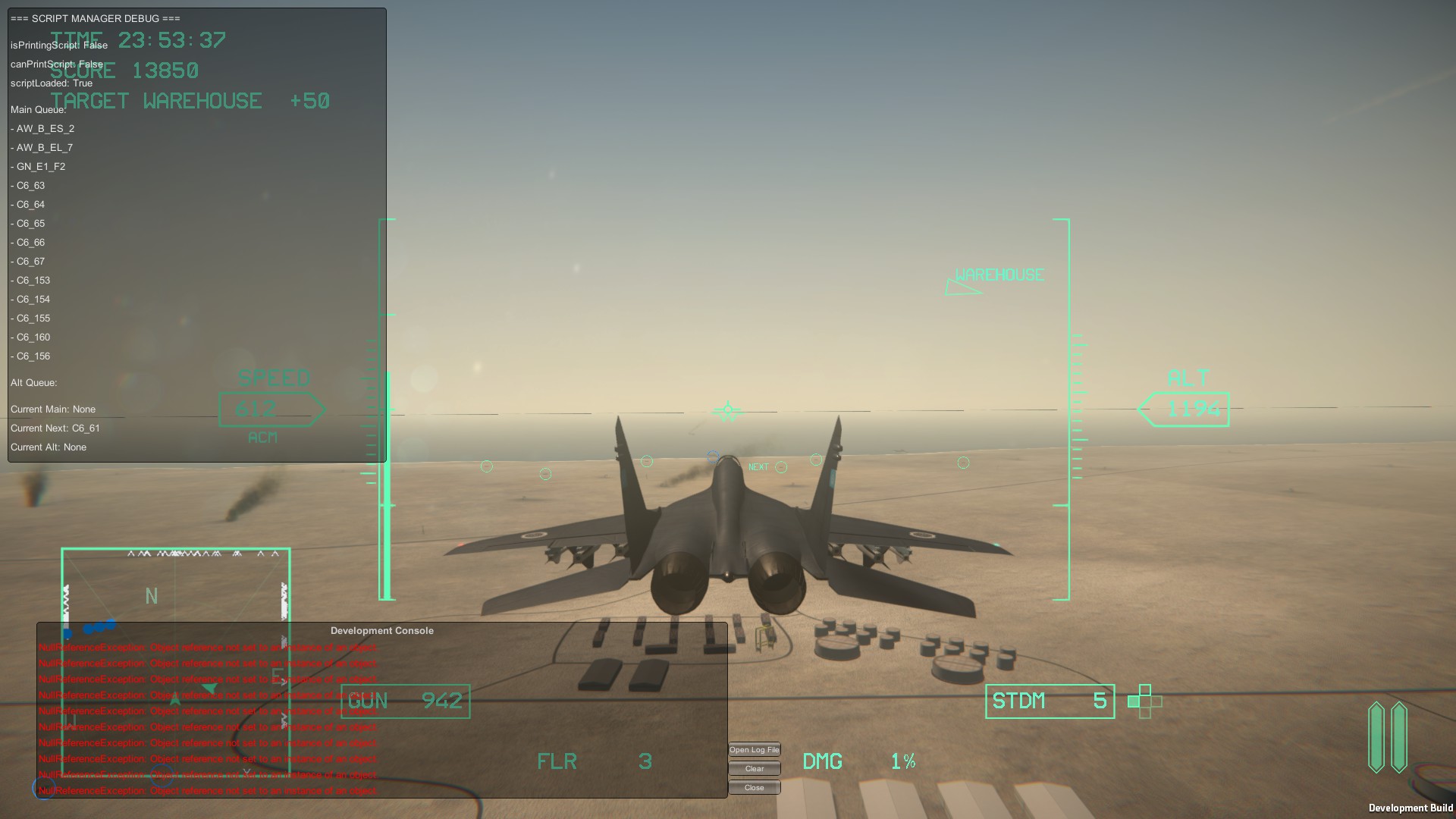
Hey buddy, thanks for testing out the bug. This screenshot is exactly what I need.

If you haven't run the game since encountering the problem, can I get you to send over the Player text file? That would also help me figure out what's causing it.

To get to the file, you'll need to go type %appdata% in your search bar, click on the folder, then go to LocalLow -> Mackerel Sky -> At Skies Edge. The file should be pretty easy to spot. You can copy the entire log file and put it on https://pastebin.com/ then send me the link to the paste. 

Thanks!

Had to make a fresh bugged log since the last one was too big, which also may or may not have been the bugged run.  Hopefully this'll help.

https://pastebin.com/ukye4s7w

Developer

From what I can see, it didn't seem like you triggered that cascade of error messages in the console from that log. Did your audio still cut out?

It did.  I can try another run and wait about a minute before exiting out.

https://pastebin.com/4hWF04rZ

Took longer than expected.  So I did wait but the queue kept growing with no dialogue or captions coming out.  I then headed over to Ogre to see if the dialogue will continue and take out the line of tanks, nothing.  So I crashed the plane and exited out.

Developer (1 edit)

I think I have nailed this problem down. Once a a voice line script finishes printing, it is supposed to 'arm'  the next script to play after a certain amount of time has passed. This is done through Unity's coroutine functions, and I suspect the problem is that in some circumstances (e.g. if your computer is under load) the coroutines aren't firing properly. I've modified the manager slightly to record the time the next script should be fired. Then it checks whether or not the current in-game time has gone over this flag before arming the next script, so it should run independently of any coroutine nonsense.

(1 edit)

I have a video with that bug happening, i needed some restarts to get, maybe restarting the mission makes this happens too?
Here the log too: https://pastebin.com/L4d1VhuM

Here the video: 

(2 edits)

I think the "AW"s and "GN"s might be related to the bug; the dialogues disappear right after some of them appear on the Script DEBUG