

Relive the golden age of home computing!
Link: https://misterm.itch.io/mr-commodore-64-basic-simulator
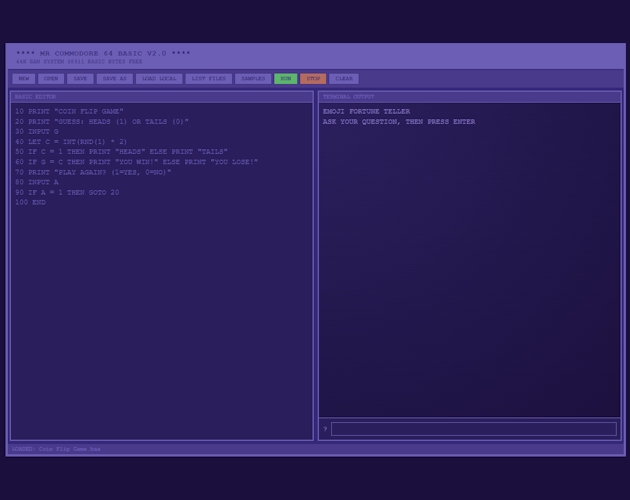
I’m excited to release the Commodore 64 BASIC Simulator - a fully functional C64 BASIC V2.0 interpreter that runs entirely in your web browser. No emulator needed, no installation required - just open and start programming!
What is it?
This is a complete web-based implementation of Commodore 64 BASIC V2.0. Write programs using classic BASIC syntax, run them instantly, and save your creations. It’s like having a C64 right in your browser!
Key Features
✨ Complete BASIC V2.0 Support - All standard commands and functions
🎮 Dual View Modes - Text terminal and game canvas views
📚 40+ Sample Programs - Games, demos, and tutorials included
💾 File Management - Save/load programs easily
🎯 Game Engine - Create interactive games with keyboard controls
🎨 Authentic C64 Styling - Classic blue-on-blue aesthetic
Perfect For
- Learning Programming - BASIC is a great first language
- Nostalgia - Relive the 1980s computing experience
- Education - Teach programming concepts with a classic environment
- Game Development - Create retro-style games
- Fun - Just enjoy programming in a classic environment!
Quick Example
10 PRINT "HELLO WORLD"
20 GOTO 10
Type it in, click RUN, and watch it go!
What’s Included
Classic Games:
- Pong, Tetris, Breakout, Space Invaders, Pinball
Interactive Programs:
- Number Guessing, Rock Paper Scissors, Memory Games
- Emoji-based games and utilities
Educational Examples:
- Math functions, string manipulation, arrays
- Subroutines, data handling, and more
How It Works
- Open the simulator in your browser
- Write BASIC code in the editor (remember line numbers!)
- Click RUN to execute
- Browse SAMPLES for example programs
- Save your work with SAVE AS
Special Features
- MODE Command - Switch between text and game views programmatically
- Auto-Detection - Games automatically run in game mode
- File Persistence - Save to browser storage or download files
- Keyboard Controls - Arrow keys/WASD for games
System Requirements
Just a modern web browser! Works on:
- Windows, Mac, Linux
- Chrome, Firefox, Safari, Edge
- No installation needed
Technical Details
- Pure JavaScript implementation
- Zero dependencies
- Client-side only (privacy-friendly)
- Uses localStorage for saving
- Canvas API for game rendering
Try It Now!
The simulator is ready to use right away. Open it in your browser and start coding!
Tips:
- Check out the sample programs to learn techniques
- Use
MODE "GAME"for interactive programs - Save your work frequently
- Have fun exploring BASIC programming!
Feedback Welcome
This is a passion project to bring the C64 BASIC experience to modern browsers. I hope you enjoy it as much as I enjoyed creating it!
Happy Programming! 🎮
64K RAM SYSTEM 38911 BASIC BYTES FREE