


⚠️ Some features shown are for the upcoming 2.1 update. If you don’t see these features in your version, they will be included shortly in the next update.
Spawn Event
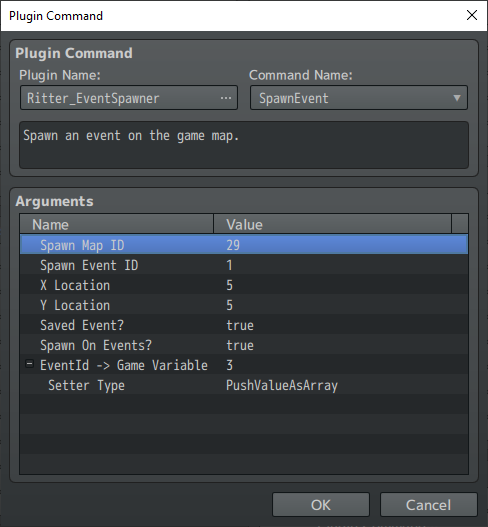
Ritter.spawnEvent(mapId, eventId, x, y, save, spawnOnEvents)
- mapId = the Id or "Name" of the map which holds the event you want to spawn.
- eventId = the Id or "Name" of the event on the map specified in mapId.
- x = x coordinate to place the event on the game map.
- y = y coordinate to place the event on the game map.
- save = true to save event and restore it when you re-enter map.
- save = false to use the event as a temporary event which goes away on map change. You can leave out save from script call to not save the event.
- spawnOnEvents = true to allow spawning on top of other events.
- spawnOnEvents = false to disallow spawning on top of other events.
- EventId -> Game Variable = ID Number of Game Variable to store Event Id into.
- Setter Type = The method of storing the EventId of the Spawned Event to a Game Variable.
- Set Value As Integer: Sets the value of the $gameVariable to the EventId as an integer.
- Push Value As Array: Pushes the EventId into the $gameVariable as an Array.
Example script call one:
Ritter.spawnEvent(42, 15, 8, 16, true)
Spawn event 15 from map 42 on the game map at 8,16 coordinates and save the event data to automatically be restored upon re-entering the map, retaining all data.
Example script call two:
Ritter.spawnEvent(42, 15, 8, 16)
Spawn event 15 from map 42 on the game map at 8,16 coordinates as a temporary event that goes away on map change.
Example script call three:
Ritter.spawnEvent("SpawnMap", "Slime", 8, 16);
Spawn the event named "Slime" from the map named "SpawnMap" onto the game map at 8,16 coordinates as a temporary event that goes away on map change.
If duplicate names are found only the first one will ever be used, avoid duplicating names for spawn maps and spawn template events.
Example script call four:
let spawnEvent = Ritter.spawnEvent(42, 15, 8, 16, true, true);
This would store the spawned Game_Event object to the spawnEvent variable.
This allows you to access it's eventId and any other properties immediately after spawning the event.
Learn how to find the event you just spawned using script here!
For Example:
let spawnEvent = Ritter.spawnEvent(42, 15, 8, 16, true, true);
let eventId = spawnEvent._eventId;
$gameVariables.setValue(1, eventId);
Spawn Event Region
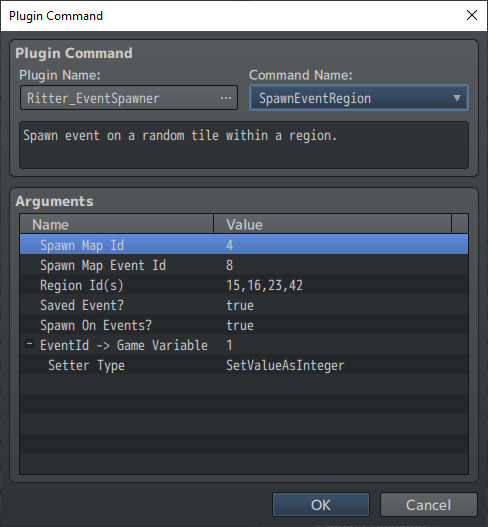
Ritter.spawnEventRegion(mapId, eventId, regions, save, spawnOnEvents)
- mapId = the Id of the map which holds the event you want to spawn.
- eventId = the Id of the event on the map specified in mapId.
- regions = regionId(s) to place the spawned event on randomly. To use multiple regionIds to randomly pick from list them like this [4,8,15,16,23,42]
- save = true to save event and restore it when you re-enter map.
- save = false to use the event as a temporary event which goes away on map change.
- spawnOnEvents = true to allow spawning on top of other events.
- spawnOnEvents = false to disallow spawning on top of other events.
- EventId -> Game Variable = ID Number of Game Variable to store Event Id into.
- Setter Type = The method of storing the EventId of the Spawned Event to a Game Variable.
- Set Value As Integer: Sets the value of the $gameVariable to the EventId as an integer.
- Push Value As Array: Pushes the EventId into the $gameVariable as an Array.
Example script call one:
Ritter.spawnEventRegion(4, 8, 15, true)
Spawn event 8 from map 4 on a random tile marked with regionId 15 and save the events data to be automatically restored upon re-entering the map.
Example script call two:
Ritter.spawnEventRegion(4, 8, [15,16,23,42])
Spawn event 8 from map 4 on a random tile marked with any of the regionIds 15,16,23,42 as a temporary event that isn't saved.
Example script call three:
let spawnEvent = Ritter.spawnEventRegion(42, 15, [8,4], true, true);
This would store the spawned Game_Event object to the spawnEvent variable.
This allows you to access it's eventId and any other properties immediately after spawning the event.
Learn how to find the event you just spawned using script here!
For Example:
let spawnEvent = Ritter.spawnEventRegion(42, 15, [8,4], true, true);
let eventId = spawnEvent._eventId;
$gameVariables.setValue(1, eventId);
Spawn Event Terrain Tag
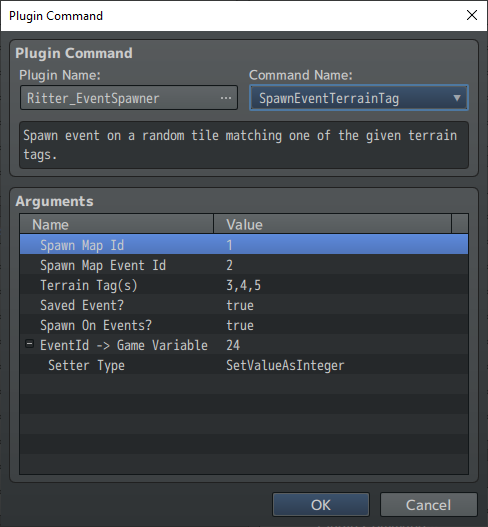
Ritter.spawnEventTerrainTag (mapId, eventId, tags, save, spawnOnEvents)
- mapId = the Id of the map which holds the event you want to spawn.
- eventId = the Id of the event on the map specified in mapId.
- tags= Terrain Tag(s) to place the spawned event on randomly. To use multiple Terrain Tags to randomly pick from, list them like this [4,8,15,16,23,42]
- save = true to save event and restore it when you re-enter map.
- save = false to use the event as a temporary event which goes away on map change.
- spawnOnEvents = true to allow spawning on top of other events.
- spawnOnEvents = false to disallow spawning on top of other events.
- EventId -> Game Variable = ID Number of Game Variable to store Event Id into.
- Setter Type = The method of storing the EventId of the Spawned Event to a Game Variable.
- Set Value As Integer: Sets the value of the $gameVariable to the EventId as an integer.
- Push Value As Array: Pushes the EventId into the $gameVariable as an Array.
Example script call one:
Ritter.spawnEventTerrainTag(4, 8, 2, true)
Spawn event 8 from map 4 on a random tile marked with Terrain Tag 2 and save the events data to be automatically restore upon re-entering the map.
Example script call two:
Ritter.spawnEventTerrainTag(4, 8, [1,2,3,4])
Spawn event 8 from map 4 on a random tile marked with any of the Terrain Tags 1,2,3,4 as a temporary event that isn't saved.
Transform Event
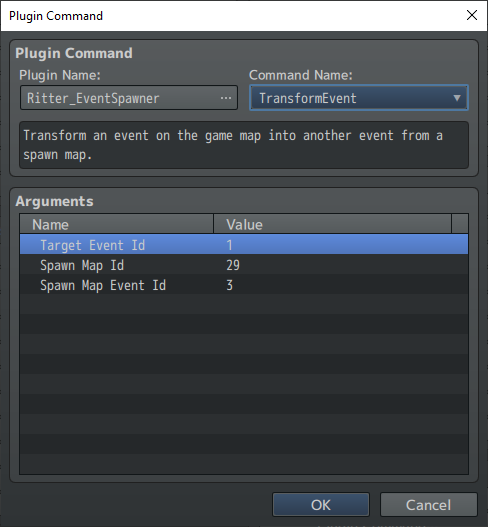
Ritter.transformEvent(eventId, mapId, spawnId)
- eventId = id of the event on game map to transform.
- mapId = spawn map id that has template event.
- spawnId = id of event on spawn map to use as template.
Example script call:
Ritter.transformEvent(1010, 4, 8)
Transform event 1010 into event 8 from map 4.
Unspawn Event
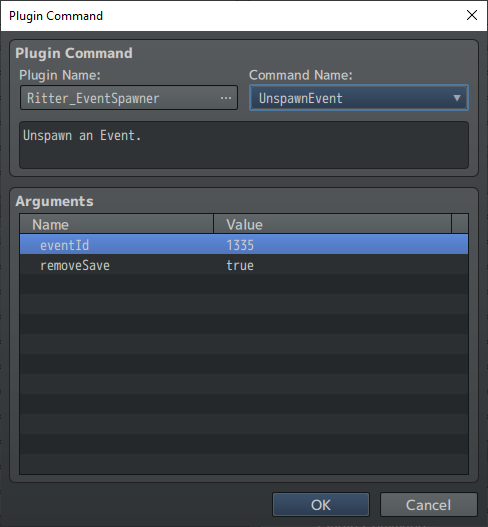
Ritter.unspawnEvent(eventId, removeSave)
- eventId = the Id of the event on the map to unspawn.
- removeSave = true to remove the event from saved events.
- removeSave = false to keep the event on save list to restore upon re-entering the map. Leave removeSave empty to keep saved event.
Example script call one:
Ritter.unspawnEvent(1000, true)
Unspawn event 1000 from the game map and delete the saved event data.
Example script call two:
Ritter.unspawnEvent(1000)
Unspawn event 1000 from the game map.
Unspawn Event XY
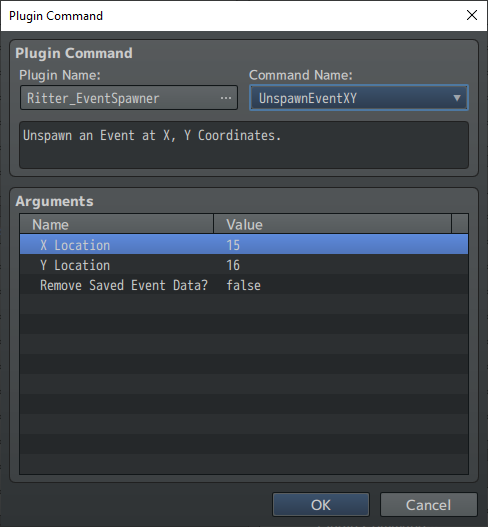
Ritter.unspawnEvent(x, y, removeSave)
- x = x location to check for an event to unspawn.
- y = y location to check for an event to unspawn.
- removeSave = true to remove the event from saved events.
- removeSave = false to keep the event on save list to restore upon re-entering the map. Leave removeSave empty to keep saved event.
Example script call one:
Ritter.unspawnEvent(15, 16, true)
Unspawn event found at 15, 16 from the game map and delete the saved event data.
Example script call two:
Ritter.unspawnEvent(4, 8)
Unspawn event found at 4, 8 from the game map.
Unspawn All
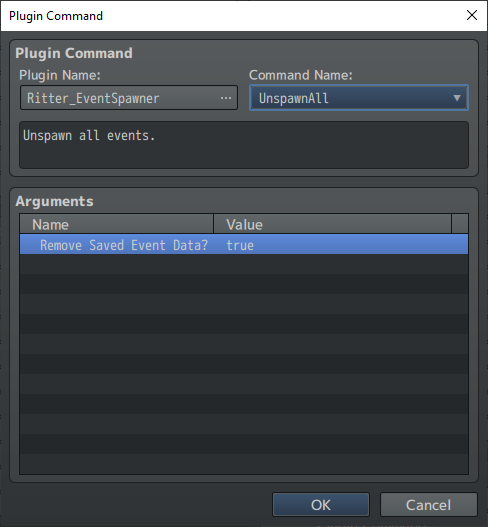
Ritter.unspawnAll(removeSave)
- removeSave = true to delete saved event data.
- leave empty to retain saved event data.
Example script call one:
Ritter.unspawnAll()
Unspawns all spawned events on the map, which includes both temporary and saved events.
Ritter.unspawnAll(true)
Unspawns all spawned events on the map, and removes saved event data for all spawned events.
$gameMap._lastSpawnEventId
Returns the Id of the most recently spawned event. (Obsolete, remains for backward compatibility, use new method linked below to find the event you spawn)