
Indie game storeFree gamesFun gamesHorror games
Game developmentAssetsComics
SalesBundles
Jobs
TagsGame Engines

Login Error 403 - Inability To Login To Itch App

A topic by Feanixx created 33 days ago Views: 1,336 Replies: 28
Viewing posts 1 to 25
(+4)

I'm pretty much desperate at this point because I don't know why this is happening but I've been stuck trying to log in through the desktop app without success for weeks now. I thought it would be something that'll get fixed with time since I could get into the website and log in just fine without issues after the Cloudflare stuff got sorted out for me. Unfortunately, the problems persisted with the app itself not allowing me to log in and I don't know if it's a me issue or an Itch.io issue at large.

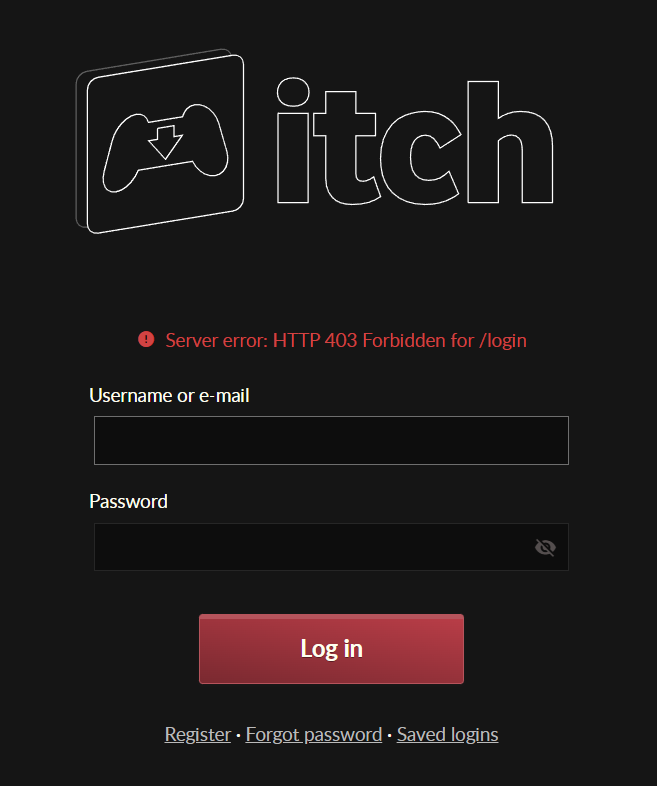
I wonder if anyone has encountered this sort of issue like me and whether or not they've managed to find a fix for it. I'm currently on Windows and this has never happened before until recently and for no reason. Below I'm attaching the exact error I keep receiving every time I try to log in, hoping that I can get access to the app again since it was more convenient for me than the browser version.

(Apologies if someone already asked this question/wondered about this, I went through pages just to look and check and couldn't find anything similar to mine, hence the topic being set up)


(The error in question)
Me too!!!

I'm glad I'm not the only one here

I don't think that's it, but maybe your app isn't up to date?

https://itch.io/t/4351835/app-and-butler-updates-may-require-manual-intervention

No not really, I have gone to the folders since I can't log in to access the app's settings and checked the versions of each part and they've completely up to date as of the current Itch app build so it's not that.

"Itch" being 26.1.9, "Butler" being 15.24.0 and "Itch Setup" being 1.27.0

Me too! I have no idea why the rest of the internt seems to never have encountered this issue. I have tried reinstalling and clearing cache and everything and nothing works!

I've emailed itch.io support 3 weeks ago but they haven't even read my email yet :(

Yeah I'm in the same predicament, I have sent them an email and haven't heard anything from them so far :c

I just got the same issue today, can't connect to the app but have no problem in browser

Yes, it's the same for me today. It logged me out of my account on the app and I can't log back in. No problem on the website, though

(1 edit)

Same error, get the 403 error in the app, but the browser works fine. That issue came very suddenly, since yesterday it still worked, and I double checked, I'm on the latest stable version, v26.1.9

(+1)

Same here, worked everyday the last weeks but today I had problems with authorization through cloudflare, restarted the App and suddenly I had server error 403. In Browser it still works obviously 

Yeah i have the same problem, i tried account name and email, didn't work so i also tried changing my password, still didn't work, so maybe there's an inside problem  coming from the app itself, maybe the app was attacked by some hackers and the problem is yet to be solved?

(+1)

Same issue here. It worked yesterday. Only the App is affected. Deleting the save profile and reentering the credentials leads to same issue.

(+1)

also cant login into the app anymore, same error, yesterday when i tried to access a website from the App, cloudflare looped infinitely, i restarted client and got the error 

Same here

(+1)

alos on my side, not able to log in the app

same here

Same here.

(+2)

Same here, but my error message slightly differs: "Server error: HTTP 403 Forbidden for /profile"

(+2)

I have a similar issue but with Butler. Trying to upload a build fails, and trying to login and log out also fails with "

authenticating: retrieving wharf status: Server error: HTTP 403 Forbidden for /wharf/status"

(+1)

same here, latest itch build too

Yeah, same here. App is up to date.

Same here. App is up to date.

Me too, since today. 10 hours ago it worked

me too

(+2)

I am finally able to login again, but now the cloudflare-purgatory blocks me from accessing the webpages via the app. Dedicated browser is fine tho.

(+1)

@Robocopmax same here, today I was finally able to log in again, just to be meet with the cloudflare verify problem again, which lead to me having the 403 error in the first place. I cleared all browser data but still no luck. Maybe it's another DDOS or something?

(1 edit) (+1)

Could be. But i rather suspect that the used browser somehow can't retain the verfication token.

I have found an functioning workaround in this discussion: https://itch.io/t/5428675/new-human-verification-fails-on-app?after=20

However the developer tools window needs to stay open the whole time. And for evry new session of the browser you need to repeat the process.

(1 edit)

Update:

It suddenly started working again after not working for almost a month. When I tried logging in again today, it asked me to do my 2FA again and finally let me through.

I guess you can try resetting or changing your 2FA to trigger the prompt(?), but I didn't do that so I'm not sure what made it work.  

Hope this can help someone at least lol