The Power of Pride Bundle 2026 — $10 PWYC Edition
On Sale: GamesAssetsToolsTabletopComics
Indie game storeFree gamesFun gamesHorror games
Game developmentAssetsComics
SalesBundles
Jobs
TagsGame Engines

violentlycurly

5
Posts
1
Topics
A member registered Mar 05, 2026

Recent community posts

https://violentlycurly.com/wp-content/uploads/2026/07/2026-07-01-21-44-40.mp4
Unfortunately, the latest update did not fix the issue for me.  Here's a video to illustrate.

Version .91 - Windows 11
........

Hotscreen using profile : default

Hotscreen Overlay starting at Max FPS : 59

Translations added from ./CUSTOM_DATA/translations.csv — languages : ["en", "zh", "es", "fr", "ar", "ru", "pt", "ko", "ja", "de"]

Using saved language code : en

Onnx Runtime version 1.23.3

Trying to load fallback TensorRt-Rtx provider.

New custom ONNX provider : NvTensorRTRTXExecutionProvider loaded from C:\Users\viole\ExDRIVE Dump\Curly's Stuff\Resources\Hotscreen 0.9.1\tensorRT-RTX-bin/onnxruntime_providers_nv_tensorrt_rtx.dll

    Allowing new devices :

        New device GPU 0: NVIDIA GeForce RTX 3070 for provider NvTensorRTRTXExecutionProvider

Windows version : Microsoft Windows NT 10.0.22631.0

CPU : AMD Ryzen 7 7800X3D 8-Core Processor, Cores : 8, Threads : 16, Max clock : 4201 MHz

Using video adapter : NVIDIA GeForce RTX 3070 from NVIDIA type DiscreteGpu

Driver infos : d3d12 version 12_0 api 12_0

Adapter 0 NVIDIA GeForce RTX 3070

Screen Rect 0 : Rect { X = 0, Y = 0, Width = 1920, Height = 1080, Top = 0, Bottom = 1080, Left = 0, Right = 1920, Location = Point { X = 0, Y = 0 }, Size = Size { Width = 1920, Height = 1080 }, TopLeft = Point { X = 0, Y = 0 }, BottomRight = Point { X = 1920, Y = 1080 } } Orientation : 1

Screen Rect 1 : Rect { X = 1920, Y = 0, Width = 1920, Height = 1080, Top = 0, Bottom = 1080, Left = 1920, Right = 3840, Location = Point { X = 1920, Y = 0 }, Size = Size { Width = 1920, Height = 1080 }, TopLeft = Point { X = 1920, Y = 0 }, BottomRight = Point { X = 3840, Y = 1080 } } Orientation : 1

Screen Rect 2 : Rect { X = -1920, Y = 0, Width = 1920, Height = 1080, Top = 0, Bottom = 1080, Left = -1920, Right = 0, Location = Point { X = -1920, Y = 0 }, Size = Size { Width = 1920, Height = 1080 }, TopLeft = Point { X = -1920, Y = 0 }, BottomRight = Point { X = 0, Y = 1080 } } Orientation : 1

Adapter 1 AMD Radeon(TM) Graphics

Adapter 2 Microsoft Basic Render Driver

Starting Screen Recorder

Initializing Windows10Capture using Video card 0 and monitor 0

Hotscreen version : Windows - Full version - v0.91

Max FPS of Overlay set to 59

Windows10Capture initiated on : 1920x1080

Max FPS Record start at 59

Frame Latency of screen set to 1

MaxFPSRecord at 59

Recreating d3dDevice for fast WGC copy

Recreating stagingTexture for fast WGC copy

Starting DirectML session for ./models/hs-real-anime-y11n-640-fp16.onnx on device 0

Starting DirectML session for ./models/eyes-detection-01.onnx on device 0

Avx is supported.

Max FPS Detection start at 59

Use double Detection start at True

Update time of eyes detection start at 0.15

Setting MaxFPSDetection at 59

Closing...

Screen recorder thread ends correctly.
I'm in love with this software! I've been trying to incorporate it into my life more but I've run into a few small difficulties; it's not really a bug, more a feature request.  I often get distracted and walk away from my computer thanks to ADHD and come back an hour later to find my computer has not gone to sleep and is just running HotScreen over my background, which is just a picture of a pretty plant.  I've also found that if I manually put the computer into sleep mode, the HotScreen Lock timer gets suspended/paused until I wake it back up, even though it is set to "Subtract Time Off".  It looks as though the lock settings are designed for a full system Shut Down, but my PC is a shared device so I use Sleep Mode more often than Shut Down, incase my husband has something unsaved on his desktop.

I am hopefully and humbly requesting an edit that works with the operating systems Sleep Mode.  Specifically, allowing your computer to go into Sleep Mode when HotScreen is running, while still keeping count of your lock time, if a "Subtract Off Time" Lock is active.  Please and thank you for your great work!

Version 0.91 - Windows 11

Let me know if a full-screen capture video would be helpful, I'm happy to provide.  I can also do a live demo of the occurrence with discord's screenshare if that would aid you. 

v.8 & v.9 - Windows 11

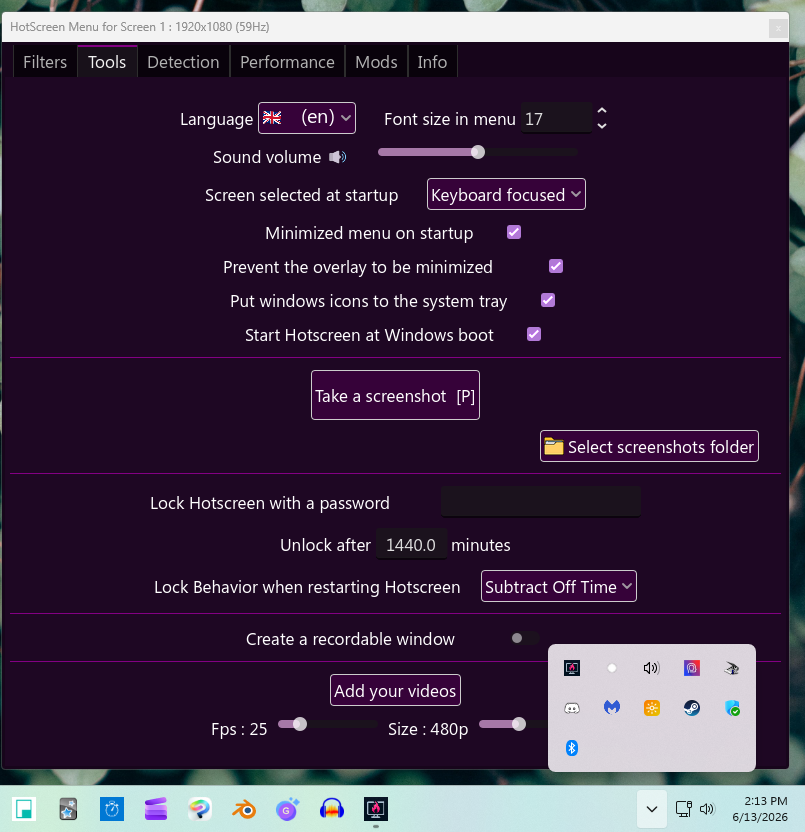
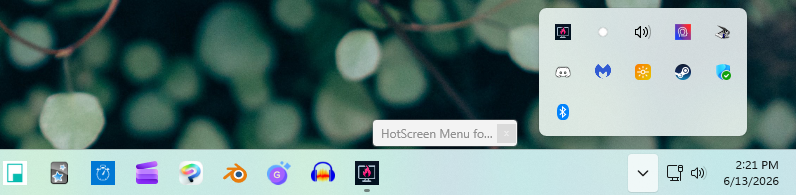
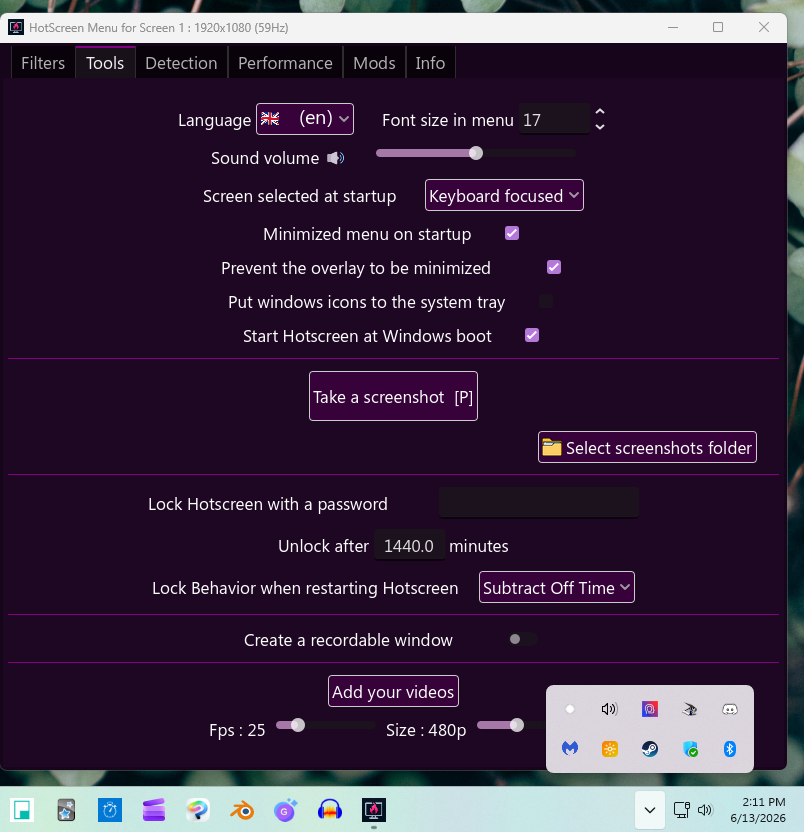
BUG: I've noticed some strangeness with the "put windows icons to the system tray" setting, I have never gotten it to work properly.  Here's a detailed description of what happens when I try, screenshots included.

1. Action: Open HotScreen
Result: Opens minimized as normal

2.) Action: Check the "put windows icons to the system tray" setting under tools
Result: Icons are still in the task bar - There is now an icon in the systems tray - The minimize and maximize button disappear, leaving only the X button, now a different shape 

3.) Action: Click the X button on menu
Result: HotScreen menu shrinks to tiny moveable tab (clicking the x does nothing; double clicking restores menu window) - Icons are still in task bar AND systems tray - Can only close HotScreen through right click menu on taskbar or systems tray

RANDOM INCONSITENCIES: Sometimes when I restore it, the minimize and maximize buttons have returned. When I click the X, it minimizes. When I restore it again, sometimes it's back to just being an X, other times not.  When the menu minimizes, sometimes it just disappears, other times it does the "shrinking and tucking away into your task bar" animation.
........
LOG:
Hotscreen using profile : default

Hotscreen Overlay starting at Max FPS : 59

Translations added from ./CUSTOM_DATA/translations.csv — languages : ["en", "zh", "es", "fr", "ar", "ru", "pt", "ko", "ja", "de"]

Using saved language code : en

Windows App SDK successfully initated : 8000.879.2017.0

Onnx Runtime version 1.24.3

Error : no WindowsML providers are founds

Windows version : Microsoft Windows NT 10.0.22631.0

CPU : AMD Ryzen 7 7800X3D 8-Core Processor, Cores : 8, Threads : 16, Max clock : 4201 MHz

Using video adapter : NVIDIA GeForce RTX 3070 from NVIDIA type DiscreteGpu

Driver infos : d3d12 version 12_0 api 12_0

Adapter 0 NVIDIA GeForce RTX 3070

Screen Rect 0 : Rect { X = 0, Y = 0, Width = 1920, Height = 1080, Top = 0, Bottom = 1080, Left = 0, Right = 1920, Location = Point { X = 0, Y = 0 }, Size = Size { Width = 1920, Height = 1080 }, TopLeft = Point { X = 0, Y = 0 }, BottomRight = Point { X = 1920, Y = 1080 } } Orientation : 1

Screen Rect 1 : Rect { X = 1920, Y = 0, Width = 1920, Height = 1080, Top = 0, Bottom = 1080, Left = 1920, Right = 3840, Location = Point { X = 1920, Y = 0 }, Size = Size { Width = 1920, Height = 1080 }, TopLeft = Point { X = 1920, Y = 0 }, BottomRight = Point { X = 3840, Y = 1080 } } Orientation : 1

Screen Rect 2 : Rect { X = -1920, Y = 0, Width = 1920, Height = 1080, Top = 0, Bottom = 1080, Left = -1920, Right = 0, Location = Point { X = -1920, Y = 0 }, Size = Size { Width = 1920, Height = 1080 }, TopLeft = Point { X = -1920, Y = 0 }, BottomRight = Point { X = 0, Y = 1080 } } Orientation : 1

Adapter 1 AMD Radeon(TM) Graphics

Adapter 2 Microsoft Basic Render Driver

Starting Screen Recorder

Initializing Windows10Capture using Video card 0 and monitor 0

Hotscreen version : Windows - Full version - v0.9

Max FPS of Overlay set to 59

Windows10Capture initiated on : 1920x1080

Max FPS Record start at 59

Frame Latency of screen set to 1

MaxFPSRecord at 59

Recreating d3dDevice for fast WGC copy

Recreating stagingTexture for fast WGC copy

Starting DirectML session for ./models/hs-real-anime-y11n-640-fp16.onnx on device 0

Starting DirectML session for ./models/eyes-detection-01.onnx on device 0

Avx is supported.

Max FPS Detection start at 59

Use double Detection start at True

Update time of eyes detection start at 0.15

Setting MaxFPSDetection at 59

(1 edit)

v.9 - Windows 11

Bug:
I just downloaded v.9 and discovered a bug with a filter I use on almost all my collections, so I thought I would bring it to your attention.  If you have or create a Fast Text filter and use the "Reach Opacity after X seconds" slider, it will disable/break the filter.  Even set 0.2 seconds, the words will not appear after any amount of time.  If you slide it back to 0.0, it functions again, the words appearing normally.  From what I can tell, this is only a problem with Fast Text filters; I checked videos and images and it worked just fine with those.

P.S. - I was super excited about the "fade out" feature, but I fear this also doesn't work, not on any of the filters I've tested (fast text, image, color, video); when the detection stops, the filter just blinks out of existence without any fade.  I was also surprised to find it a checkmark rather than a slider like the fade feature I mention above.  Was your intention that any filters with the setting checked would fade out at the same pre-determined rate?

Logs:
Hotscreen using profile : default

Hotscreen Overlay starting at Max FPS : 59

Translations added from ./CUSTOM_DATA/translations.csv — languages : ["en", "zh", "es", "fr", "ar", "ru", "pt", "ko", "ja", "de"]

Using saved language code : en

ERROR while initiating WinAppSDK : Package dependency criteria could not be resolved.

Windows version : Microsoft Windows NT 10.0.22631.0

CPU : AMD Ryzen 7 7800X3D 8-Core Processor, Cores : 8, Threads : 16, Max clock : 4201 MHz

Using video adapter : NVIDIA GeForce RTX 3070 from NVIDIA type DiscreteGpu

Driver infos : d3d12 version 12_0 api 12_0

Adapter 0 NVIDIA GeForce RTX 3070

Screen Rect 0 : Rect { X = 0, Y = 0, Width = 1920, Height = 1080, Top = 0, Bottom = 1080, Left = 0, Right = 1920, Location = Point { X = 0, Y = 0 }, Size = Size { Width = 1920, Height = 1080 }, TopLeft = Point { X = 0, Y = 0 }, BottomRight = Point { X = 1920, Y = 1080 } } Orientation : 1

Screen Rect 1 : Rect { X = 1920, Y = 0, Width = 1920, Height = 1080, Top = 0, Bottom = 1080, Left = 1920, Right = 3840, Location = Point { X = 1920, Y = 0 }, Size = Size { Width = 1920, Height = 1080 }, TopLeft = Point { X = 1920, Y = 0 }, BottomRight = Point { X = 3840, Y = 1080 } } Orientation : 1

Screen Rect 2 : Rect { X = -1920, Y = 0, Width = 1920, Height = 1080, Top = 0, Bottom = 1080, Left = -1920, Right = 0, Location = Point { X = -1920, Y = 0 }, Size = Size { Width = 1920, Height = 1080 }, TopLeft = Point { X = -1920, Y = 0 }, BottomRight = Point { X = 0, Y = 1080 } } Orientation : 1

Adapter 1 AMD Radeon(TM) Graphics

Adapter 2 Microsoft Basic Render Driver

Starting Screen Recorder

Initializing Windows10Capture using Video card 0 and monitor 0

Hotscreen version : Windows - Full version - v0.9

Max FPS of Overlay set to 59

Windows10Capture initiated on : 1920x1080

Max FPS Record start at 59

Frame Latency of screen set to 1

MaxFPSRecord at 59

Recreating d3dDevice for fast WGC copy

Recreating stagingTexture for fast WGC copy

Starting DirectML session for ./models/hs-real-anime-y11n-640-fp16.onnx on device 0

Starting DirectML session for ./models/eyes-detection-01.onnx on device 0

Avx is supported.

Max FPS Detection start at 59

Use double Detection start at True

Update time of eyes detection start at 0.15

Setting MaxFPSDetection at 59

Setting usePreciseEyesDetection at true

Setting usePreciseEyesDetection at false