

v.8 & v.9 - Windows 11
BUG:
I've noticed some strangeness with the "put windows icons to the system tray" setting, I have never gotten it to work properly. Here's a detailed description of what happens when I try, screenshots included.
1. Action: Open HotScreen
Result: Opens minimized as normal
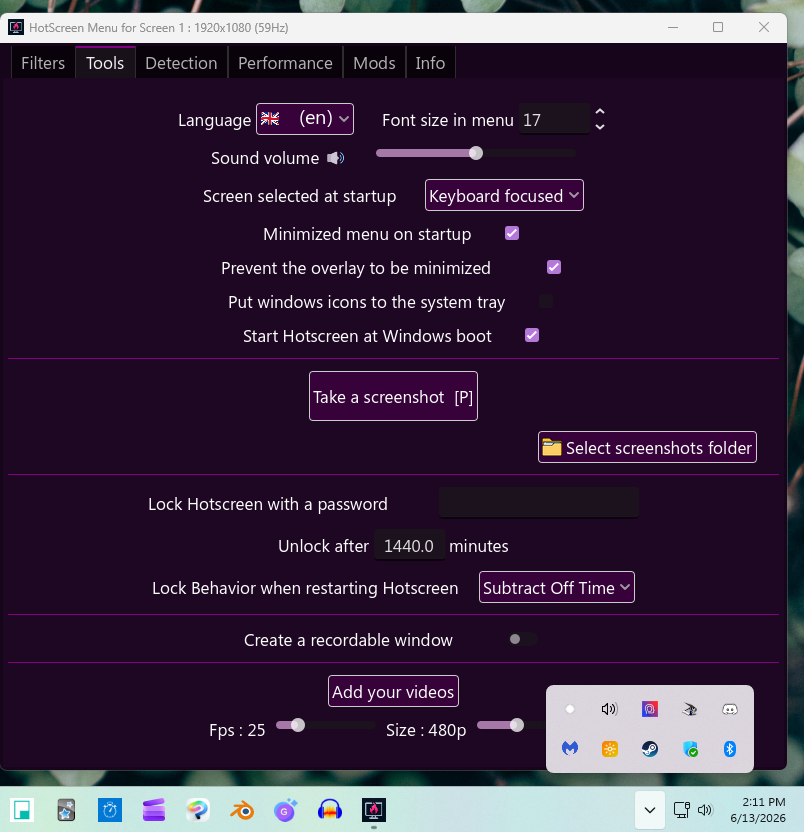
2.) Action: Check the "put windows icons to the system tray" setting under tools
Result: Icons are still in the task bar - There is now an icon in the systems tray - The minimize and maximize button disappear, leaving only the X button, now a different shape 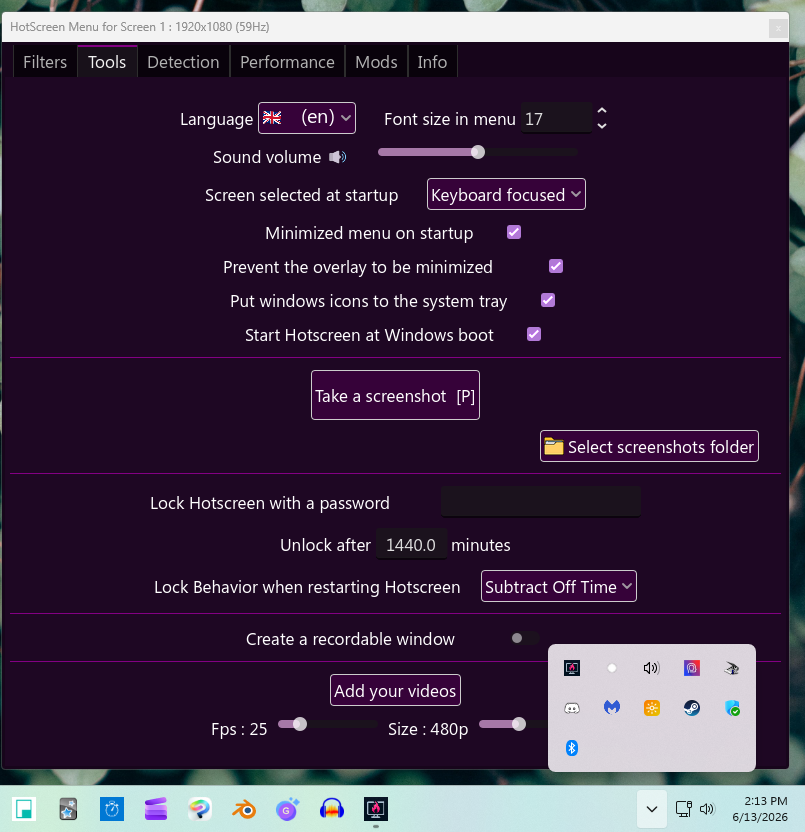
3.) Action: Click the X button on menu
Result: HotScreen menu shrinks to tiny moveable tab (clicking the x does nothing; double clicking restores menu window) - Icons are still in task bar AND systems tray - Can only close HotScreen through right click menu on taskbar or systems tray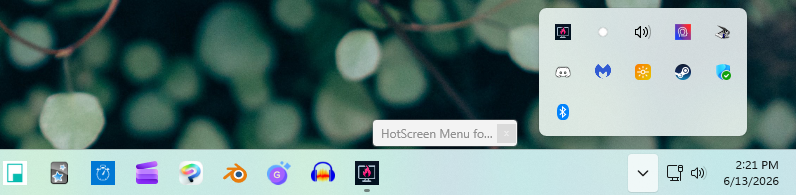
RANDOM INCONSITENCIES: Sometimes when I restore it, the minimize and maximize buttons have returned. When I click the X, it minimizes. When I restore it again, sometimes it's back to just being an X, other times not. When the menu minimizes, sometimes it just disappears, other times it does the "shrinking and tucking away into your task bar" animation.
........
LOG:
Hotscreen using profile : default
Hotscreen Overlay starting at Max FPS : 59
Translations added from ./CUSTOM_DATA/translations.csv — languages : ["en", "zh", "es", "fr", "ar", "ru", "pt", "ko", "ja", "de"]
Using saved language code : en
Windows App SDK successfully initated : 8000.879.2017.0
Onnx Runtime version 1.24.3
Error : no WindowsML providers are founds
Windows version : Microsoft Windows NT 10.0.22631.0
CPU : AMD Ryzen 7 7800X3D 8-Core Processor, Cores : 8, Threads : 16, Max clock : 4201 MHz
Using video adapter : NVIDIA GeForce RTX 3070 from NVIDIA type DiscreteGpu
Driver infos : d3d12 version 12_0 api 12_0
Adapter 0 NVIDIA GeForce RTX 3070
Screen Rect 0 : Rect { X = 0, Y = 0, Width = 1920, Height = 1080, Top = 0, Bottom = 1080, Left = 0, Right = 1920, Location = Point { X = 0, Y = 0 }, Size = Size { Width = 1920, Height = 1080 }, TopLeft = Point { X = 0, Y = 0 }, BottomRight = Point { X = 1920, Y = 1080 } } Orientation : 1
Screen Rect 1 : Rect { X = 1920, Y = 0, Width = 1920, Height = 1080, Top = 0, Bottom = 1080, Left = 1920, Right = 3840, Location = Point { X = 1920, Y = 0 }, Size = Size { Width = 1920, Height = 1080 }, TopLeft = Point { X = 1920, Y = 0 }, BottomRight = Point { X = 3840, Y = 1080 } } Orientation : 1
Screen Rect 2 : Rect { X = -1920, Y = 0, Width = 1920, Height = 1080, Top = 0, Bottom = 1080, Left = -1920, Right = 0, Location = Point { X = -1920, Y = 0 }, Size = Size { Width = 1920, Height = 1080 }, TopLeft = Point { X = -1920, Y = 0 }, BottomRight = Point { X = 0, Y = 1080 } } Orientation : 1
Adapter 1 AMD Radeon(TM) Graphics
Adapter 2 Microsoft Basic Render Driver
Starting Screen Recorder
Initializing Windows10Capture using Video card 0 and monitor 0
Hotscreen version : Windows - Full version - v0.9
Max FPS of Overlay set to 59
Windows10Capture initiated on : 1920x1080
Max FPS Record start at 59
Frame Latency of screen set to 1
MaxFPSRecord at 59
Recreating d3dDevice for fast WGC copy
Recreating stagingTexture for fast WGC copy
Starting DirectML session for ./models/hs-real-anime-y11n-640-fp16.onnx on device 0
Starting DirectML session for ./models/eyes-detection-01.onnx on device 0
Avx is supported.
Max FPS Detection start at 59
Use double Detection start at True
Update time of eyes detection start at 0.15
Setting MaxFPSDetection at 59