If it's happening even for a random Bug battle on the very first forest map, then it's a Joiplay thing, sorry. Does this happen even for the same map in the previous version (last time I checked, it was still available) too?
Tarwix
Creator of
Recent community posts
It won't fit. Limit for a comment is 20480 characters, and even the reduced changelog is ~41kb.
I'll post it as a downloadable on my bugfix page here.
My bad! "Terrec" posted on the Discord the key info that this started happening once a bunny was dead. Turns out the plugin that does the "bust" images on the sides of the screen was being turned off when you talk to a dead bunny in the house, and not turned on again after that.
Made a bugfix file, which you can unZIP in the www\data folder, but I can't post it here. Check my own itch.io page (yes I'm also BishoujoHelper, long story...) in a few minutes. Or the BunnyHunter Discord #hunter-bug-reports channel.
But I will also send DO! this same file, and let him put out another full download if you're worried about security/trust.
Agree, going by the stack dump that's definitely Joiplay doing something.
That line in rpg_scenes.js is about triggering the zoom/wipe effect before a battle, which is what the JoiMV.js is handling (and I have no access to). Have you tried starting over and getting into any battles in the first forest screen before trying to catch the bunny? Because there's nothing special about starting the boss battle except setting the music. It's even going to use the same background as a random Bug encounter on the first forest screen.
I would ask about this on the Joiplay Discord or Reddit.
There's a HUGE amount of changes, actually. So much so that when DO! himself asked me, I gave a summary, and even that got summarized on the main page. The detailed list that I made for myself, with internal game data notes, runs about 57kb. Maybe about 30kb of fixes after I take out the suggested but not implemented ones, and the notes. You REALLY want to see that?
So far, this seems to be working almost entirely as expected. Only thing I've seen is warnings of
The provided value '36' is not a valid enum value of type CanvasTextAlign.
which happens in the Equip screen 5 times each time a different Actor is displayed, apparently once for each equipment slot that's visible, or when the list of slots scrolls (my game has a 6th slot that's always empty for now). If you want a call stack, let me know.
There's also occasional "[Violation] 'requestAnimationFrame' handler took ###ms" with various values that I don't remember happening before.
But that's still immeasurably better than a warning for each text character sent to the screen.
THANK YOU!
Can you look into making a tiny (I hope) core patch that fixes the easily thousands of warning messages that show up in the console log when playing a browser build on itch.io, which read something like:
"The provided value 'undefined' is not a valid enum value of type CanvasTextAlign."
from Bitmap.drawText @ rpg_core.js:1348
Bitmap.drawText @ YEP_CoreEngine.js:1031
Window_Base.processNormalCharacter @ rpg_windows.js:327
Window_Base.processCharacter @ rpg_windows.js:319
Window_Message.updateMessage @ rpg_windows.js:4411
<snip>
and occur for every character of text written to the screen, except for the map name. I've seen this in both my own and other people's games.
Thanks for posting this kind of design decisions discussion! Two things that might have addressed some problems:
- TDDP_MouseSystemEx plugin lets the player directly click on things to activate them without having a character visibly move to them. For documentation you'll have to go to this Wayback machine page.
- Instead of manually pasting in files omitted by "exclude unused files" they can be included in the deployment by having a do-nothing plugin with lines that look like " * @requiredAssets img/SumRndmDde/hud/pictures/Rose" to reference the files.
Your hint is that it's an area where the typical ground is white. Past a save statue from the entrance.
In fact, use the save statue BEFORE you start looking around for this, because that release had issues with the two events that may make it impossible to move after you get the item. Use Ben's teleport spell if that happens; you did get that from the Goddess already, right? Of course, those errors have been fixed in the BHRE.
I strongly suggest running away from the single Bug enemies on the very first map when Ben is solo, but then pushing through The Bridge and outside the Cavern to get inside the Cavern to the waterfall room. Then grind up to level 4 or 5 while near the healing save statue.
Run back to the house to rest if necessary before you get Sunny. Also have to go home to learn the girls' PowerSkills from the plants you get in Sunflowers Meadow before taking on the boss battle there.
I'm sorry to hear this is happening. This cannot occur in the next release. Partially because there is no "left side" to the door into the Haunted Mansion from the outside. It appears to be a wide door, but it will only open when you try at the middle. This also applies to the large house that Ben and the bunnies explore and then live in for the last part of the game.
Can you post a screenshot of where this is, so I understand exactly which place it applies to?
It's also possible that this is happening due to the game engine trying to go above 60 fps, which is a known issue. The update has a fix already (MAC_High_Hz_Fixes plugin), but all I can suggest if this happens in the current release is to save often, quit and reload.
250.
Use your Skills until you're out of SP. This one can use its own skill twice to restore 75 HP once it gets below 50%.
You should also grind in the room before that, or even earlier, because they're both still at level 2! This game is much easier if you aren't avoiding battles ALL the time, because this is only the 2nd of over 10 required, and several optional bosses.
That profile warning can be ignored, it's basically a Windows Registry issue. But if you want to fix it, the easiest way is to text edit the package.json file, and in the line with "name":"" put something in the "" like "elf-freaky" to give it a unique value. And for any other RPG Maker MV or MZ games that give the same message.
I looked at the "MV Characters" pack and noticed that you caught the white "scratch" near the blue/purple hair fairy on Nature.png, but not the white dot to the upper right of the bottom right pink-hair fairy.
If I use this image in my game (replacing my own edits making those fixes to the RTP version of Nature.png), is it OK to fix that on yours?
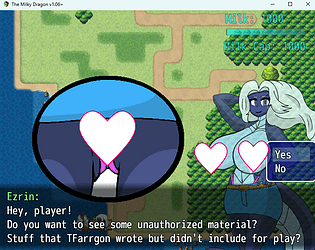
Not sure what you're asking, but the original game and mod might break when Shimmer tries to go above level 71 or Milk Cap of 4000. I've got some safeguards against that, but they're not foolproof hack-proof.
Here's an image, using the debug room and some removal of background distractions, of what that looks like. The sprite used at that size is is visible through her tits.

But OOPS! Looks like the current version of the mod that's posted doesn't have ANY save files included! So, I will definitely post the "final" v1.06+ that I promised ASAP, including one. Just have to play the modded game to that point yet one more time to generate one...
Yes, the error still occurs in the download version. But the console log didn't seem much help at isolating it. I think it happens after the "Day 2" goes across.
I'm also getting several other errors in the console log:
GET chrome-extension://odlameecjipmbmbejkplpemijjgpljce/img/pictures/Nebel_APNG.rpgmvp net::ERR_FILE_NOT_FOUND
GET chrome-extension://odlameecjipmbmbejkplpemijjgpljce/img/pictures/Spider.rpgmvp net::ERR_FILE_NOT_FOUND
Those 2 appear when the game is started.
And after each time that I save the game there's
"Save data too big!"
When you get close to the end of the game, you can get a list of all the image locations via Blinky. That #9 text is ambiguous in the current version, it should be more like "through north exit" and look behind the only tree on the right side near the chests. The new version and guide will make it clearer.
My first few hours looking at this, some of the flickering is due to always doing an Erase before every Show. Some is due to the Leaking and non-leaking graphics fighting it out. There will definitely be some improvement in the next update. At the very least, 71 Common Events will be squashed into 1.