
Indie game storeFree gamesFun gamesHorror games
Game developmentAssetsComics
SalesBundles
Jobs
TagsGame Engines

So far, this seems to be working almost entirely as expected. Only thing I've seen is warnings of
The provided value '36' is not a valid enum value of type CanvasTextAlign.
which happens in the Equip screen 5 times each time a different Actor is displayed, apparently once for each equipment slot that's visible, or when the list of slots scrolls (my game has a 6th slot that's always empty for now).  If you want a call stack, let me know.

There's also occasional "[Violation] 'requestAnimationFrame' handler took ###ms" with various values that I don't remember happening before.

But that's still immeasurably better than a warning for each text character sent to the screen.

THANK YOU!
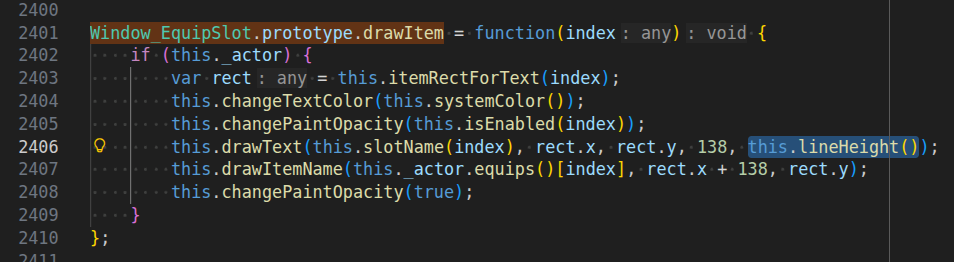
A call stack would help, but a a 36 appearing there sounds like someone is calling drawText on Window_Base as if it was the method on Bitmap. The former doesn’t have a lineHeight parameter preceding align.

I’m pretty certain that this line here in Window_EquipSlot.prototype.drawItem is the culprit:
this.drawText(this.slotName(index), rect.x, rect.y, 138, this.lineHeight());

The bug is present in both MV and MZ, but fixed in the YEP_EquipCore.

You can just delete the , this.lineHeight() part there to fix this, but I’ll make plugin to auto-check that argument tomorrow, too.

This is now available as Window_Base.drawText Ignore CanvasTextAlign Numbers.

Regarding ”[Violation] ‘requestAnimationFrame’ handler took ###ms”, that’s a performance warning with unspecific cause. It means something took too much time and caused a lag frame.

You can figure this one out using the profiler, but usually it’s just something like resource loading not running in parallel.