On Sale: GamesAssetsToolsTabletopComics
Indie game storeFree gamesFun gamesHorror games
Game developmentAssetsComics
SalesBundles
Jobs
TagsGame Engines

Ocram Ratte

28
Posts
3
Topics
12
Followers
11
Following
A member registered Aug 12, 2019 · View creator page →

Creator of
Recent community posts

So I should be setting the cells individually looping through them? I thought it returned what a load_csv would return, which is what I’m using in the original one set the same way.

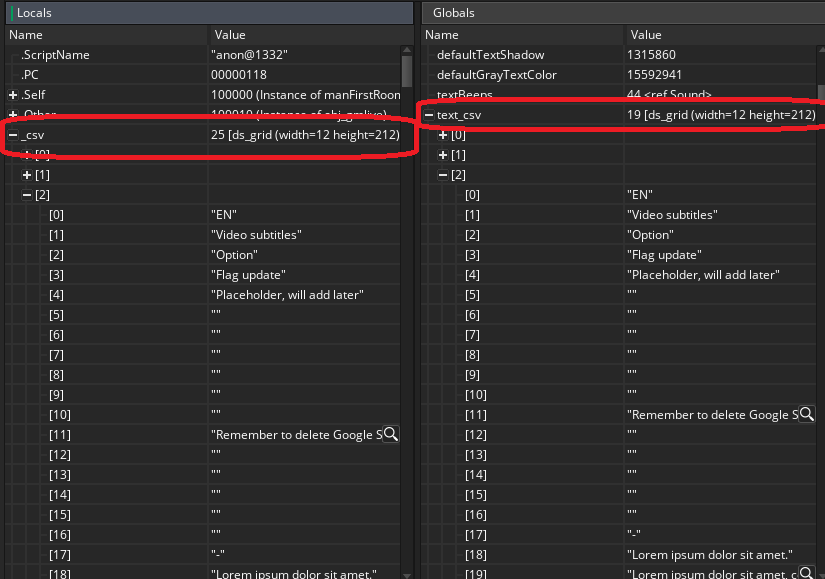
They look identical on the inside, one says 25 (Reloaded) and the other one says 19 (Original) I’m unsure what the 25 and 19 are. image.png

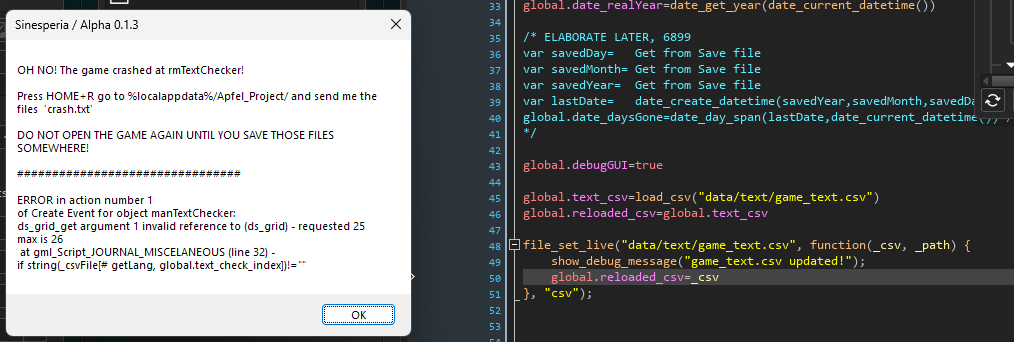
Hi, I’m unsure if I’m missing something, but trying to set this CSV file with the file_set_live kind of doesn’t work. For reference, if I had put “global.text_csv” instead of the live one in the script that makes this crash, this wouldn’t have happened.

image.png

Ahhh, it might be that then, that macro was only referenced inside a script, gotcha, thanks!

Oh really? I thought I was just doing it wrong, still, I think the problem resides in the way the macro is formatted and can’t be taken as an argument in the live_constant_add() function

#macro TEXT_FOREST_VESTIGES						\
case("example"):								\
    scrText("example_A_01");					\
    scrText("example_A_02");					\
    scrText("example_A_03");					\
    scrText("example_A_04");					\
    scrText("example_A_05");					\
    break;                                      \
case("example2"):								\
    scrText("example_B_01");					\
    scrText("example_B_02");					\
    scrText("example_B_03");					\
    scrText("example_B_04");					\
    scrText("example_B_05");					\
    break;                                      \
(3 edits)

I’m not sure if I’m doing this right, but I store a lot of things in multiline macros to keep my project clean, I came across that I needed to set some of these with the live_constant_add() function because when updating them, I’d get a GMLive error or a straight up crash.

The game just doesn’t compile when a multiline macro is referenced in live_constant_add().

Script: MACRO_TEST at line 1 : got ':' expected ',' or ')'

Not sure if this is an oversight, impossible to implement or I just didn’t read the documentation enough.

Edit: This served me as a leason to not use multiline macros this way so I switched to a different method, I’ll just leave this post here in case you’re interested on checking it out.

Edit edit: Okay I just realized what the fuck I was doing, sorry, lol.

Is there any alternative for the current version of GameMaker?

Yeah, it crashes the game.

{ message : "invalid date conversion - dates earlier than 1 Jan 1970 will be incorrect", script : "gml_Script_anon@21528@___struct___94@gml_Object_gm_pulse_Create_0", line : 822, stacktrace : [ "gml_Script_anon@21528@___struct___94@gml_Object_gm_pulse_Create_0 (line 822)","gml_Object_gm_pulse_Other_68 (line 39) - 				_h.handler(_request, _response);
" ], longMessage : "ERROR in action number 1
of Async Event: Networking for object gm_pulse:
invalid date conversion - dates earlier than 1 Jan 1970 will be incorrect
 at gml_Script_anon@21528@___struct___94@gml_Object_gm_pulse_Create_0 (line 822) - 					var _epoch = floor(date_create_datetime(1970, 1, 1, 0, 0, 0));
" }

IDE v2024.6.1.160 Runtime v2024.6.1.208

- var _epoch = floor(date_create_datetime(1970, 1, 1, 0, 0, 0));
+ var _epoch = floor(date_create_datetime(1971, 1, 1, 0, 0, 0));

At gm_pulse Create Event, line 822

Not sure why but when trying to take a screenshot it will crash, changing 1970 to 1971 fixed it, maybe it’s because of the timezone.

goty

Oh, I'm sorry, I didn't use that one, I just tried it and now it works perfectly, this is amazing thank you so much for making this!

(1 edit)

This is amazing! One small thing is that bpm automation is not reflected in this midi player, maybe it's because json doesn't preserve that data when converted (edit: oh it actually does preserve that data). Other than that this is super cool!

This is really cool! 

The best theme for aseprite, I recommend it everytime, it's soooo good and clean.

This is really cool :]

There are no shorcuts and Ctrl+Z? It's quite a pain having to close the canvas everytime I want to change something