I just thought of something that could be really useful.
In addition to requiring the previous node to be unlocked in order to access the connected ones, it could be great to have an optional requirement based on a Switch being ON. This would allow the creation of perks that remain locked until the player unlocks them through gameplay conditions , for example, reaching a certain point in the story.
I think this would give developers much more control over progression and would be useful in many different scenarios. Let me know what you think when you have time.
I wanted to let you know that the window issue is still present, and I apologize for not being more precise before.
The window works correctly when there is no background. However, as soon as a background is set on the right column (where the visual skill tree is displayed), the confirmation window does not appear when pressing the button. If the background opacity is reduced, the window starts to become visible, which shows that it’s being rendered behind the background instead of on top of everything.
That’s the exact issue I’m seeing.
Sorry again for the confusion earlier, and thanks as always for your time and support.
You’re already doing an amazing job, so no worries at all about how long any of this might take , there’s absolutely no rush. I really appreciate the care and attention you put into the plugin.
About the icons, that was just an extra idea. You’re totally right that the interface might be too small for them, so it’s definitely not necessary to implement that part.
Thanks again for everything you’re doing, and best of luck with all your current and future projects. Keep it up , your work is truly appreciated!
If I come across any more issues or have further suggestions to improve the plugin, I’ll be happy to let you know, if that’s okay with you.
I found an issue that I can reproduce even in a brand-new blank project, so I’m not sure if it’s related to the latest update. It seems that all stats are being applied twice. For example, the menu shows +15, but when the upgrade is confirmed, the actual value becomes +30.
I also have a few suggestions for possible improvements, in case you’re interested:
A description window with editable text to show additional information. Right now, players only see the name, with no further details. We have a description window in the editor but not in the game menu, it would be nice to have it also in game.
When the confirmation pop-up appears, it would be great if it could be displayed above everything else. Currently, it sometimes appears behind other elements, which makes it a bit hard to see.
Configurable parameters to define how base parameter changes are displayed in the top window. Ideally, this would allow customizing the parameter names and even assigning icons to them, or alternatively pulling the data directly from the System settings so the names match the project’s terminology. At the moment, these names can’t be changed and don’t match mine.
That’s all for now. If I come up with any other ideas and you’re available, I’ll let you know.
I’m trying to use this plugin because it looks really interesting. However, my project is using the VisuStella core plugins, and I suspect there might be a conflict between them.
In my project, any damage dealt is always shown as NaN. If you look closely, you can actually see some numbers appearing behind it, which makes me think those might be the default RPG Maker MZ or VisuStella floating damage numbers still being calculated correctly.
I’ve attached an image for reference.
Do you have any idea what could be causing this behavior? I’d really like to use this plugin if possible. I’ll keep investigating on my side while waiting for your response.
Thank you so much for the detailed explanation and for fixing it so quickly. I really appreciate your speed and dedication. I’ve tested the plugin thoroughly with all the new options you added, and everything works perfectly now.
I also really like the new ResetBranch command; it’s a great addition and fits the system very well.
Thanks again for all the work you put into this. I already use several of your plugins and they’re all amazing. Keep up the great work, it’s truly appreciated!
That’s totally fine. I only mentioned it because I wasn’t sure whether the art was made with AI or not. Using tools to improve your workflow is great.
The question came up because I noticed some small oddities in a few sprites, like outline lines ending where they shouldn’t, but that could easily be due to the script you mentioned.
Thanks a lot for the explanation, and great work overall, keep it up!
Thank you so much for the quick update — I really appreciate how fast you implemented this. I’ve already tested the new features and overall they work great.
I did notice a small issue, though. When using the respec all command on an actor’s entire skill tree, it always returns one extra point. Aside from that, the command works as expected.
Regarding the respec single node command: the points are refunded correctly and the node itself is disabled, but it doesn’t break the connection with already learned nodes further down the tree. For example, if Node 1 is learned by default, and I learn Nodes 2 and 3, then respec Node 2, Node 3 remains active. My suggestion would be that respecing a node should also reset any connected nodes beyond it and refund their points as well.
That said, I personally don’t plan to use the single-node respec feature — this is just a suggestion in case you’d like to look into it. The main function I care about is respec all, so fixing the extra point issue would be the most important part for me.
I absolutely love this plugin. Honestly, it’s one of the best I’ve ever used. Amazing work.
That said, I feel there’s one very important feature missing: a command or script call to respec a specific actor’s tree. By this, I mean the ability to use an item or an NPC to restore LP (or whatever points are used) and reset all related switches, stats, and learned skills back to their initial state.
Something similar to what you implemented in your other plugin, LvlPoints, would be perfect.
I think this would add a lot of flexibility and value to the system. Thanks again for your great work, and keep it up!
Hola, al final me puse a mirar el código y conseguí solucionar los problemas que tenía, de todas formas, gracias por la intención. No es necesario que me avises, pero te irá bien actualizarlo para el resto de personas. Gracias, saludos.
Hey there! Love this plugin, but there's something I haven't been able to figure out.
I'm using this plugin together with VisuStella's plugins. I've noticed that when I use your plugin with VisuStellaMZ_MainMenuCore active, the character images in the Status window don't appear. However, when I turn VisuStellaMZ_MainMenuCore off, the images show up correctly.
What do you think could be causing this?
No errors found by the way.
To fix the character images not showing up, I've already tried adjusting the X and Y coordinates in the plugin settings, but that didn't solve the problem. The images still don't appear when VisuStella's menu plugin is on.
Hola, perdona: ya añadí el interruptor local que olvidé, pero tras probarlo todo sigue igual. Además olvidé comentar otra cosa; con auriculares noto que el BGS por distancia se panea al lado contrario: por ejemplo, en un pasillo con la fuente a la izquierda, al acercarme se escucha por la derecha, lo cual no tiene sentido.
Siento las molestias; estos problemas me impiden usar el plugin correctamente. Esperaré pacientemente una solución.
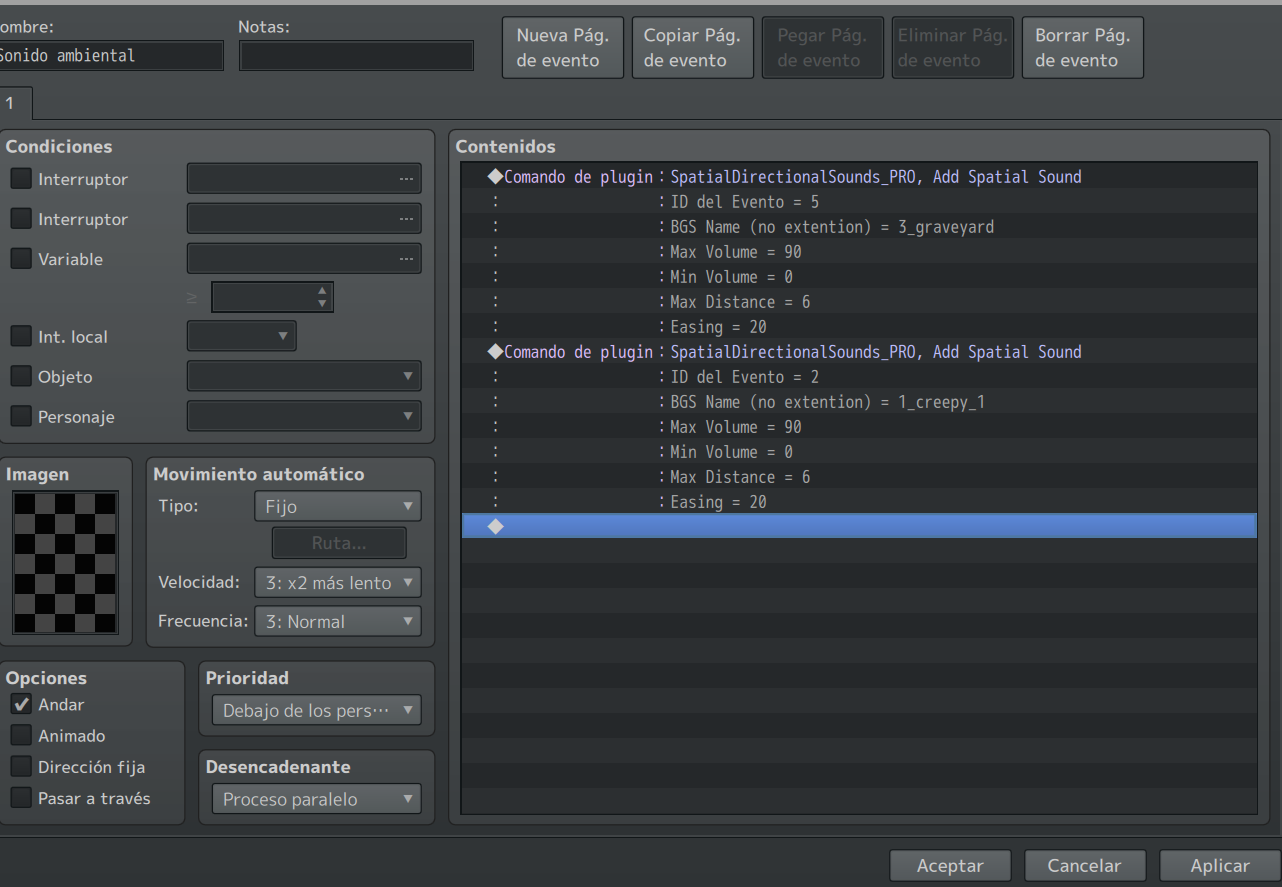
Esto es la captura de como tengo el evento. Puedo escuchar los eventos por separado si los pongo 1 a 1. Pero en cuanto los pongo tal y como en la imagén, solamente se escucha el último. He desactivado todos los plugin que tenía por si alguno interfiere, pero obtengo el mismo resultado
Muy buenas, tengo una pregunta. Estoy usando tu plugin Pro y he visto que solo se puede emitir sonido de un evento. Si quiero que venga de más eventos no es posible. Es esto así o es un fallo? Me gusta mucho el plugin y lo necesito bastante, si pudiera ser posible eso me haría muy feliz jajaja
Are you seriously selling this? Do you realize it contains copyrighted material? I'd like a refund, this is clearly illegal. Nowhere do you mention the source of the icons; instead, you present them as your own work. That’s misleading at best, and dishonest at worst.
Did you actually create these icons? I noticed some of them look very similar to ones from the game Battlerite. That raises some serious concerns about potential copyright infringement.