Indie game storeFree gamesFun gamesHorror games
Game developmentAssetsComics
SalesBundles
Jobs
TagsGame Engines

shalevy

4
Posts
4
Topics
3
Followers
A member registered Aug 13, 2017 · View creator page →

Creator of

Recent community posts

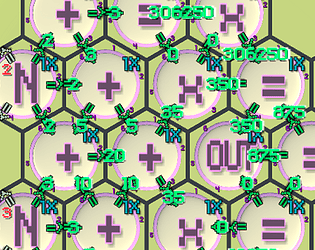
To Solve the second Puzzle you need to connect 3 Tiles together. First, create a Constant Tile that has the value '1'. So this Tile will create the value '1' on it's out direction ports each cycle. Then connect this Tile to a 'Plus' (+) Tile. This Tile adds all of it's inputs each cycle to create a new value on it's out port. But it also has a nice property that can be enabled where it remembers it's last result and uses it it addition to all the in port values. Which in this case basically means it act as an accumulator. You need to enable this in the Plus Tile property pane. Then connect the Plus Tile to an OUT Tile.

There are more ways to solve this Puzzle. Another option is to have 3 Constant Tiles, connected through the Equal Tiles such that the value '1' connects directly to the OUT tile, the value '2' connects through 1 Equal Tile to the OUT tile and the value '3' connects through 2 Equal Tiles to the OUT tile. This way you create a delay to when the values '2' and '3' appears on the OUT Tile. Another important details here is how the OUT Tile processes it's inputs, which is clockwise order. Meaning that if there are valid values in more than one in port, it will use the one in the smaller port number.

Here is  a general description of how the game mechanism works:

A Tile is the basic execution unit of the game. There are many different types of Tiles, each has a unique execution task. Tiles share  few concepts in common:

  • Ports - each Tile has 6 ports ordered clockwise from North-East (port 1) to North-West (port 6). 
  • Ports direction - a port can either be: In port - values enter the execution unit. Out port - values exit the execution unit. No port. Changing port direction can be done using Shift-N (where N is between 1 to 6). Each press of Shift-N cycles through in, out, no port.
  • Speed - by default Tiles executes each cycle. You can change the speed to the Tile to 1/N of a cycle (N is between 2-9). This is a more advances topic that will be explained in a different discussion. Keyboard shortcut '1' to '9'.

A Value is what passes between Tiles. It is produces in the Tiles execution units and passes through the ports. Values can be Integers, Float or NA (Not a number).

When the simulation runs (you hit play) it employs the concept of cycles. On each Cycle there are 3 phases: Phase 1) Each Tile observe the values passed to it from adjacent Tiles and consider only those that are on the In direction ports. 2) Each Tile executes it's logic based on the inputs and creates a new value. 3) Each Tile Duplicates the value into each of his out direction ports. 

There are many different types of Tiles, some also have properties the user can change, for example the Constant tile can define its value in the properties pane.

CategoryNameDescriptionProperties
MathPlus (+)Adds all the values on it's in port to produce a new value on the out port.. 

- Keep Last Result: if Enabled save the last cycle results and adds it's to it's next execution cycle.
- Reset Last Result using Port Input: if enabled can be used to reset back to zero the saved value. 
Minus (-)Pick the first valid in port value, clockwise order, and reduce from it all the other valid inputs. For example, if the value '6' is on in port North East (Port 1) and '4' is on in port South West (Port 4). Then the result will be '2'.
Equal (=)Pick the first valid in port value, clockwise order, and output that value on the out ports.- Ignore Zeros: ignore in ports with zero value.
Multiply (x)Multiply all the values on it's in port to produce a new value on the out ports.Same as the Plus Tile.
Constant Tile (N)Create a constant value on it's out ports.- Value: which constant value to produce.
- Repeat: how many times to produce this value.
- In used as Reset: reset the repeat count based on any valid value on any in port.
Min Compare all in port values to produce the minimum value.
MaxCompare all in port values to produce the maximum value.
Random (R)Creates a random value on it's out ports.- Seed: use a specific seed to create a random sequence of numbers that is reproducible every run of the game.
- Use Seed: should be used or not.
- Max value: till what values to produce the random value.
- Whole numbers: produce integers of floats.
StreamsINProduces a pre-defined sequence of numbers based on a specific IN stream.- Stream Name: Choose the stream to be used by this Tile.
OUTPick the first valid in port value, clockwise order, and output this on the choose out stream.- Stream name: Choose the stream to be used by this Tile.
LogicLess Than (<)Pick the first valid in port value, clockwise order, and compare it to all the rest of the valid values. Output '1' if Less Than, '0' otherwise.
Greater Than (>)Pick the first valid in port value, clockwise order, and compare it to all the rest of the valid values. Output '1' if Greater Than, '0' otherwise.
Equal to (==)Pick the first valid in port value, clockwise order, and compare it to all the rest of the valid values. Output '1' if Equal to, '0' otherwise.


Solving a puzzle can be done in many different ways. Each Puzzle defines what Tiles are available to the user and how many of each tile can be used. 

Hi All,

In this programming puzzle game you are giving simple units of execution that can be connected on an hexagon grid. Each unit executes a simple task on it's given in-ports and produces an output results on it's out-ports. Connect given out-port to an out unit to produce a sequence of numbers as instructed by the given puzzle.

After spending several months building the framework of this game, designing several puzzles and trying to balance the difficulty vs. creativity, I would really appreciate some criticism. Is it too easy, too hard? is the concept boring? is it fun to just design small programs in the sandbox? What other ideas can this leads to? Should I continue the development and in which direction?

Obviously, I have some ideas where I would like to take this concepts to. Some are not trivial and would require lots of additional work. Before I invest in some of those directions, I thought it would be a good idea to provide people with access to the early development of the game and gather feedback. 

Itch.io project link: https://shalevy.itch.io/overcomplex-calculator

Simple youtube tutorial: https://www.youtube.com/watch?v=N7VohBsIaFA&feature=em-upload_owner

(2 edits)

For now the game doesn't come with easy tutorial or any kind of help. So here is a little explanation to get you started.

From the main menu choose Puzzles and then choose the "First Introduction" Puzzle. Once in the game screen, click on the hexagon icon with the letter 'N' and place your first tile anywhere on the grid. Press 'e' to edit this tile properties and in the value field enter '5' and click on the Done button. Next, click on the hexagon icon called 'OUT' and place it to the right of the first tile. Use Shift-5 (if you placed it to the right of the previous tile) to change the port directions, so that now the arrows indicating the direction will turn green. Next, press on the 'Play' button to see the simulation running. If you did everything correctly, the 'out' buffer will fill with the number 5 and will match the expected buffer. Once it's all done you will see a scoring screen.

That's it. From there explore on your on.

Note: if you pressed on '5' instead of 'Shift-5' it will change the Tile speed instead of the Tile port direction. Press '1' to change the speed back to normal.

Here is a video: Youtube First Introduction