Will you be releasing this garage on FS25?
pixel-ink
Recent community posts
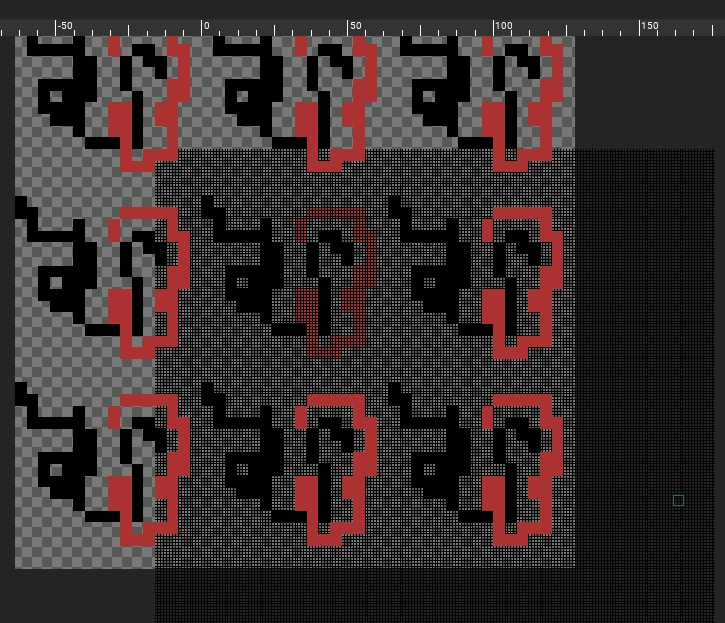
Hi, I'm trying out your app. Works great so far. However, I think I found a bug (not sure though).
I created my original canvas at 16x16. Turned on grid view (worked fine)
Then I drew on it.
Then I resized the canvas to 64x64. Now the grid is out of line. I tried turning on/off grid view, but it stays put.
Thought you would want to know.
Thanks
Some suggestions for future updates...
1) Currently you can add lights, but cannot delete them afterwards. Need the ability to delete added lights
2) Creating, Edit and Saving of project settings so we can comeback and edit what we have made. From programmers viewpoint... you would just save a text file of the path to the image and all the settings.
3) If you keep the export canvas function, a) change icon to something else beside an animation/video icon; b) The ability to edit the dimension (WxH) of the canvas.
Okay. There is a preview checkbox in the export tab on the right panel. I did check it, and use the "export to" button, that worked perfectly. The preview image is properly cropped. Also note, that I used the icon up top that looks like a video player with a white button. That is the one that does not crop the image properly
Okay it works, but when it exports it exports the entire screen leaving the little image in the middle. Meaning I have to crop it to use it. See the image below . Even though you can't see the boundary it extends three times wider and taller than the little 3D image itself . Save the image to your hard drive and then look at it you will see what I mean . 
Just a suggestion. Most people when they first download a piece of software will test what ever is available for testing. If you don't allow exporting of the sample skull. Then some people will walk-away from the app thinking it doesn't work. If you don't want to allow export of the skull, then you should consider adding a message dialog stating that they can't export the skull and should test using their own image. Most all people test software to find it's max functionality... and output is very high on the list.
Well... it's not a dumb question... I did try my own image and it exported. However, how do I export a finished image. I get the 4 "texture maps" but what about the finished preview???. I would be just needing the final image for graphic design. Not really needing the maps unless I am making a game. I know this is with game dev in mind. But, just an output of the final image would be used by lots of people.
I get a message saying everything exports... but when I go to exported folder... nothing is there. lLke I said, only if I click the top export button do I get the one and only normalmap... nothing else.
Windows 10 (ver1908)
GTX 2060
Intel Core i7
16 MB RAM
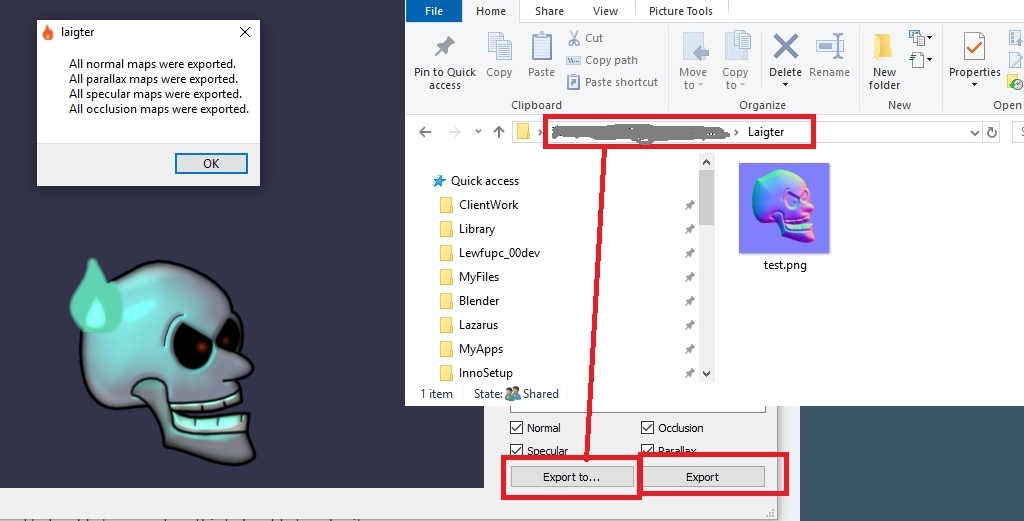
FYI.. .screen doesn't reflect location of the application. I have a folder I keep all my created content in. I just named that folder Laigter too.
Hi, I like the concept of this app. 2 things... 1) Can you add a menu bar with all commands so we can use shortcut keys and also have a link in the memu back to your website? 2) Bottom right buttons, Exporting all images (normal maps etc) doesn't work at all on my Win10 machine. And the top export button ONLY exports the normal map... no other images, not even the preview. Would be nice if exporting worked and supported transparent PNG's. Even thought this app would be mostly for game dev, I would use it just for general graphic design. A quick way to add 3d effect to any flat image. Great work so far!!