
thank you :)
nonpop
Creator of
Recent community posts
I think that's the proper way to go between a graph and its dual, so in theory it works. But for this game there are a couple problems. First, currently the game only allows simple graphs (no loops or parallel edges), so for example you could only have one N-3 connection in your first example.
Even if we'd allow non-simple graphs, the second challenge would be layouting. You might have to connect far away vertices (the N-3 connections go around the whole graph), so making the final graph clean could be difficult. I'm sure algorithms for this exist but sounds like a lot of work for this game.
So, cool idea but maybe it has to be a separate project :) Maybe a game where one graph shows some clues and the dual shows other clues and you have to switch between them to solve it.
Thanks, and thanks for the suggestions! I was indeed thinking of dual graphs when designing the rules so good catch there :) Now, one place where I think this breaks is in levels with both kinds of clues (last level in this demo). If I modify your example a bit you could do something like this, where on the right the 2-line crossing the two edges means both of them are lit. There probably will be such "cut clues" in later levels but it might be quite difficult to cleanly generate them for dual graphs.
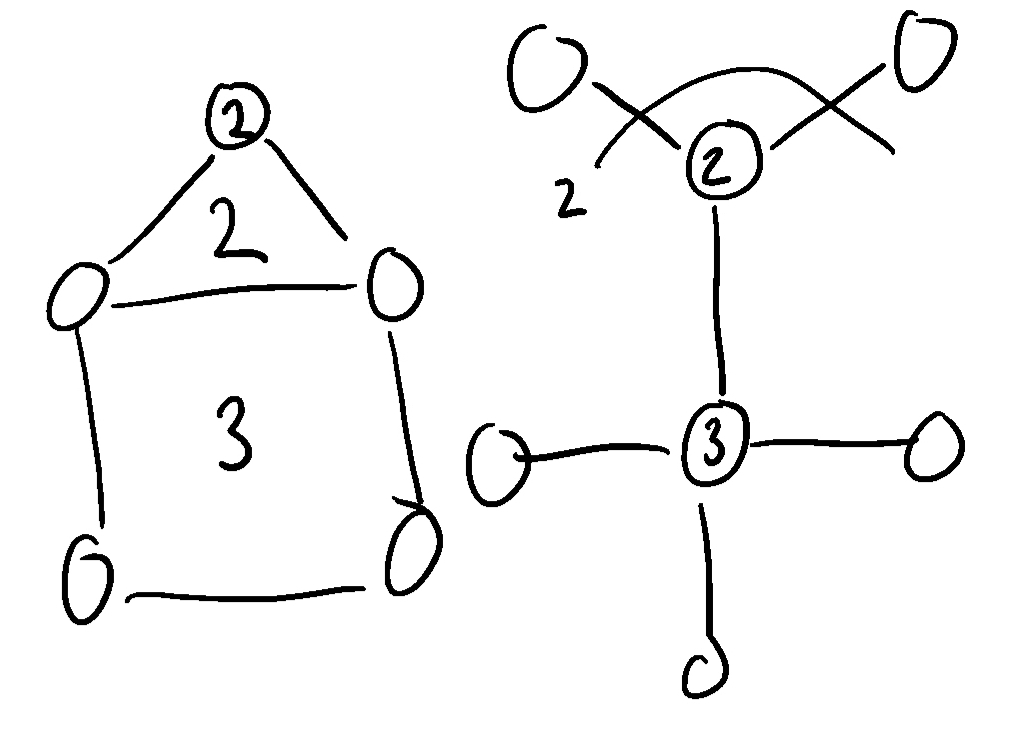
These "cut clues" also make the spring idea more difficult to implement since you'd have to bend the cut lines so that they cross the correct edges. It's unfortunate because I really liked the idea of being able to switch between the arrangement needed for the image and a different arrangement more suitable for solving :|
Oh, hello fellow arch user :) I tried with the same firefox version, it works for me, so my best (and so far only) guess is something goes wrong with the graphics drivers somewhere.
I uploaded a linux build of the demo, does that work?
If you want to play in browser one more thing to try is disable hardware acceleration in firefox:
- Edit -> Settings
- use search box to find "use recommended performance settings"
- Uncheck, and then uncheck "Use hardware acceleration when available"
Restart firefox and try once more. You probably want to restore the setting after trying, though.
Hmm.. Does this page say your browser supports WebGL2? https://get.webgl.org/webgl2/
Also could you enter about:support in firefox location bar and find the value of WebGL 2 Driver Renderer?
What OS and Firefox version are you running?
A simple solution for persintence could be that every level (at least the named ones), after solved, becomes a new rule you can use. Need some way of organizing so you can easily find them, though. If/when I add first order logic I think something like this would be very useful or the proofs might get very long.
How did you open it? Sometimes you can't just double click but have to right-click the app and choose "Open" in the menu, and then again "Open" in the confirmation dialog. I think this is only needed once and then it works normally. Unfortunately I don't have access to a Mac anymore so I can't verify.


