



Hey, thanks so much! Right now I don't have any plans to add new features to this. I've thought about maybe making another card creator, or remaking this in a more simple way. If I start on a project like that, I'll definitely keep that feature in mind, because it would be handy to be able to save cards!
Nash High
Creator of
Recent community posts
Do those gray lines still show up after you click print & either go into a print preview or actually print it? Sometimes on the preview there will be little gray lines when there's a tiny bit of space between the pages or such, but it shouldn't appear in the actual print, since it's just the zine arranger background showing through the gap.
I think to get the map pages on the same spread, you'll want the first one to be on an even-numbered page & the second one to be odd. At 25 pages total, the ZineArranger is probably adding 3 blank ones to the end to bring it up to a multiple of 4. You could insert a blank page somewhere prior to the map to get it to land on 24 & 25--I think that would do the trick. Or you could add all 3 blank pages in somewhere prior to the map & have the map be 26 & 27, if you want it to be right at the end.
Oh, maybe I should make a video--that's a good idea. I made up the templates for 1/24th & the smaller sizes when I was working on the update, so I don't know if there would be much in the way of resources/instructions out there. There are instructions for the 1/16th size, and the pattern is similar, but not entirely the same of course.
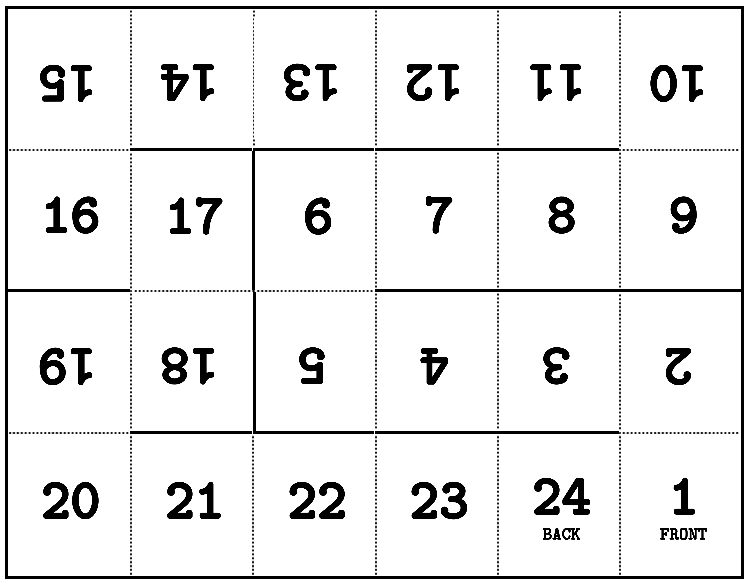
For now, the best I've got is this template image from the Folding Instructions page (which you may have already found): 
& I will add that as I've been folding these, I found it helps to just do the cuts first--so I'll fold in half to get those two middle horizontal cuts, then cut the rest of the lines as well. Once all the cuts are done, I grab the first page and start folding, working my way up in order. It's a sort of alternating pattern to, so p1 and p2 will be back-to-back, then p2 and p3 will face each other, then repeat all the way through!
I know a video will be a lot easier to follow for many folks, though, so I'll try to get one of those put together soon, and I'll let ya know when I do!
For sure! You can download it from the Codeberg page: https://codeberg.org/nashhigh/zine-arranger
And thank you so much! I still need to try out Scribus!
Ohh--yes! That's pretty much it. Really I need to add some instructions specifically for half-size + single-sided. Technically you can still do single-sided, but you'd have to flip every second sheet around & stick it to the back of the previous sheet.
It might be easiest to staple them first, just make sure they're lined up right (so p2 is on the back of p1, and p4 on the back of p3 and so on), staple & fold. Then you'll have sets of blank pages between your content, but you can just put some glue on those & stick them together.
But another thing I have done when I didn't have a printer that could do double-sided is set it to print only odd pages first, then manually put the pages back in & print the other side. There's a lot of room for error in that & I even messed it up a few times despite my best efforts, but it might be easier than gluing!
Hmm, I'm not sure! If you sort the sheets before folding, does the booklet end up in the right order, or are they printed wrong so that the pages are always out of order, no matter how you arrange the stack? Also what's your printer setup like, is it an automatic-double-sided printer, or one where you have to flip the pages over & put them in again?
Well, darn! Does it still end up pretty much the same when you use the beta version, or is it changed at all?
I did notice in your screenshot that Safari doesn't seem to have a "Fit to Page" option, which I often have to use to get mine to work. Without Fit To Page, my little test A4 document will work at about 91%-94% Scale, although you already mentioned playing around with the scale & not having any luck with that either, so that may not be too helpful.
I wish I had Safari to test it out in! But I'll keep trying to come up with ways to make things fit better automatically, regardless of the browser--there may be some more tricks I just haven't learned about yet.
Okay--I made some adjustments over on the Beta Version that I think are helping, if you'd like to try it out! Here's the link to that version: https://nashhigh.com/code/ZineArranger-1-1-Beta/
I still have some testing to do on the other v1.1 features before I'll be ready to update the itch.io version, so for now it'll probably work better to use the Beta if you're doing paper sizes other than US Letter.
And if you run into any more issues, or if it's still a problem, let me know! This one is at the funky intersection of CSS, JavaScript, and the browser's print function, so I'm not 100% confident the fix I've done so far will do the trick for all situations!
I think you have found a bug! It looks like the Zine Arranger doesn't work very nicely with A4 paper sizes.
I'm going to try and fix this real quick, and then I'll reply again once I have an updated version for you to try it out on & we can see if that takes care of it.
Thanks for bringing this to my attention!
Oh no! Yes, I can try to help. Do you mind answering a couple questions so I can try and track down what's going wrong?
- What zine size are you using? & are there any special settings?
- What's the page/paper size on the original PDF?
- What browser are you using? Also if you don't mind, a screenshot of the print window showing the print settings could be helpful too!
It occured to me that even if you're arranging your zine manually, you might be interested in some of the new zine templates on the ZineArranger (beta) Folding Instructions page! Each of the new sizes & configurations has a numbered template image that you're free to download & use. Although, they come with the same caveat that it's a beta version, so some of them might actually be incorrect! (I used the ZineArranger to generate the templates.)
https://nashhigh.com/code/ZineArranger-1-1-Beta/folding.html?8-1ps
Oof, I have done this before & it is always tricky. Depending on your printer/print software, it might still give you an option to do a manual double-sided printing, where it'll print all of the odd pages first & then tell you to flip the stack over & put them back in to print the opposite side. And if that's not an option, sometimes when you go in to set custom pages to be printed, there will be an "Odd Pages" and "Even Pages" option, so I've also done it where I run Odds first then Evens on the opposite side.
The flipping part is always tricky, but it sounds like you've already been doing that, so I imagine you know how your printer needs the printed pages to be placed back in the tray. I think that should be all the same with a multi-page print as with single pages, but you might still wanna start with a shorter document to make sure that it's all coming out right!
Ah, cool! I started working on it after you asked & I do plan to include 1/16th size options in the next update! The template I went off of is a little different than the one you linked. Similar concept, but it loops back on itself so that page 1 and page 16 share a fold, which I think will help with durability.
Ahh, do you mean the really tiny ones where you fold the sheet into 16 boxes? I actually don't even know how to fold those! I can look into it, though.
Right now it does support what I often think of as a "16-page Minizine", but that's a double-sided mini, so it's still an eighth of the page--not the super tiny guys!
I'm actually working on a little update to this right now, so I'll try to figure out if the 1/16th size is something I can reasonably add in this round or if it will have to go on the list for the future!
Ooh, that's a really interesting concept / question! The bad news is the way Zine Arranger handles lots of pages is gonna make this especially tricky.
Right now whenever there's more than 1 sheet worth of pages, Zine Arranger sets things up so that each sheet nests into the middle of the previous -- so like for a minizine, you'd open the first sheet to the middle, lay the 2nd sheet in there and so on, and then staple the spine. But for gluing the 2nd sheet to the 1st sheet, you'd need a totally different page order...
It's a bit of a pain, but right now my best suggestion would be to separate each sheet into it's own 8-page PDF -- then you just have to make the first and/or last page blank, depending on where the sheet falls in the order.
It's good to know about this method of making a longer booklet, though! I'm glad you reached out. I added a note about it on my to-do list. Someday when I get a chance to add some features to this, I'll try to add in an option to have the pages arranged in a way that would work better for this--maybe where each 8 pages becomes 1 complete minizine, in order instead of expecting to be nested into each other.