My device doesn't have enough memory to use those. I'm using a Fire Tablet. T_T
Melontree
Recent community posts
I think it might be your internet. I've tried downloading large games on my tablet before and got the same error on larger downloads(would become slow and fail with 'forbidden error'). The issue only went away when I switched to a different internet connection/moved to a new area(I was camping at an RV resort at the time).
Or you need more space.
Probably running out of ram on your device. I often have my games shut down randomly after playing for a while, when the scene is too resource intensive, or when a fight/H-scene gets particularly active in what's happening on screen. Because of this I've built a habit of saving a lot to.save progress. It's unfortunate android seems to have opted for "Let's shut down this app because it used up all the ram" instead of "This app used all the ram? Oh well! Guess I'll keep the bare minimum for myself, while the app stays running."
Do any of the downloads run on stuff like Ren'py or Godot (As in they are not entirely dependent on a any one file specific to Linux or windows, and can run on something like Joiplay with the correct plugins)? (I want to run the game on Joiplay on my fire tablet and I don't have enough room to spare in order to test them all. I have less than 1.5 gigabytes left so I can't test it without butchering half my games that are mostly 500mb to 750mb.)
I'm having trouble getting the Itch app to connect to the internet, despite my Chromebook itself being connected. I tried troubleshooting for a solid hour with help from Gemini, but got nothing. I'm using Arch Linux on my Chromebook, so if anyone knows how to fix this issue, it would be greatly appreciated! I reinstalled Itch using the official Itch-setup file. I do have Firejail installed, but I am not explicitly telling Itch to run with Firejail.
edit:
Never mind, I fixed it by disabling ```systemd-networkd``` and installing and enabling ```dhcpcd```.
(FOR LINUX; I don't know if it's the same for Windows.)
For those of you who might be struggling to manually import this game into itch, simply make your own receipt.json file with the following steps.
1. Make a blank json file and put the following in it:
{
"game": {
"id": 2890613
},
"upload": {
"id": 13209536
}
}
2. gzip the file. (make sure the file ends up with the name "receipt.json.gz")
3. Put an empty folder for the game in the "~/.config/itch/apps" file path. (name it something like 'anomalous-coffee-machine' or 'ACM')
4. Move the game file/executable(in this case) into the new folder.
5. Make sure to give the game file/executable(in this case) permission to run.
6. Create a folder labeled ".itch" in the new folder.
7. Move the "receipt.json.gz" file into the ".itch" folder
8. Tell the Itch app to search for new installs in the manage install locations tab on the itch app.
And voila! The game is now listed. You will likely still need to re-download the game and update the upload ID in the receipt manually, each time you wish to update the game.
I may re-post the steps with an updated upload ID for some of the future updates. (depends on if I see the update and feel like updating it)
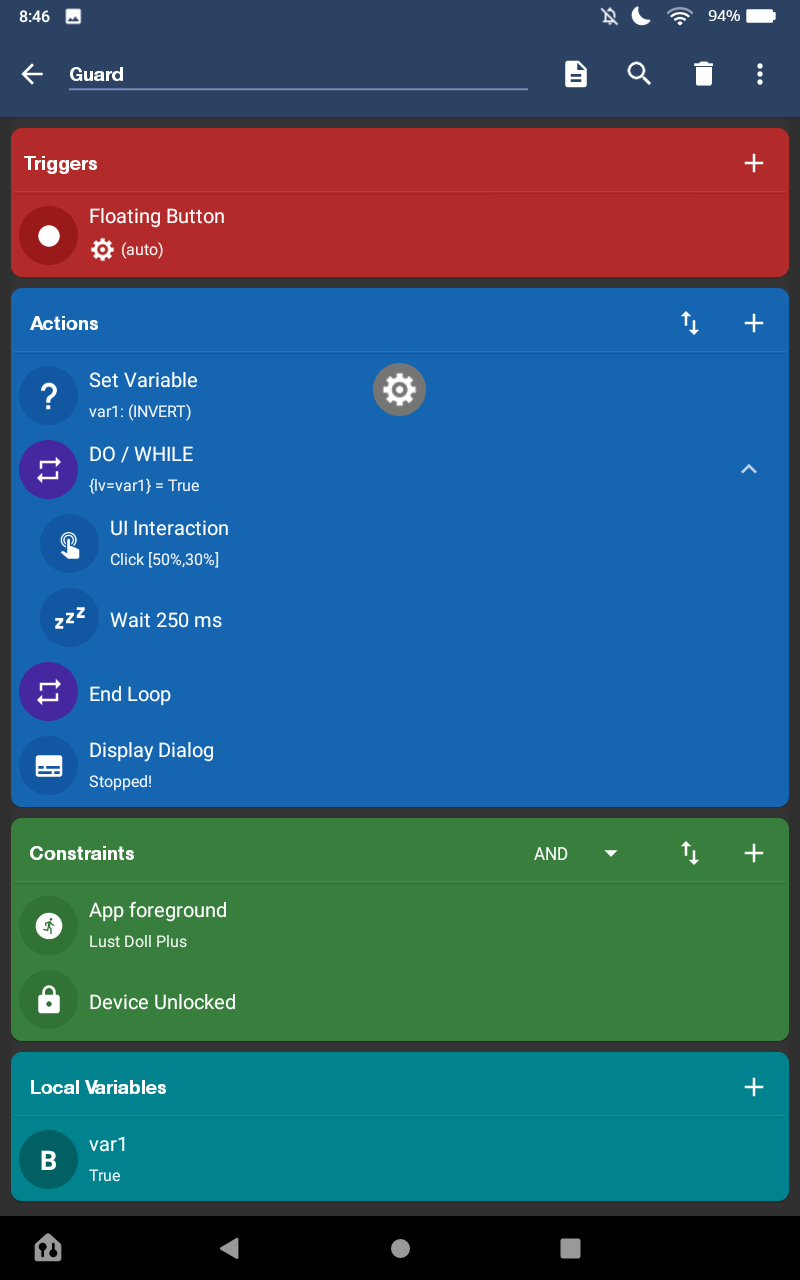
For people who want to work on your RES stat, I suggest using an autoclicker with a delay of 250ms to only click GUARD while fighting against a Harpy(run the autoclicker for several hours). I use android on a fire tablet and used Macrodroid downloaded from Macrodroid. Attatched is my specific set-up for the macro. (Also works on chromebook!) Macrodroid can also be downloaded from the play store. Please ignore the gear symbol, it is just the floating trigger button.