Thanks for the feedback! Hope you enjoyed the game.
luksamuk
Creator of
Recent community posts
Hi! Yes, it won't work on PSP, and I couldn't get it to work as well.
The reason for that is that most games from the PS1 era used an SDK that was full of bad practices when it comes to writing to memory-mapped structures. The SDK I'm using does most of it as it should be, but old emulators don't implement the accurate memory mapping features in the right way (mostly because it was not necessary). So PSP's emulator, which is very old, cannot run this game.
You'll get similar bugs when running this game on any version of ePSXe or older versions of PCSX-ReARMed: music and sound effects simply won't play.
Hey there! Thanks for the input on this. I will try to give you some solutions, but feel free to give me more information so I can properly help you. For example, DuckStation version, console model, burning method and what program did you use for that... All of this is very important.
So, since DuckStation does not work with the .bin/.cue files, what happens when you look at BGM TEST on the Level Select? If it says 00:0D, the tracks are being recognized as they should, but if by any reason there is not a 0D or there is a different hexadecimal number at the end, the tracks are not recognized at all... if this happens, make sure that 1) the .cue and .bin files are on the same directory; 2) that they have the same name; 3) if you have renamed them, the .cue file's contents reflect the new .bin file name as well. Also make sure you are loading the game from the .cue sheet directly and not from the .bin file.
As for burning the project onto a disc... what is the model of your console, and what method did you use? I remember that I once used tools like Brasero which only support burning directly the .bin file, and that might mess up the track table on the CD, since there would be no track information. I would also recommend taking a look at the guide linked on Install Instructions as well; I only use CDRDAO to burn discs because it is the recommended method.
EDIT: Did you notice if sound effects play normally as well?
Hey there, thanks for your feedback and thanks for enjoying the demo!
I'm glad you noticed how this game relates to Sonic Worlds Level Collab, because I was actually one of the creators of that fangame! (I used to be known as LHTheHedgehog back then.)
Amazing Ocean Zone is an attempt at porting the original level from SWLC, though still highly unfinished because the engine still needs a few tweaks, while Surely Wood Zone is a sort of homage for Kessler12's Wild Wood Zone.
Hmmm, that's interesting and odd at the same time. Could be the case. It appears like incorrect texture mapping, since the text is drawn using a technique similar to the level itself.
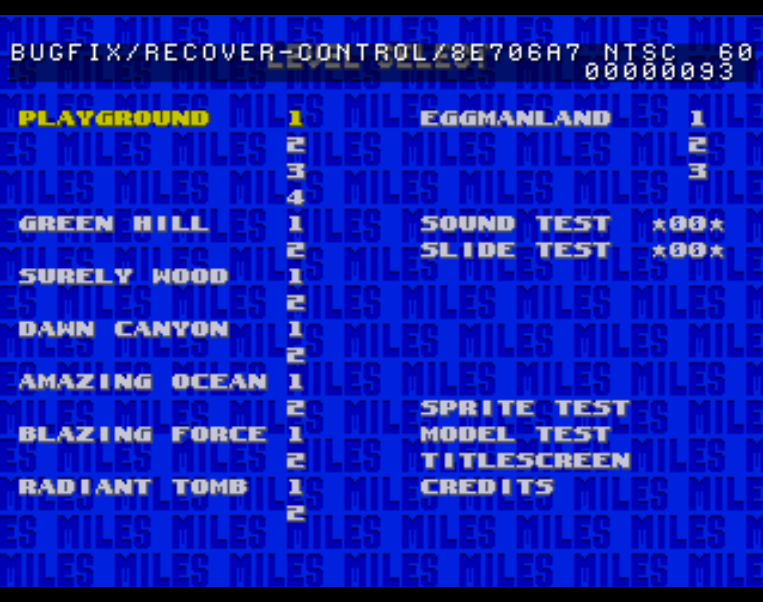
Out of curiosity, what happens when with the text when you enable debug mode on level select? Specifically, the text within the upper semitransparent square up there:
I managed to run it flawlessly on Void Linux, however it requires `libsndio.so.6.1`, which I think should be included with the c-deps. I created a symlink of `libsndio.so.7.0` from my system at `/usr/lib/libsndio.so.6.1` and it worked, even though I'm sure it's not a safe solution.
Great Bomberman clone, though! I still was a bit bothered by the collision and the seemingly free movement of the characters (i think they should move from tile to tile, at constant units, instead), but the graphics, solid gameplay and music more than make up for it.