
On Sale: GamesAssetsToolsTabletopComics
Indie game storeFree gamesFun gamesHorror games
Game developmentAssetsComics
SalesBundles
Jobs
TagsGame Engines

kurochan

57
Posts
1
Topics
46
Followers
45
Following
A member registered Aug 13, 2019 · View creator page →

Creator of

Recent community posts

(1 edit)

Wanted to say 2 things!😁

First: Hope you had a great Xmas this year Elv Games team!🎄 My team and I really wanted to wish you a Merry Xmas on the 25th but… us adults in the family kinda got swept up in Xmas Morning energy the kids in our household had and we forgot lolz!😅

Second: We wanted to let you know we really love the art style you’re sticking to with this new EvoMonster Pack series! Super cute and cool looking!✨️💖✨️ We’re making sure to claim and save each new pack you release to the private Collection we’re storing the various assets we are using in for quick access during the dev stages of our game projects. (We actually create a dedicated private Collection here on itch for each of our game dev projects and we make the Collection public once we release a game so our players and other devs can see what we used in the released game.)

Anywho, keep up the great work! Our team loves your game asset packs!💖 TBH, we would also love to eventually form some type of partnership with your team (so both ElvGames and Pegonthetrack) for commissioning specific game assets in the awesome styles your team makes, but that’ll need to wait until we have the funds needed to make commission requests often enough and at a payment value reasonable for such a team-up.

(NOTE: I’d be glad to discuss that more in depth via a private email convo since it’s not something that makes sense to clog up the comments section with. 😅)

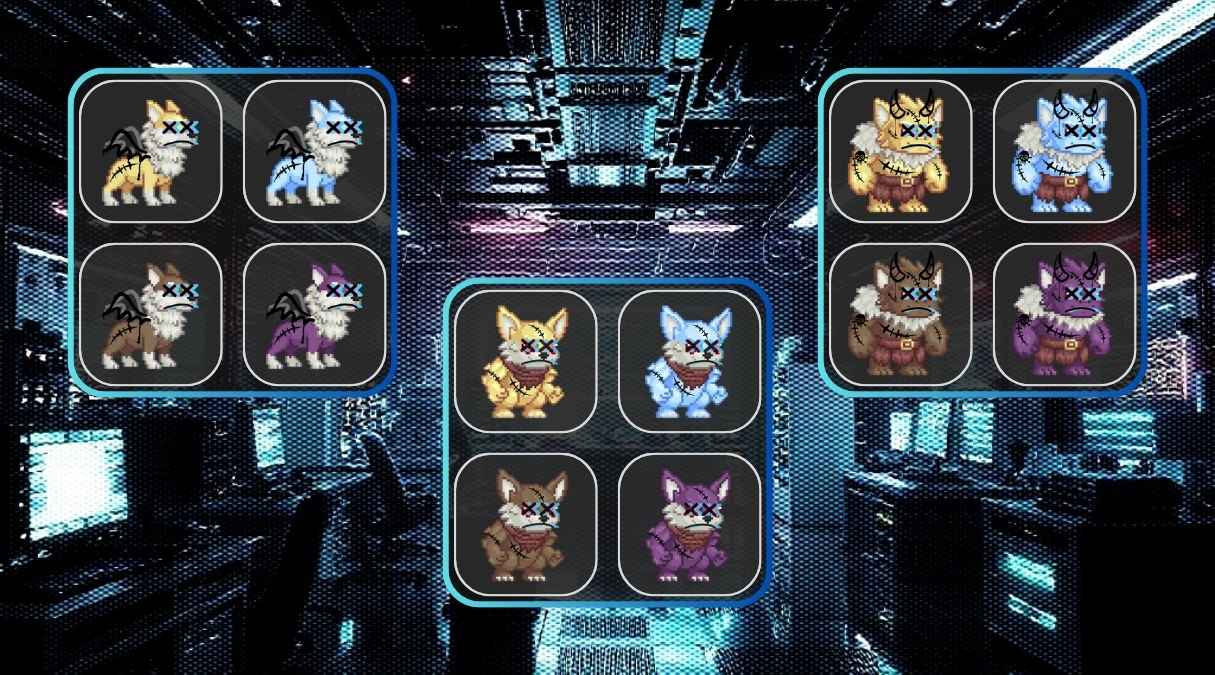
A quick preview sheet I just tossed together for the “Glitch Form” modifications of this pack.

I managed to make the edits I had in mind for the glitch effect/corrupted vibe that I needed for the enemy sprites in Synthverse. The player can “Tame” them by collecting and redeeming “Beast Codex Medals” (name still pending…) obtained from the refining stage of making the glitchy raw data from the Glitch Beasts usable.

I’m a huge fan of your game assets ELV Games!

I’ve already got an idea of how your Pixel Evo Monsters packs can be used in “Synthverse” too!

I’ve already talked it over with my team and we’re going to use the Monsters from this asset pack series (so this pack and the others in this same series that you release) in the combat and taming systems of the game.

We’re going to need to create a slightly altered version of each of the Monsters packs that have the “Pixelated Glitch” effect we’re applying to the “raw materials” icons since the game’s theme is “Reviving society’s ‘lost fun’ via reformatting corrupted Glitch Beast data into ‘fun toys and games’ for society.

Oh and on a side note… I did have a question about your creation process for the cyber themed background texture of the itch product page, the preview video, and the album artwork of this music pack.

I really like how the repeating tiled texture of the background looks and I was wondering what software you use for making those repeating background layer textures?

I personally have professional experience with the following image editing software:

  • Gimp 3
  • Photopea (basically Adobe Photoshop CS6)
  • Canva (Pro tier)
  • Figma (free tier)

Would I be able to use those software I listed to make that style of repeating tiled background? TBH… I don’t have much experience with making repeating background textures since i don’t normally get requests from my clients asking for that type of graphic…

Any tips you’d be willing to share? Maybe a link to your favorite YouTube tutorial video channel on the subject?

(1 edit)

I’ll deffo be using the songs:

  • Kanagawa.wav
  • RGB Dash

in my small commercial side project I’m working on! (actually as I type this comment lolz)

I’ll be using loopable version of “Kanagawa.wav” as the Main BGM and the loopable version of “RGB Dash” as the combat mode BGM.

By the way @Elvgames the name of my side project game is “Synthverse” and these songs are an absolutely PERFECT fit for the game’s world setting and theme! I love the assets you and @Pegonthetrack make and you can be 100% sure that I’ll be 1 of your TOP 5 avid customers for life!❤️

There’s an RPG Maker MZ plugin and build workflow here that supports IAP via Google Play Store payment method.

Here’s the link to the guide: HackMD MZ Android Deployment Guide

But yeah, there’s not really a good way to implement an “add IAP support” option in this tool since it would require some pretty advanced custom configuration for Capacitor that you would need to implement yourself custom tailored to your project.

The types of app specific config info needed:

  • Google Play Store AppID
  • The IAP “product package” info from the Google Play Store Developer Console related to your game/app.
  • a bunch of other configuration related to the Supported Payment Methods that you want to support.

So yeah, that’s not something that can be added to a tool like this without some serious technical knowledge, on the user’s end, of how Capacitor works. If you want to add IAP support to your game, then I suggest you go ahead and create your own custom Capacitor build workflow from scratch that’s custom tailored to meet your unique requirements.

(1 edit)

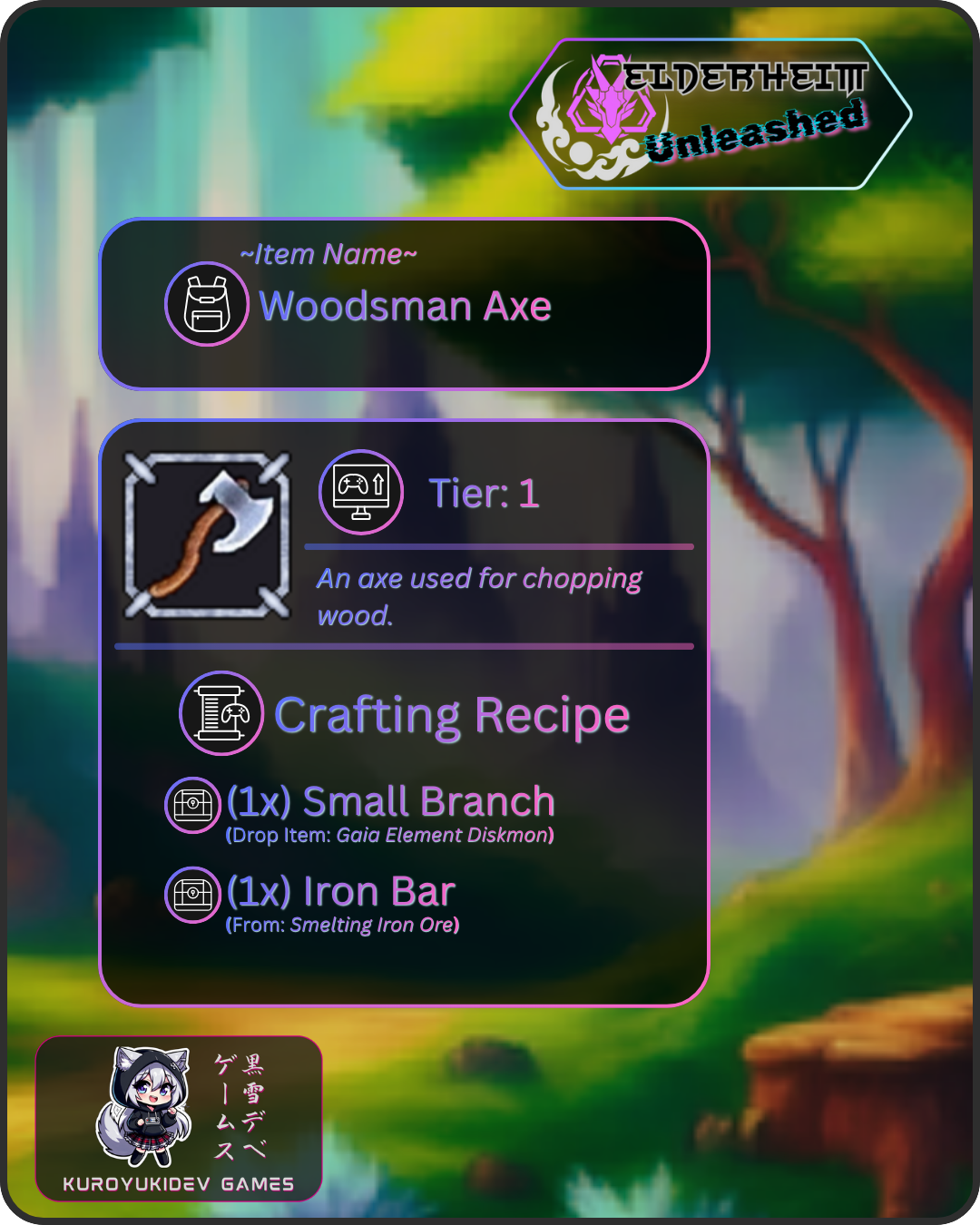
Here’s the preview image I promised you!

Note the usage of your bordered panel asset as the base layer of the Axe Icon. I’ll be using a total 4 different colors of your border assets for the 4 tiers of the items and equipment and a few other colored border assets for the “unique purpose” items in my game project (from the same pack as the silver colored border in this preview image for the 4 tier colored borders and I’m still deciding on which of your other borders I’ll use for stuff like quest items, etc.)

these borders will look great as the background layer of the icons in my game!

I’m currently looking for icon border type graphical assets to finish putting together the icons for my game project.

Here’s how I plan to use them:

  • I want to use specific colors for the borders of item/gear icons to indicate their Tier/Rarity/etc.

Your border and panels packs are the perfect types of assets for my goal. I’ll post a preview of 1 of the item icons as a PNG file as a reply to this as soon as I finish one of them. (Don’t worry, I’m not going to “redistribute” it. I have a Preview Image template in Canva Pro that I use create preview images that I post in progress report posts. It has Info Text captions in the template for each image asset in the post.)

(1 edit)

technically… yes. it does “support” IAP features available within the Android OS via the Capacitor CLI build framework’s support for Android OS related features.

that said, this tool only provides a easy-to-use “single-click-esque” automation of the build tasks and doesn’t actually have any involvement with or control over the actual in-game/in-app features of the game/app since it just gives a GUI (Graphical User Interface) to a process that would normally be done via Command Line.

if you want to use IAP features in your RPG Maker games, you’ll need to handle that with a plugin specific to the game engine you’re using.

there are a couple things missing/broken from this tool:

  • The APK file doesn’t currently use the optional custom icon png file passed into the builder tool.

  • The deployed game seems to have the orientation configured to rotate based on what the device’s detection sensor identifies instead of enforcing landscape orientation for RPG Maker MV/MZ games.

Possible solutions:

  • Since the builder tool uses Capacitor, you can setup a feature in the builder tool to set the orientation rule and to set the app’s icon via the CLI tools being run in the background.

  • For the icon issue, I’d suggest double checking whether the icon file is being copied over to the temp folder or where ever you’re storing the temporary build files during the build process. It kinda feels like the default Capacitor app icon file isn’t being replaced with the custom icon so the builder ends up using the default Capacitor project icon instead.

  • For the orientation issue, adding a simple dropdown option in the builder tool’s UI that uses enums/constants for setting the specified orientation rule for the app that would then trigger the setting/updating of the orientation config value in the Capacitor config dynamically.

Hope this helps Kagura! I love this tool btw and I plan to use it from now on for the Android port of my games and NW.js Web Apps. It saves me a TON of time since I won’t need to take the time to configure a new Capacitor build environment for every app I’m building.

(1 edit)

just wanted to make sure I’m using this tool correctly… which of the “Stat Table” values would we input into RPG Maker MZ for character stats? I’m trying to make sense of the meaning of the definition descriptions for the 2 tables in the “Help” section but I’m still having a hard time knowing the difference between the 2 stat tables and their displayed stat values’ usage/purpose…

is there a tutorial video for this tool on youtube by chance? that would be very helpful since I’m more of a visual + hands-on learner and I’d really like to follow along with a tutorial video to learn the tool faster. 😅

(1 edit)

Never mind the above comment from me… I wasn’t aware that pegonthetrack is actually an outsourced partner and NOT actually a direct member of the ELV Games team so naturally their music packs would have a different system than any game assets made in-house at ELV Games.

I sent ELV Games an email asking about this and I got a reply explaining it pretty well. Thanks for clarifying the situation to me via email ELV Games!

(and sorry if that above comment seemed rude… that deffo wasn’t my intention… I usually just sound annoyed but I assure you it’s not “annoyance” but instead just my rather blunt sounding nearly non-existent communication skills lolz… I am working on that btw… just takes a long time for me to change old habits lolz!)

what about if we purchased the actual “Mega Music Bundle” from the bundle sale and not from the product page?

will we get the updates for free as actual “updates” since we bought what would be understood as an “Access Pass” which would imply it is a single time payment?

Sorry… I think this whole thing of opening up the page on certain days is actually a very bad idea since it really does feel like we are getting scammed since if we bought the All Access Assets bundle then it makes no sense given the wording of that bundle being literally “All Access” and that the bundle says we get “all assets released by ELV Games”… yeah that means these music packs should also be added to that automatically given the way you worded that…

btw, I did buy the All Access Assets Bundle so that’s why I’m wondering why I had to buy this as well given this is a bundle of asset packs released by your team… wording does matter.

(3 edits)

I’d like to use single frame PNG renders of some of the angelic and demonic monsters as scaled down wall graffiti tiles in my RPG Maker MZ maps. Can you tell me how to scale the character images down to about 144x144px without destroying the amazing quality of your art? I figured I’d ask the actual artist for tips on scaling down the size of their characters… basically I’d need to know how to scale the bigger character images down to be 96px (2 tiles).

EDIT

I just found a quick YouTube Tutorial that shows how to solve this question, so I’m good now!

Here’s the link to the YouTube Tutorial if anyone else is curious about how to do this like I was.

Click to See YouTube Video

Or Watch it in this Embed Player…

Glad I can help NovaStarEquinox!

Fun fact: This is actually the original final version of the website that was made public when the original devs made the announcement that the website was going to shutdown due to their team lacking the required funds to keep the website alive.

All I did was use my web dev skills to transform the online web-based tool into an offline app for computers using the ElectronJS build tools while also modifying the original web app’s “wrapper” and features so it can run without internet access as a standalone desktop app.

Sadly, since I don’t have a MacOS computer or an active Apple Developer’s license I cannot create a version of this app for MacOS…. (and given my hatred for how Apple’s top brass act and their business models… I likely won’t ever reactivate my Apple Developer’s license or buy another Apple device again unless their entire top brass gets completely removed from the company… but it’s best not to bring the topic of Apple’s administration personnel up with me since I can’t stand them and will likely get rather… toxic… about them…)

The Linux build is actually a test build and I don’t know if it’ll actually work since I don’t use Linux (outside of the Linux Subsystem on Windows 11 since I greatly prefer using the Linux CLI over the Windows CMD.exe commands whenever possible…) so I should mention that the only platform I know will work is the Windows build.

If anything stops working then please let me know ASAP and I’ll look into it. That said, I have a pretty full plate of projects I’m working on so it might take a bit before I can get a fix made and released… but I’ll do my best to make it at least 1 of my “top 10” priority tasks. (meaning it’ll be an active task not a “whenever I find the time” kinda task.)

(1 edit)

I’m seriously thinking about using the blue, green and red walking sprites to serve as the “enemy on map sprites” that wander around in set areas in my game and interacting with them triggers a randomized battle against a set of possible enemies of the elemental type the walking sprite is indicating. Although the battle system is still a work in progress in my game project… I am close to having it ready for implementation tho.

Oh before I forget, I did buy your mega bundle and I was just looking thru the smaller items included in the bundle and this caught my eye. I mainly bought the mega bundle for commercial usage of the tileset packs but I deffo didn’t want to miss out on the rest as a nice bonus during a sale.

I saw this devlog in my feed and I was curious about what this “EasyRPG” thing was…

yeah… I don’t think I’ll be implementing that tool into my own game dev workflow… it would be a good idea if my games were actually FREE but my games are commercial indie game dev projects that won’t be FREE unless the person downloading it from our site has a special access link or a special coupon code issued by our studio for some reason…

Tbh… the only people who would likely have a FREE copy of our games are our playtester team’s crew members and that would be due to the FREE copy of the game upon release is part of their rewards for helping us with finding bugs in the game before it gets released.

Anywhoozlebee… glad to see a fellow game dev studio putting in the effort to support platforms their community requested! That’s a great sign!

I finished making my own Canva Template for Box Art style product images.

I’m working on making the product images for my own products here on itch right now.

Might take a little bit before I finish all of them since I’m still working on my commercial video game project while I’m making these new product images… but I’ll slowly but surely be replacing/adding the product images for my products!😁

Just wanted to respond to your msg here before I forgot @2Plaer

(1 edit)

I’m about to play this first time! Looks super awesome from the Trailer Video you have on YouTube!

I’ll deffo be sure to give this a complete playthrough along with a review/rating!🎶

Oh and I did have 1 quick question about this game… my game dev curiosity got activated when I saw the trailer video lolz!😅

Here’s the question: What game engine did you use to make this game?

The reason I ask is… while the tilemap style feels like parallax mapping using RPG Maker MV or MZ, the UI designs deffo aren’t “RPG Maker esque”.

If I know what game engine it was made in or that you prefer to use, I might be able to give suggestions for some of the more “niche” types of features that could make the gaming experience for any of your future game projects. Features like gamepad vibration or the Discord SDK integrations.

Well anywho… I’ll have more of an idea what kinda suggestions (if any) would be fun “extras” once I play this game!😁 Just fired up the game now btw and I’ll be playing all day today. Looking forward to playing!

if the game is just on-hold due to other projects… could you please switch the game listing’s status to the “on-hold” status instead of leading us on with it sitting there still on “in development” status?

its been more than 2 years since the last update… if you aren’t going to get back to it… then just switch the game listing’s status to “abandoned” please…

Well I personally don’t use Photoshop for these types of graphics… I use the paid tier of Canva which is Canva Pro… Sorry, but there isn’t any option to export a Canva Design as a PSD file…

Also, I wouldn’t be using a template to make these Box Art images… well… not someone else’s template at least… I will likely end up making a custom template Design in Canva and just duplicate the template Design and rename the duplicate and then start editing that…

That said, I might actually create a couple YouTube Tutorial Videos for how to make a game Box Art image for itch product pages sometime this week since this seems to be something people might want a tutorial for…

If I do end up making a tutorial video for this ^^ I’ll share the link here if that’s OK with the owner of this page…

NOTE TO THE DEV: I’ll wait until YOU give the OK before I share the link to such a tutorial video here. I don’t wanna step on you toes with that…

I know right? I’m thinking about re-making some of my own itch product images for my Games/Game Assets with this Box Art style just for funzies! This game’s Box Art image looks epic! really makes you just wanna try the game out with how well it grabs your attention!

I might just re-make some of my other game asset product images that I don’t want/need to replace (since they’re doing just fine in terms of sales) and I’ll just post the re-modeled product images onto my Instagram for fun… but some of the products I have on itch don’t have a product image (yet…) so I’ll make those while I’m at it…

Well I know what I’ll be doing this week now lolz! This will be fun!

(2 edits)

Game Engine Used:

Pokemon Essentials (needed for Pokemon Assets):

An important thing to note tho…

Technically (and legally) speaking, making fanmade Pokemon games is "illegal" according to Nintendo's way of thinking... despite the clear facts that making AND selling a fanmade manga (known as a doujinshi) based on "existing works" you don't own is considered to be completely OK legally speaking in Japan... Nintendo just has that lawsuit trigger happy stick waaaay too far up their asses to think about it logically and reasonably....

SO MAKE SURE YOU PROCEED WITH CAUTION IF YOU CHOOSE TO MAKE A FANMADE POKEMON GAME SINCE NINTENDO IS RUN BY A BUNCH OF CROTCHETY OLD GEEZERS WHO ABSOLUTELY HAVE NO UNDERSTANDING OF HOW FANMADE GAMES CAN IN FACT BE BENEFICIAL FOR BOOSTING SALES FOR THEIR OWN GAMES IF THEY JUST LEFT US INDIE GAME DEVS THE HELL ALONE....

P.S.

If you couldn’t tell, I’m deffo NOT an indie dev who is afraid of Nintendo’s legal team since I do understand the rules/laws behind Copyright, Trademark and Patent infringement and just how far a company is actually allowed by international corporate law and regulations to target these types of fanmade game/media products… Nintendo will be facing quite a bit of backlash in this arena thanks to their most recent (and still ongoing) battle against Palworld… This legal battle has started to open the eyes to this type of corporate abuse of power via Patents and the legal systems worldwide will deffo be seeing many “adjustments” to prevent corporations from overstepping the limits of how far they can interfere with other companies via patents… these limits already existed but they were never really “clearly defined” but that is deffo going to be changing over the next couple/few years ahead thats for sure….

no effort into the art just because they use AI? clearly you aren’t aware of the latest job market for AI Prompt Engineers who can control how an AI generates the final results by writing their prompts with the correct keywords… the people who say junk like “oh its AI. it isn’t art.” or stuff like “AI art is plagiarism.” or “it lacks originality.” well…. you clearly don’t know what YOU are talking about…

1st off… EVERY artist and EVERY game and EVERY film and EVERY song created in this current era is absolutely devoid of anything truly “original” since they’re created using the same methods as any instance of the same medium that came before it. If you draw a person, you include the same body parts as all other artists who ever drew a person before you in the same exact structural arrangements as every other artist before you.

The only difference between using AI to create a drawing and drawing by hand is the amount of time it takes to finish the piece. The AI does exactly the same process as a Human Artist would but fully automated and it does require Human Input to know WHAT to draw hence why you cannot say “no effort is required” since you as the AI user MUST know what you want the AI to create and then design the AI prompt to guide the AI towards the desired results.

You say its a “Lie of omission” do you? Are you saying its against the law to use AI in the process of creating art even when you don’t train the AI on art that is forbidden to be used for that purpose? Did you know that the reputable AI Art generators are ONLY trained on art that the artists have given the OK to do so? You can submit your art to a global database of art that is forbidden to train AI on and any art in that database is then protected and any public AI art generator tools (like Leonardo.ai) found using those art pieces for AI training are required by law to remove them from their trained AI models.

anywho… I apologize for unloading like that… but as a software engineer, game dev and an AI user myself, I absolutely hate it when people make comments like yours @nyny69 and @nolongeradude about AI when you clearly know nothing about it. Lack of understanding is no excuse for making ignorant statements publicly like that…

I’m deffo playing this starting today!

just 1 important suggestion for you tho….

you might want to revise the part in your page’s text where you state that the ownership of Pokemon is owned by [company names] and add that no “Trademark Infringement” and no “Patent Infringement” intended too since Patent Infringement is actually what Nintendo uses to target “pokemon-like” games with lawsuits…. Copyright Infringement is different and they can’t take you to court over that (as seen with the recent Palworld vs Nintendo drama….) that said since this is basically just a fanmade Pokemon game…. they MIGHT be able to take you to court over copyright claims too….

that said I’m no legal expert but I deffo don’t want to see this game get suckerpunched by big bad evil Nintendo’s legal team…. us indie game devs gotta stand and fight together ya know!

Gotta Fight on and Game even harder!!

Based on that error I can definitely say for sure you’re using RMMV since the community lighting plugin hasn’t been ported to MZ.

Just a suggestion but… I’d actually recommend not suggesting AopAop for playing on android and instead suggest using JoiPlay since it’s more stable.

Hope its OK if I make a series of custom RPG Maker MZ tileset sheets from the tilesets I’ve bought as a part of your “Game Assets Mega Bundle” pack. The custom tileset sheets will only be for use in my game so I’m deffo planning to follow your ToS. I just wanted to follow the rule in your ToS that says to state that I’m going to do so… tho this probly isn’t where you meant for that to be mentioned… oh well… this reply also serves a double purpose anyhow… I wanted to also tell you that I’m planning on sending you a free copy of my game when I finish and release it. I think you’ll be pleased with how i’m using your tilesets in the map designs! Also, I was wondering if you have a Discord server or some place where your customers/fans can post WIP screenshots of their map designs that use your tilesets? I didn’t see that option in your list of social media icon links so I figured I’d ask…

(1 edit)

where are the wooden floor RM A2 floor tiles from the screenshots? I only see carpeted floor tiles and grass floor tiles in the A2 tilesets… Grass doesn’t tend to belong in interior tilesets tho….

(2 edits)

@dabomberhawk

well technically… yes and no…

Yes: Because the game is made in RPG Maker MV and there is a (most likely discontinued at this point) emulator app for Android that allows you to play RPG Maker MV & MZ games made for Windows PC on your Android device. Its called “JoiPlay” and it was recently taken off the Google Play store by its devs and I’m pretty sure they’re now distributing the app on their official website (if at all anymore) as an Android APK file.

No: Pinky already said on their Discord server and on the previous builds’ comments that it won’t have Android support but more than that, EXE files aren’t designed to run on Android devices… best option at the moment, try and find the JoiPlay RPG Maker game emulator app I mentioned in the “Yes” section above this “No” section. That’s assuming the JoiPlay app’s devs are still making it available for download via their official website…

I was looking for your discord invite link on all your product pages but couldnt find it. can you post a discord invite link somewhere I can find it? I’d be glad to tell ya more about my game project.

Btw, I just downloaded the v0.5 build and I’m about to play it now. from the screenshots it looks like you made some nice UI improvements in the Hentaimon + Player XXX clips UI as well as others. I did notice some other players in the comments asking about the XXX clip visuals player UI being improved. glad to know you’re taking your players’ requests into consideration! not many indie devs these days do that which is sad. as indie devs, our players are great sources of inspiration for creativity!

Some minor clarification about the part of that ^^ where I said I was doing something similar in my own game project…

The skills in my game are added to the player’s skills a bit differently in that they get upgraded in a different manner. It’s kinda hard to explain in a TL;DR length summary tho… but I didn’t want to give the wrong idea like I was copying your game since it’s only similar and not implemented in the same way.

Anywho, I’m gonna get back to playing Hentaimon now! 😁 I’m enjoying the game so far and I look forward to seeing it get finished and fully released! I’m deffo going to keep playing it!

I was looking thru the listings of Adult rated Pokemon-like games here on itch and I stumbled into this epic little beauty of a gem!

Loving the way you used the captured monsters in this game! It’s pretty hilarious to know another fellow game dev out there in the indie game dev community had a similar idea to what I was working on in RPG Maker MZ! Great minds think alike! 😉 The biggest difference between Hentaimon and the game I’m making is the world progression in my game is more along the lines of “beat the floor boss, unlock access to the next floor’s unique catchable monsters and resources”. I deffo like the way you incorporate the Hentaimon skills into your area progression! Very nice world design touch there!

This is an awesome tileset pack! I’m deffo using this in the commercial game project I’m working on right now! The art style perfectly matches the art style of current tilesets I’m using so it’ll mesh into the area maps in my game no problem! Keep up the great work! I look forward to seeing (and likely using) more of your tilesets!

(4 edits)

Heyo @shubibubi Your tilesets are exactly what I needed for the commercial game project I’m working on! I bought the Full Version of your asset pack so I can use it in a commercial project. I’ll be sure to post a couple screenshots of your tilesets in-game here from WIP area maps that are “ready enough” for social media posts! Keep up the great work! I’ll likely be using your tilesets for this current project’s future content updates as well!

~ Kurochan

Official Website

Wait… Windows 7 is still working??? Microsoft terminated support for Win7 ages ago tho…. and it is starting to look like they’re trying to push Windows 10 users over to Windows 11 now…

Just a thought, but you might want to upgrade to at least Win10 since there are hardly any modern software(s) out there that still support Windows 7/8 any more…

a follow-up on this @pixerelia, I managed to get some new (and pretty steady) sources of funding setup so I’ll deffo be buying more of your icons for my game/app/website projects since I’m a huge fan of your art style! I’m keeping an eye out for icon packs you publish that will fit my current design tasks and I’ll be sure to buy said icons whenever I see a pack that is related to the project I’m on. at the moment I’m good on icons but I’ll probly need something related to weapons/armor or special currencies in the near future.

(1 edit)

actually I did. I paid for this asset. that was a long ways back… 247 days ago to be specific… paid $2.00 USD according to my payment records. please don’t make rude comments like that… not very cool to do that to a complete stranger…

wow! these game icon assets you’ve made are amazing! they’re all the correct art style for the Mobile RPG I’m making right now too. I’ll def be sending you a link to the game once I release the Pre-release Early-Access version to the Google Play Store for sure since I’ll most definitely be using your pixel art icons in my game project. the name of my game project is “Mystic Artificer” and to start out, it’ll only be available for Android phones (not tablets…) but I do have plans to port it to Windows PC shortly after it hits the Google Play Store as its Fully Released version.

as for these Fantasy Eggs icons, I have plans for using them in the “Familiars” system I’m currently in the middle of programming (at this very moment I have the code open in Godot Engine on 1 of my other monitors lolz) and the player has a chance of finding a “Monster Egg” as a monster drop and they’ll hatch into a baby form of a Familiar. (Think Monster Rancher type games combined with Pokemon battle and Level up/Evolution systems)

I just gotta say… these Item Borders look totally EPIC yo! I’m def going to use these in my current game project (I’m using Godot for this project btw) and since I just made some streaming revenue from my Spotify Artist Royalties earlier this month, I’ll be sure to drop ya at least a few bucks tip to help you feel motivated to keep up the great work! (grins) I’m def following your itch profile and I’ll most likely keep coming back to your game art packs from now on!

Unfortunately I do not use any Linux distros at the moment… so the Linux build is more of an experimental build and I can’t actually test it out myself… this offline app is currently only getting 100% support for windows 10 and newer.