On Sale: GamesAssetsToolsTabletopComics
Indie game storeFree gamesFun gamesHorror games
Game developmentAssetsComics
SalesBundles
Jobs
TagsGame Engines

juseyo

23
Posts
2
Topics
2
Followers
2
Following
A member registered Jul 09, 2024

Recent community posts

So to answer myself, I just found out the developer already included that feature in 0.7  馃

Somehow I completely missed that "mod" folder already included 馃珷

level_up_increase_lock_timer.mod.tscn does almost exactly that, it adds time to the lock if you're running a collection that levels up. 

Looks fantastic, can't wait for this!

Or before locking Hotscreen x amount of time,  you'd be able to configure an "amount of time added to the lock"  for when a body part is detected. +2min for boobs, +4 for ass, -1 for dicks, etc

Gooner's gotta goon lol

Guys, it's coming soon™,  PerfectFox  is probably polishing the hell out of the new version, fixing the last few kinks, the new version will be well worth the wait :)

Hi, where you able to make a purchase through patreon @SamyFemb? If not, let me know, I'll help you

Where you able to make a purchase through patreon @zzswm?

That'd be huge. Just thinking about it, the possibilities... oof! I want it now :p

(1 edit)

I tried to do that  but it won't work without an offset, which is not possible right now .

Have you tried the Gooning example collection? You could obscure your whole screen and only show bodies.

Thanks, all good advice. I should have included a link to the config file. I also know about the other forum. My goal here was to show some simple effects, how to do them and first of all, I just wanted to post screenshots to show new people here how easy it is to make.

The other forum right now lacks image content ^^ and last time it had A LOT of spam compared to the number of legit posts.

But you're absolutely right, we should go post configs over there, especially bigger one. 

Might use this post as a image dump of interesting effects tho :p

(1 edit)

Censor Box

Make a censor pixel box with a colored border. 
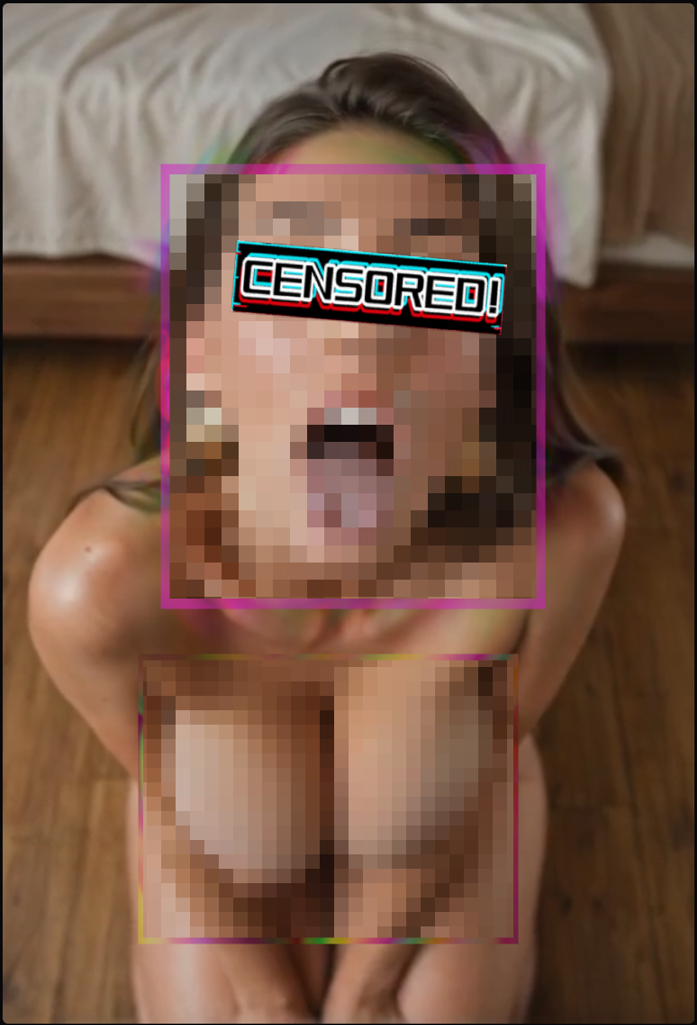
(The "censored!" image on the eyes are not part of it, sorry, didn't notice it when i took the screenshot, but easy to add if you desire so)
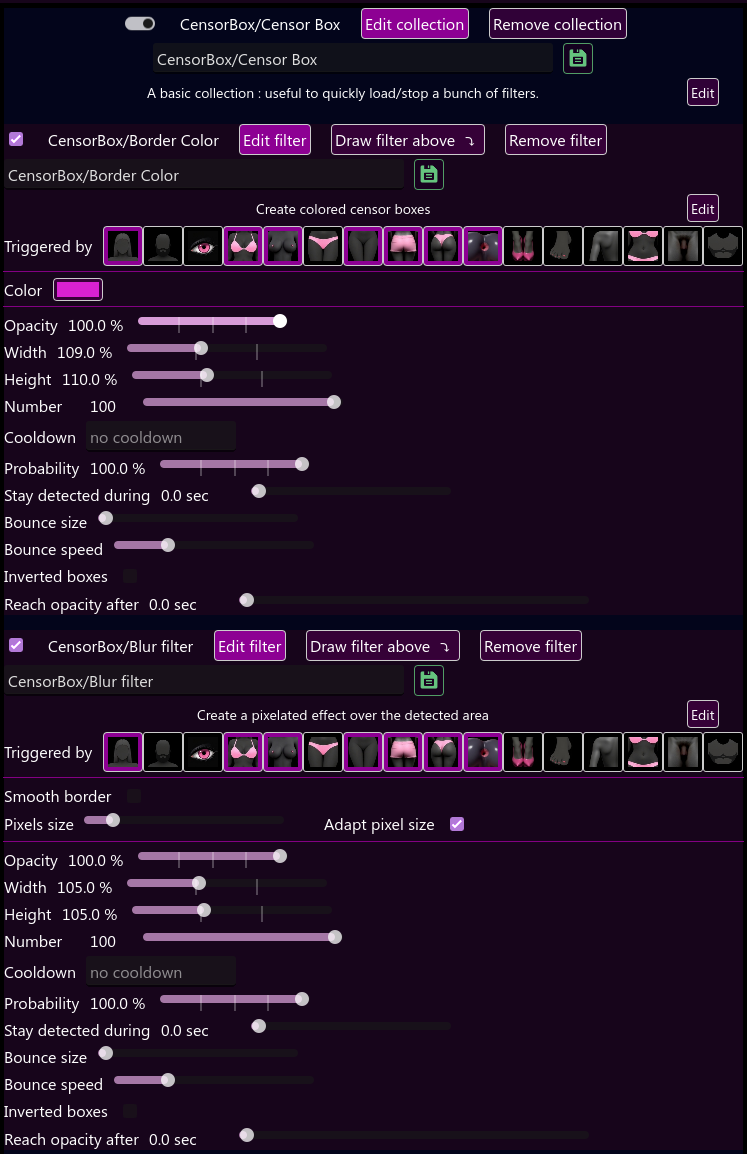


What's important here is

  • Pick the exact same body triggers on both filters
  • width/height, it as to be slightly larger on the border color filter than the blur filter. 

Everything else doesn't matter much, feel free to experiment. Colors and opacity are also up to you.

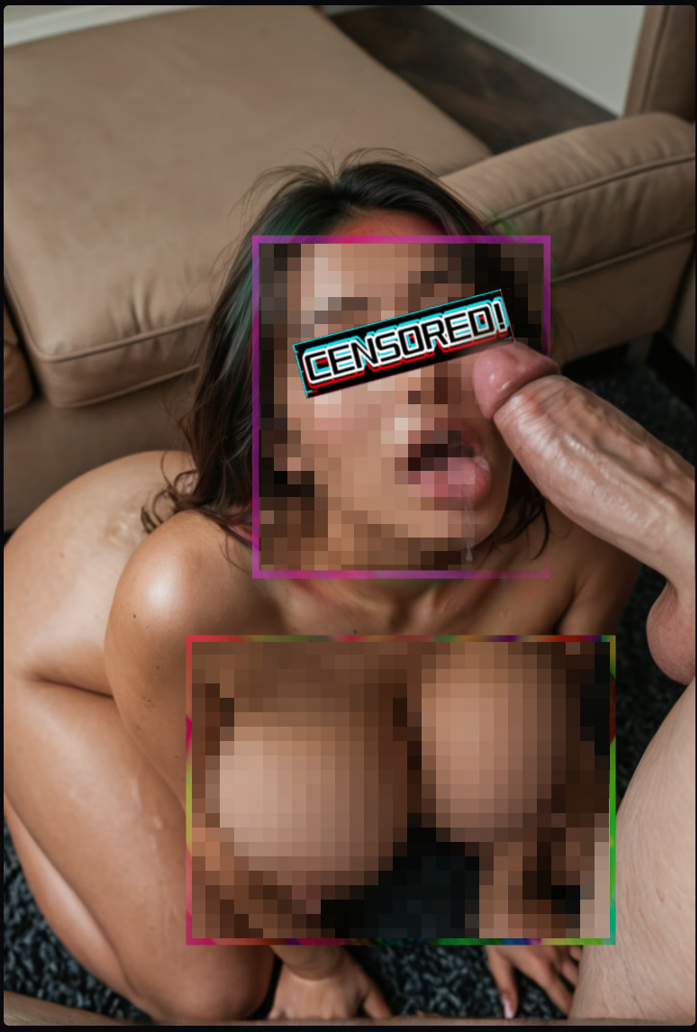
Next one is with a glitch border, ratatat image over the eyes again and "always display screen" on the dick:
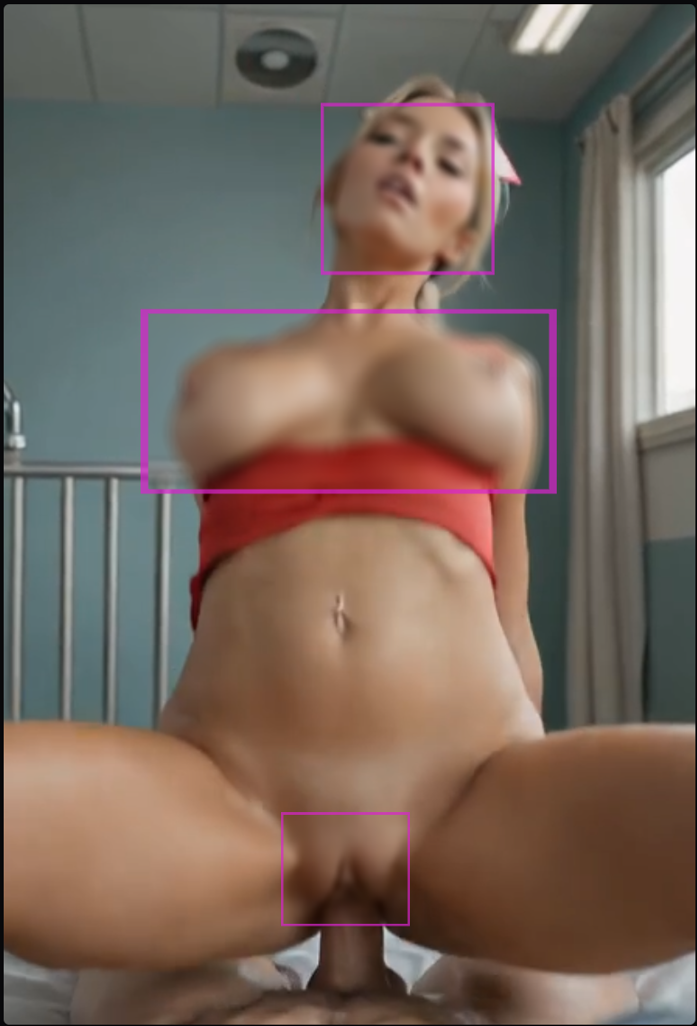
Blur effect instead of pixels:

(2 edits)

Feel free to share your beta effects in this topic everyone <3

Focus on parts of the body, blur everything else

This effect will blur everything except for the body , INCLUDING the GUI and Hotscreen menu window. So, when using it, either try it on a second screen, or be careful, put the window of one side of the screen and know where your disable tick boxes are ;)

Alternatively, instead of blurring, you can use any other effect, like the pixel censor one.


Add a collection > New collection

(1) Add a filter > Censor > Color
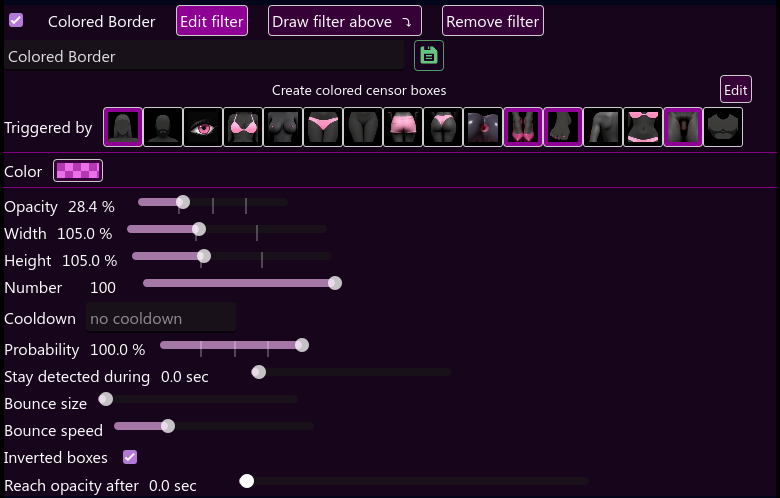
  • Pick the body trigger you want.
  • Opacity to around 20-30% is goon imo, or else you'll have too much color bleeding on the side of your screen.
  • Width and Height should be around 5% less than the blur filter, which by default is at 110%
  • Enable Inverted box

Pick the color you like and use around 50% alpha, you can try a few different values until you found what you like:
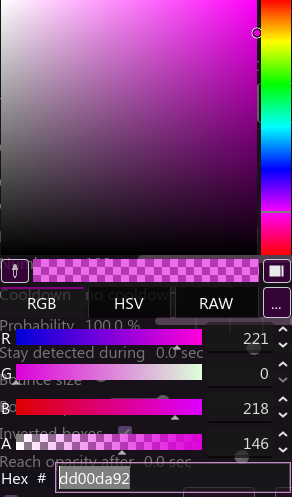

-----

(2)  Add the second filter below the first one : Add a filter > Censor > Blur filter 

  • Pick the same body triggers as last filter
  • Enabled Smooth border. that'll make the color bleed on the screen borders, but it'll limit the blur effect and at least you can read through the filter. Try it with this option check and uncheck and see what you like.
  • Set Blur strength as you like and enabling Adapt  blur size is optional
  • Full Opacity
  • Width and Height 5% higher than the previous filter
  • Enable Inverted box

Enjoy :)


Same config but with the pixel filter:

(1 edit)

Used it for 10+ hours straight no problem, autostart on boot and password locked. After unlocking I played with a few params and while i was moving some screenshots for another post here I noticed Hotscreen wasn't opened anymore. So, it happened while the Hotscreen menu was not focused. No idea why.

Hotscreen using profile : 0
  
Hotscreen Overlay starting at Max FPS : 170
Translations added from ./custom_ressources/translations.csv —  languages : ["en", "zh", "es", "fr", "ar", "ru", "pt", "ko", "ja", "de"]
Using saved language code : en
Windows version : Microsoft Windows NT 10.0.26100.0
CPU : AMD Ryzen 5 7600X 6-Core Processor, Cores : 6, Threads : 12, Max clock : 4701 MHz
Using video adapter : NVIDIA GeForce RTX 4060 from NVIDIA type DiscreteGpu
Driver infos : d3d12 version 12_0 api 12_0
Adapter 0 NVIDIA GeForce RTX 4060
Screen Rect 0 : Rect { X = 0, Y = 0, Width = 2560, Height = 1440, Top  = 0, Bottom = 1440, Left = 0, Right = 2560, Location = Point { X = 0, Y  = 0 }, Size = Size { Width = 2560, Height = 1440 }, TopLeft = Point { X  = 0, Y = 0 }, BottomRight = Point { X = 2560, Y = 1440 } } Orientation :  1
Screen Rect 1 : Rect { X = -1920, Y = 0, Width = 1920, Height = 1080,  Top = 0, Bottom = 1080, Left = -1920, Right = 0, Location = Point { X =  -1920, Y = 0 }, Size = Size { Width = 1920, Height = 1080 }, TopLeft =  Point { X = -1920, Y = 0 }, BottomRight = Point { X = 0, Y = 1080 } }  Orientation : 1
Adapter 1 AMD Radeon(TM) Graphics
Adapter 2 Microsoft Basic Render Driver
Starting Screen Recorder
DXGI initiated with a resolution of 1920 x 1080
DXGI using Video card 0 and monitor 1
Max FPS Record start at 170
Hotscreen version : Windows - Full version - v0.6
Max FPS of Overlay set to 170
Frame Latency of screen set to 1
MaxFPSRecord at 170
Avx is supported.
Detection starting using model : ./models/hs-real-y11n-640-fp16.onnx
Detection starting using eye model : ./models/eyes-detection-01.onnx
Detection starting using device : 0
Max FPS Detection start at 170
Use double Detection start at True
Update time of eyes detection start at 0.1
Setting MaxFPSDetection at 170
Error during DXGI capture : HRESULT: [0x887A0026], Module:  [SharpDX.DXGI], ApiCode: [DXGI_ERROR_ACCESS_LOST/AccessLost], Message:  The keyed mutex was abandoned.
Recording is too slow. Stopping screen latency.
DXGI initiated with a resolution of 1920 x 1080
DXGI using Video card 0 and monitor 1
Error during DXGI capture : HRESULT: [0x887A0026], Module:  [SharpDX.DXGI], ApiCode: [DXGI_ERROR_ACCESS_LOST/AccessLost], Message:  The keyed mutex was abandoned.
Failure of DuplicateOutput : 0x80070005 (HRESULT: [0x80070005],  Module: [General], ApiCode: [E_ACCESSDENIED/General access denied  error], Message: Access is denied.
)
Retrying Desktop Duplication number 1
DXGI initiated with a resolution of 1920 x 1080
DXGI using Video card 0 and monitor 1
Error during DXGI capture : HRESULT: [0x887A0026], Module:  [SharpDX.DXGI], ApiCode: [DXGI_ERROR_ACCESS_LOST/AccessLost], Message:  The keyed mutex was abandoned.
DXGI initiated with a resolution of 1920 x 1080
DXGI using Video card 0 and monitor 1
Setting usePreciseEyesDetection at 1
Setting usePreciseEyesDetection at 0
Closing...
Screen recorder thread ends correctly.

Hi! Try the "Safe for beta" or "S4B" collection included in 0.6. It's not really a game per say, but the more you watch girls, the stronger the effects will be with on each level. This example is based on his previous game, but you can also look at how it's configured and make you own with the new Levels Collection feature.

Yup. I have 2 screens and always experiment with Hotscreen's menu on the second screen, otherwise I'd have been fucked a few times ^^ Inverted boxes are fun tho once you've found the sweet spot.

No idea how feasible it is to not draw effects over Hotscreen's menu or just have it on top of everything else.

It never got that bad for me, but I did experience lower frame rate when I was using video filters on a lot of body part (like A LOT of videos playing at the same time). My screen resolution is lower too, at 1440p, compared to  your 3840 x 2160.  Do you know what filters you were using?

(7 edits)

Today I'll just list a 4 interesting ideas (2 of them are very similar) I got since last time, and that could easily be implemented without much effort (I think. Maybe I'm wrong :s).

I would still categorize them as not important features.


Progress increment based on body parts

For Levels Collection, make progress increment based on which parts of the body are being displayed.

Example:

face give you +0.5

covered breast give you +1

naked parts give you +5


Random words / Kinky sentences game

Based on https://itch.io/t/5231094/better-access-to-findom-currency-and-beta-modes-points after thinking about an easy implementation. 

Imagine a popup with a sentence made of randomized words and a textbox where you have to write that exact sentence. Length should be customizable.

Instead of random words, you could have a random list of user made sentences.

This could be used to reward the user with a currency to be used in findom. Could also be used as an alternative to the password when you lock the app.


Reward points

The user gets points for time spent away from selected body parts. Or the opposite, gets rewards for watching selected body parts. Those points could then be used to lock/unlock filters, or as a currency for unlocking new tiers in the findom game, or restarting from a clean state in a gooner game (more on that at the end of the post).

It would also only counts down the time if there's been mouse movement in the last 3 minutes for example, in case the user gets up and leaves the computer.

The points could be used x times per day or week and maybe rewarded points would be reset every 24h, not sure...

Example: you would stay away from "blocked content" for 3 hours, gaining points during that time. Those points could then be used when you choose so to unlock censorship for x amount of time depending on how many points you got (let's say 10 minutes here), with a countdown ticking and your points count going down. That would reward users that use Hotscreen 24/7 with a short time window to freely watch previously "blocked content".

Allowance

Similar to the previous idea, allow a total of x amount of points to use every x days/hours. Refill allowance at <set time>.


Gooner Game Example

Make a Levels Collection.

Level 0 has no filters. I like to be able to use my computer like usual, without effects going crazy. Progress will only be made by looking at certain body parts, say girls face for example.

Level 1 is when the game really starts. Full body and face censorship.

Progressively starts having less censorship, slowly revealing the body. Could have some incentive, like a videos filter showing boobs instead of a covered chest, etc.

Last level. Fully naked body are shown, and gooner screen effects are making you focus on it.

So far, everything I wrote is achievable in 0.6, which is just showing how versatile and powerful Hotscreen already is.

The next part is Reward feature I talked about previously. Every seconds/minutes would reward you with points. Restarting the game (going back to level 0) would require you to watch enough porn to have the necessary amount of points. When you have enough points, a popup would show up every now and then and ask you if you're done and want to restart.


Until next time ;)

Thanks :)

For the customization, that would indeed be very powerful. But I still hope you'll publish new effects / modes that are user-friendly and can be used out of the box.

I'll have a look at the command line too.

Multi Collection don't work in Levels Collection. When a level changes, the corresponding Multi collection is enabled and the previous one is disabled correctly, but the inner collections stay disabled.

Well worth the money imo

Hey, I'm not familiar with writeform.org but having some way to gain some Hotscreen currency by completing tasks or running a program/game on a third-party platform would be awesome. This currency could then be used for the findom collection or the levels collection.

First idea that came to my mind would be an idle/incremental game running in the background. 

An API would solve that for sure but @PerfectFox265 also talked about opening Hotscreen to developers by allowing to load full Godot scenes created by users, which from what I understand would also be very powerful.

In Tools > Unlock after, when you type, the cursor keeps moving to the left. If I want to write 123 minutes for example, it will write 321. I have to reposition the cursor to the right after each number.

Forgot to mention that in my other big post.

Had the same issue. Between clicking the "Select position" button and pressing Enter, did you click somewhere? Try not clicking anywhere when moving your mouse, before pressing Enter. At least that's how I managed to make it work.

I'm loving Hotscreen 0.6 so far and the direction it's taking! Especially the start on windows boot and the levels collection. I've been playing with it for the last 3 days and here's a few ideas I would love to see implemented, in order of importance:

Most Important (I'd really really love to have this ideas implemented) 

  • [feature] Option to start Hotscreen in the Windows System Tray and not have the windows in the taskbar unless the Hotscreen menu is opened. When you close the menu window by clicking the X it goes to the tray. The tray itself should have a quick menu like maybe "Open screen 1 menu", "Open screen 2 menu", "quit" (greyed if Hotscreen is locked)...
  • [feature] When reaching a specific level, add a set amount of time to the "unlock after x minutes" timer in the Tools tab (add a set amount to the current value when reaching a level (should have a cooldown) OR add n amount of time based on time spent on that level; for e.g: every minutes spent on the last level, add 30 more minutes to the lock time). And also be able to lock Hotscreen (with the current set password) when reaching that level.
  • [feature] Add "progression speed" input to each levels in the Levels Collection (maybe keep a global progression speed but add an override for each levels). What I'm trying to make: my first level is an empty collection with a very short timer, just so that it doesn't automatically start censoring stuff and I can do whatever. Then on the next level the censorship kicks in, longer but still quick. Then the next few levels have more heavy filters and should be longer. Last level is a fullscreen lock, so I don't mind about the progress speed, but I'd like to do a quick progression decay.
  • [feature] "draw collection above" and "below" button to reorganize collections, especially in the Level Collection

Important

  • [feature] option for Hotscreen to relaunch itself if the process is killed, without becoming a malware and triggering antivirus. Also restart itself when crashing? (better detection when crashing/having issues)
  • [model training] i don't know if that's even remotely possible, but detection of the exact shape of the body as described in:  https://itch.io/t/5210133/can-videoimage-moderation-be-added-based-on-the-exposu...

Would be nice

  • [feature] Have in the Hotscreen window's title the screen it's censoring (monitor's number/resolution/maybe other infos like screen latency).
  • [feature] Have each Hotscreen menu window save their size and position.
  • [feature] Remove/hide the Hotscreen Overlay windows from the taskbar.
  • [feature] Add an option for Levels Collection to be identical on all screens (same effect, same %, starts on both screen at the same time).
  • [feature] Add an instruction text box (could be the Level Title maybe if it's reworked). Something suggesting my computer is corrupted / I have been hacked / a beta chip was installed and is giving me instructions. Could have a few instructions for each levels and pick randomly, or be based on level progression/time. Instruction completion could be based on event, like some level progression going up or down, or having to click a popup window. Actually, an enhanced popup window could also work... Then you could also modify the font, color, size, etc. TLDR an instruction text box or window based on the current level would be awesome!

Bugfix and other less important stuff

  • [feature] Not sure if possible, but have the Hotscreen menu window be still visible and not affected by its own visual effects (like fullscreen filters)
  • [feature] Transition options: add an option to display video for each level, pick a random sound in a list, pick a random text in a list for the Level Title.
  • [feature] Update the Level Title based on timing or level progression. e.g at 10% display this text, at 50% display that other text, etc... Animation effect when a Level Title changes.
  • [feature] More visual effects for Level Titles (font size and color can be set for each level). Remove the text (or part of it) after x amount of time. 
  • [feature] Add more options for popups. text size, color of the button, maybe an icon. Also an option to automatically close the window after a certain amount of time could be interesting.
  • [feature] Add more option for Level Title text position: text align (left-center-right) and direction (up-down) for new lines.
  • [feature] Change "minutes" to "hours" in the "unlock after x minutes" timer. Or make it configurable.
  • [bugfix] "reach opacity after" does not work on fullscreen filters (inverted box checked) or popup windows
  • [bugfix] Popups sometimes are too small, can't read the text and sometimes the window itself is so small you can't even click the button. It should be able to always display the text and maybe have a minimum size?

Don't delve into this, it's a time waster

  • [feature] Have an AI speak to you (text or voice), monitoring what you're doing and commenting on it, giving you instructions.

So far that's all I've got. Maybe I'll add to it in the next few days.

What do you think people? What feature would you have implemented in the next update?