
Indie game storeFree gamesFun gamesHorror games
Game developmentAssetsComics
SalesBundles
Jobs
TagsGame Engines

Hotscreen

Add very hot effects to your screen. · By PerfectFox265

Mini games mod help

A topic by juseyo created 36 days ago Views: 1,267 Replies: 6
Viewing posts 1 to 6
(+7)

Hi everyone,

I’m working on a mod that would act as a collection of small mini-games. Each mini-game would either add or remove time to the lock and maybe do user-configured actions.

I’m unsure about the best overall structure for this:

  • One idea is to have a central GameManager mod, with each mini-game implemented as its own separate mod. If I go this route, what’s the recommended way for mods to communicate with each other?
  • Alternatively, is it possible to include multiple .tscn scenes within a single mod and manage them from there?

If anyone has a small example or can point me in the right direction for either approach, I’d really appreciate it. Thanks!

PS: I plan to release the mod as soon as possible. Right now I have a dice game working, but I'd like to add more (Wheel of fortune, puzzle, etc)
(+3)

I kind of figure out how to do what I wanted (still need more testing) and that involved actually learning how Godot works (especially parenting between scenes -not sure that's the exact term). So yeah, total godot noob here :p 

(+1)

I'd love to see this become a reality! All the concepts you've talked about sound super fun and would hopefully reinforce gooning even deeper into our edged out minds!

Thanks! I'll definitively share the mod with the community once I'm satisfied  with the result :)

(1 edit) (+1)

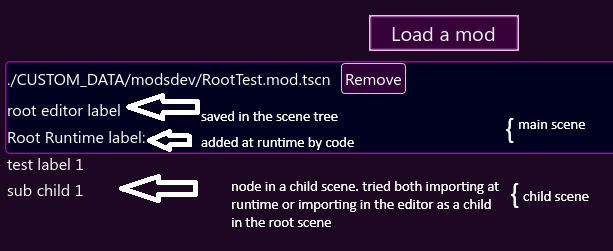
When importing the mod, it kind of works but I ran into another issue... The main/root scene gui is imported correctly but all the child scenes are out of the layout and I can't find a way to fix it.

Here's a screenshot with some comments:

Here's the very basic code:

extends Node
func _ready() -> void:
    # adding label by code
    var mod_label = Label.new()
    mod_label.text = "Root Runtime label:"
    get_meta("ui_node").add_child(mod_label)
    # adding the mod to HS
    var ui_mod_container = get_meta("ui_node")
    var ui_mod_node = $VBoxContainer
    remove_child(ui_mod_node)
    ui_mod_container.add_child(ui_mod_node)

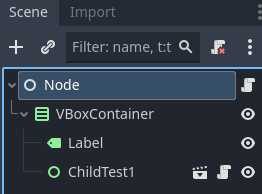
Here's how it's structured:

Is it something that I'm doing wrong or...? Any help's welcome :)


EDIT

I'm also getting this message in the console when importing the mod:

WARNING: res://CUSTOM_DATA/modsdev/RootTest.mod.tscn:3 - ext_resource, invalid UID: uid://db0oem1hjj223 - using text path instead: res://CUSTOM_DATA/modsdev/ChildTest1.tscn
(+1)

A third issue I have is signaling from a child scene output this error in the console:

ERROR: In Object of type 'Control': Attempt to connect nonexistent signal 'signal_from_child' to callable 'Node::_on_child_test_1_signal_from_child'.

That same code works without issue in Godot.

And printing from a child scene also doesn't work...

What am I doing wrong?

Developer(+2)

Your ChildTest1 scene is stored in another .tscn file (ChildTest1.tscn) than RootTest.mod.tscn. This means that RootTest will try to load  res://CUSTOM_DATA/modsdev/ChildTest1.tscn (which work in Godot because the editor consider that every files of the project are inside res://) but Hotscreen can't find it with this name.

Solution 1 : if you can, all your mod should be 1 single scene. In your example, you can probably delete ChildTest1, go to the ChildTest1 scene, copy all the scene tree, and paste it under VBoxContainer in RootTest scene.

Solution 2 : you can load your other .tscn files in your script (that what my mods example add Collection and add Filter do) Like this :

var scene_for_mod = load("./CUSTOM_DATA/modsdev/ChildTest1.tscn")  # there is no res:// so Hotscreen knows its a file path
$VBoxContainer.add_child(scene_for_mod.instantiate())