Introduction
Welcome to my first post in a series of dev logs concerning the development of my dark fantasy furry visual novel, Ultaimia and the custom engine it is made in: JaderVN.
This first dev log is about a quick overview of JaderVN and a dive into an overview of the narrative engine, Jader.Novel, the core of JaderVN and the backbone of Ultaimia's scene design.
[Note: This was originally posted to my own page, but I did not realize that the post did not reach the community side, so here it is.]
Engine Quick Overview
JaderVN is a JavaScript-based visual novel engine rendered with PIXI 8 inside an Electron shell, using Howler.js for audio playback. It is fully data-driven, loading and unloading multiple JSON files as needed to define assets, dialogue, and custom properties for maximum flexibility and customizability. These JSON files control everything from asset usage and ordering to authored behaviors, allowing developers to build highly tailored narrative experiences without hardcoding.
Core Structure
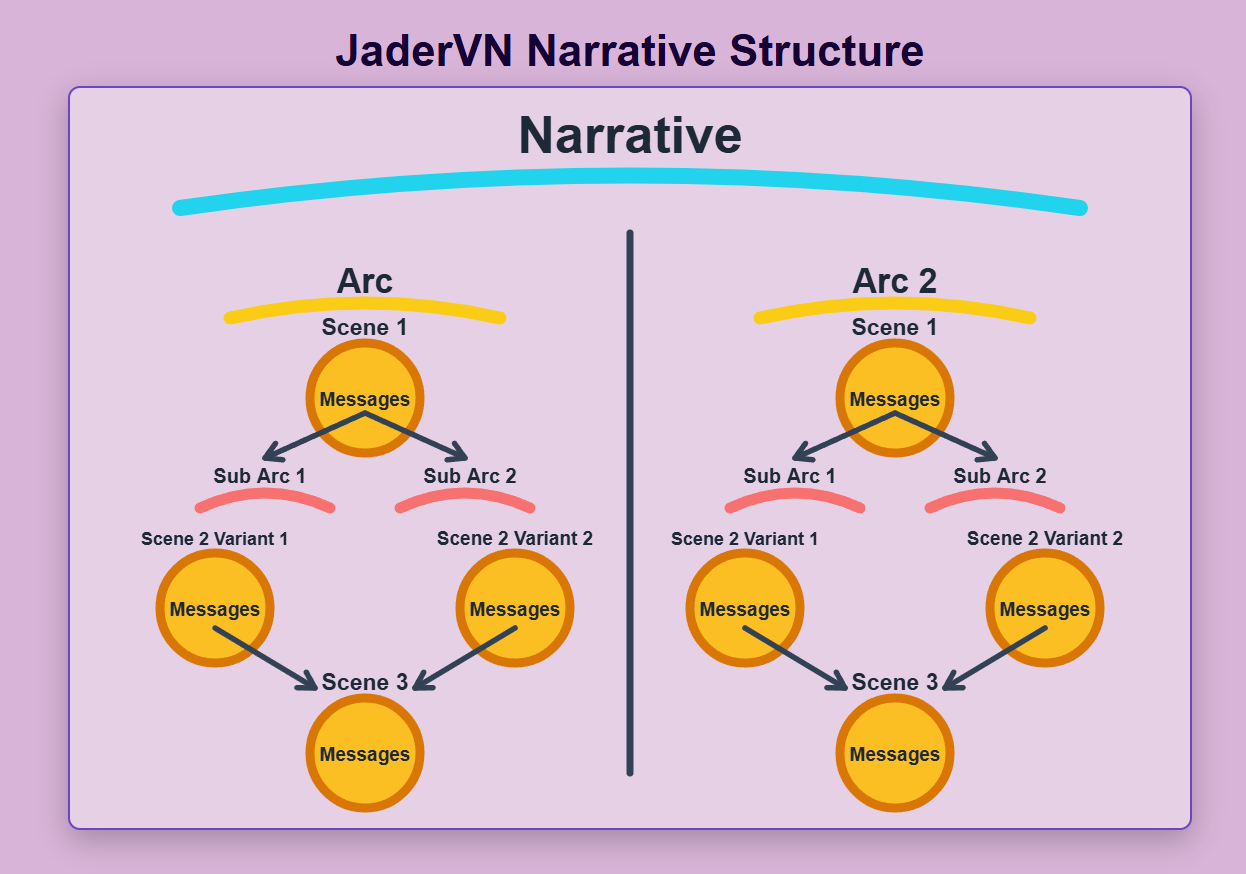
The engine organizes content hierarchically with messages grouped inside JSON files, scenes that reference those messages, and arcs that define broader story routes.
- Arcs: Contain main and sub-arcs, each consisting of ordered scene IDs with conditions to determine player progression. This layered approach enables complex, branching narratives while maintaining organized data management. Arcs represent the highest-level story containers in JaderVN, functioning as distinct routes or parallel paths with collections of scenes driven by conditions. They support sub-arcs that can split based on player choices or state, allowing simultaneous or branching storylines. Players progress through positioned arc slots, with scenes playing out according to the defined order and conditional logic.
- Messages: Serve as the fundamental unit of dialogue and are stored within message groups in JSON files. Each message includes the core dialogue text (with notetags for formatting), plus custom properties for visuals, metadata, and behavior. They provide the building blocks that scenes assemble into coherent narrative moments.
- Scenes: A scene is a JSON-defined collection of ordered message references (by ID, group, and file) that together form a specific narrative beat, supporting shared or individual visual properties. Scenes include a messages object with references, authored commands, and continuation instructions, allowing messages to jump between scenes while preserving continuity via Return Points. This design supports both short single-message scenes and complex, multi-scene sequences.
The Main Flow & Message Cycle
An arc begins by selecting the first eligible scene based on conditions, which then loads its message queue and tracks scene metadata, current POV, and speaker information.
The queue itself is more like a history log then a payload list. The real order comes from each scene's Message Order. Once a scene is loaded, it selects a Message Order that meets conditions and plays each message in that order, based on the Flow Control that each message commands. Every time it swaps to a different scene, regardless of when or how many messages are left in the order of the previous scene, the engine will always play out the Message Order of the current scene, then when using a Return Point, it plays out the order from that returned message's own scene, and so on.
The Message Cycle processes each message through distinct phases:
- “Before” Phase: Executes commands that are labeled "before". Occurs before message text.
- UI Creation: Generates UI boxes and speaker text.
- Flow Control: Dynamically calculates what comes next, whether the same scene, a different one, etc.
- “During” Phase: Handles the typewriter text animation and on-screen character busts speaking alongside punctuation. Includes commands that occur "per glyph" (per letter) or "on complete" (when typewriter finishes typing animation).
- “Player” Phase: Grants control for saving, menus, or making crucial choices.
- “After” Phase: After player advances, it executes commands that are labeled "after".
This cycle ensures smooth presentation, scene commands, player interaction, and dynamic routing while distinguishing between narrative scenes (player-facing) and JaderVN scenes (engine-facing) to maintain strict narrative continuity.
Scene Nesting, Reactions, and Transitions
To support the complex, reactive narratives required for Ultaimia, the engine handles non-linear flow using three core mechanics:
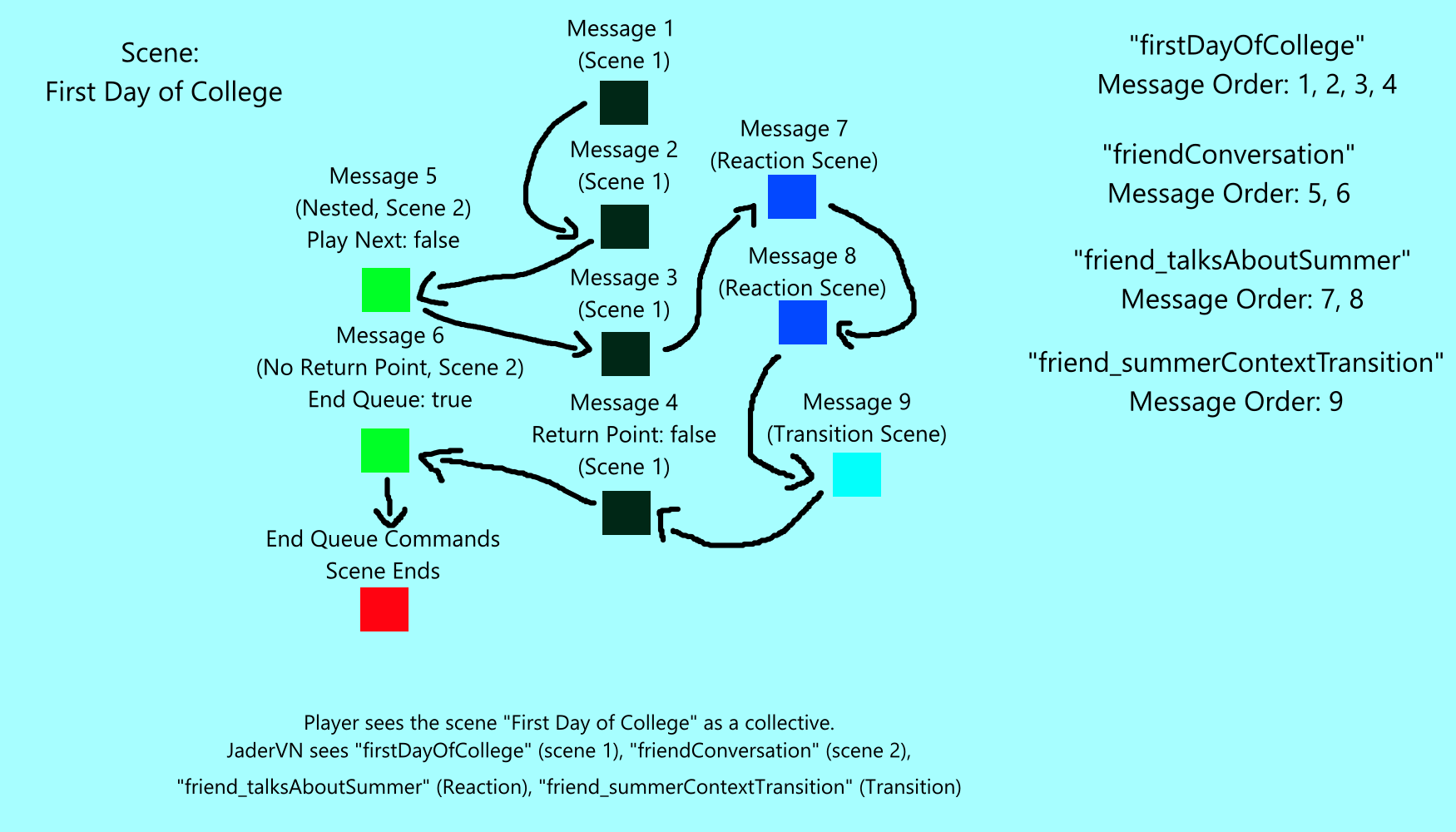
- Scene Nesting: Occurs when a message that was marked as a Return Point jumps to another scene, pushing the origin onto a Return Stack so the engine can resume the parent layer after completing the nested content.
- Reactions: Allow dynamic changes to the next message during the Player phase, triggering an immediate nested scene for highly responsive story branches based on real-time choices.
- Transitions: Use matching
Transition Tagson nested scene endings and parent messages to insert bridging narrative scenes, providing smooth continuity especially for dynamic or reactive storytelling.
Complex Message Flow Example
Conclusion
Overall, the narrative engine of JaderVN was built to handle complex visual novel narratives with an emphasis on customization and dynamic input from both the author and player. While there are currently no plans to make the engine public, I found it important to show off the brains of what will make Ultaimia tick. The visual novel will have complex routing and required a way to simplify the organization of it all, so I made the engine. Additionally as I continue to develop the game, I will improve on the model, as it will pave the way for creating future visual novels as well.