
On Sale: GamesAssetsToolsTabletopComics
Indie game storeFree gamesFun gamesHorror games
Game developmentAssetsComics
SalesBundles
Jobs
TagsGame Engines

Iniour

22
Posts
8
Followers
2
Following
A member registered Jul 22, 2019 · View creator page →

Creator of

Recent community posts

Yes! I just saw it!
Thank you for your nice review. :)
Don't hesitate if you have a problem

https://steamcommunity.com/app/1112580/discussions/0/2968393780773191676/
There is in this page the information how to find your save.

Hi Casper!
Ah?
Can you send me your save at apiratequartermaster@hotmail.com?

Yes, of course!

Great news!
But if you bought it on itch.io, why not play with this version?

Hi,
It would take a lot of work to adapt it to the mobile format.

I'm not going to say I'll never do it, but it's not in my plans right now.

Sorry I couldn't help you more.
Hopefully one day you will have the configuration for it! :)

The file doesn't need and can't be extracted. You just have to put it in the folder I shown you.
After, when you launch the game, you'll see this game created:

If it doesn't launch it when you press on it, I think it's because your computer is not adapted.
Revising the whole game would be too much work, I didn't plan it to adapt it to several configurations.

WeTransfer link: https://wetransfer.com/downloads/dc5b2abfc121d101226cd638cdcc88b720211212203231/...
I did a video for you, but the folder you have to find is not in the folder of the game you downloaded. It's on your hard-drive.
The name on your PC is not "ivana", normally it's your name or pseudo.
The video:
https://we.tl/t-CQzpN1H1gc

After you place the savefile in the folder, launch the game and you'll have a new game created. It's to try to see if the game works by avoiding the creation.

Normally, the file I send you by the link WeTransfer is a savefile named univ1.xml. I'll create a new one.

Your screenshot show me the folder of the game, but you have to go to the folder of the saves on your PC. You have to go on your hard drive, follow this path:
C:\Users\"YourName"\AppData\LocalLow\Le triangle à l'harmonica\Quartier-Maître
Replace "YourName" by your specific name folder (it's the red square on the screenshot), and then add the file I send you, or replace the one you have in this folder.
Normally the folder "AppData" is hidden, you have to type it manually in the path bar.
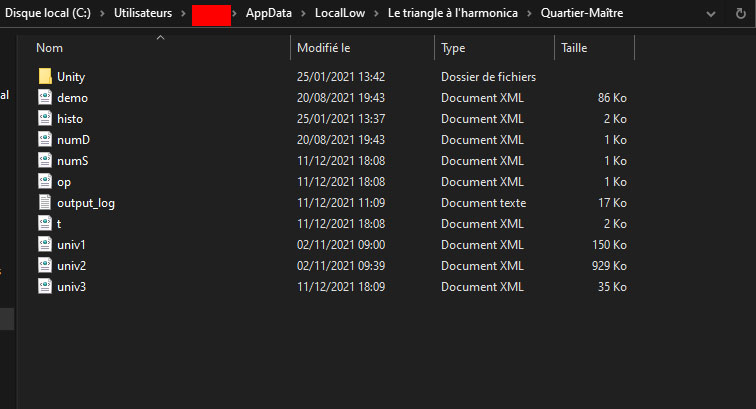
Then you'll a game already created on the titlescreen of the game. So we can see if your problem is only during the creation of a game.

In the folder, you have files like univ1.xml, univ2.xml,etc.

Replace one by the savefile. They are your 3 saveslots.

Do you see the loading?
I think the problem comes from the RAM, because it needs a lot for the initialisation.
I'll create a savefile for you to see if it crashes only during the creation, drop it in:
C:\Users\YourName\AppData\LocalLow\Le triangle à l'harmonica\Quartier-Maître
WeTransfer link for the file: https://we.tl/t-aEX41McvhH

Hi Casper, I'll try to help you. The game crash immediately after selecting a character or does it take a while?

I don't know what to do for you. I'm sorry for this. Maybe you can ask for a refund? 

What about your graphic card?
Maybe the game doesn't work with your configuration. :/

What is your PC's configuration?

Have you tried to restart a game with other characters?

And tried deleting save files, language etc?

Um... I'm sorry to read that.
The demo was working properly but not the full version?
Try to delete the files related to the game.
I'll check everything on my side.
What computer configuration do you have?

You have a free demo if you want to try it and see if it works well for you. Don't hesitate!

I think you mean Windows x86?
It is already compiled for this architecture, and therefore in 32 bits.
You can't run it?

Hi,
What operating system are you talking about?
I just updated the Linux version, the link seemed to be dead (it was at 0 bytes)