Thanks for explaining. could you tell me how to put the command in? I mean I see two commands; one 'curl -L' and another 'bash -s'. Do I copy the whole command into one line? What about the pipe between the commands? I'd love to hear from you again. I also know I will have to fill in the path to the game myself.
Fushi
Recent community posts
Hi StudioWhy, I downloaded the Mac version of the game and in your install instructions it says:
'If you are downloading for Mac, you will need to run the following command in your Terminal: curl -L b * t , I y / macallowapp | bash -s "/path/to/FlutterMare.app"'.
(When I tried to fully type out the link it gave me this: '
Please check the information you provided
- To prevent spammers and malicious links we don't allow posting b * t , I y links')
Could you please explain to me what these linux commands do, and how safe they are?
I've played this game before on my old Mac, back when I didn't know what I was doing (I loved the game by the way). I kept on giving apps that didn't open complete access over my executions by typing in things such as 'sumo chmod -R777' in my terminal. Now my old Mac is fried (Probably from all the viruses I installed) and I'm being very careful now.
Hi, I had the same problem about a year ago, and CummyStudios replied to my comment with this:
Hey! You try following this one:
1. Download the game and unzip it
2. Open Terminal and type "chmod -R 777 " (With a space at the end)
3. Drag the game(.app) into the terminal (It should show "chmod -R 777 /*Path to the app*/*Game Name*.app")
4. Press Return
5. Try to open it again (This time it would say something like "malicious software")
6. Press the left-top Apple icon -> System Preferences -> Security & Privacy
7. Under the tab "General", press "Open Anyway"
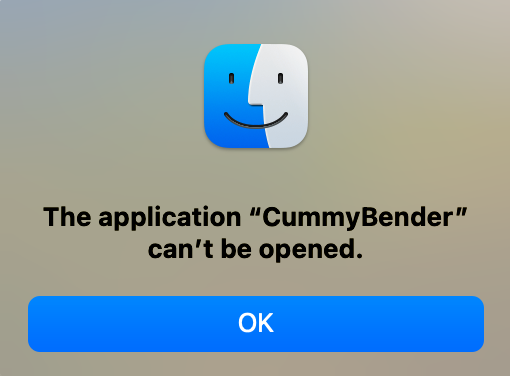
When I try and open the app on Mac, then it says:
The application “CummyBender” can’t be opened.
How do I fix this?
Edit:
Read through comments and came across this comment from 3 years ago:
Is it "app cannot be opened" error?
Try this solution: https://www.youtube.com/watch?v=i9TtoOJjGpU
This solution doesn't work for me.
When I open the app this is what I get:
Finally, I searched the web, and the conclusion I got was that either the MacOS version of the app is damaged, or the app isn't compatible with the newest MacOS update.