

True. I also checked the code today and saw that it is supposed to allow windows games to be added directly. I am on v26.22.0, so it must be a bug of some sort.
UPD: Just checked on Debian (though i used WSL so anything could go wrong) and it also doesn't show the switch: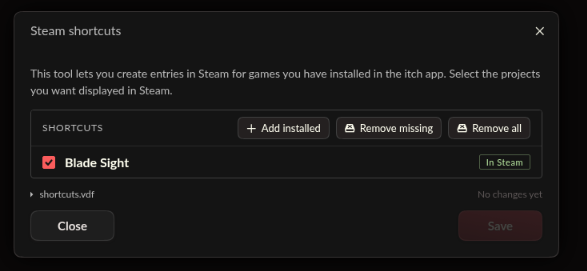
A member registered 87 days ago
Recent community posts
itch.io Community » itch.io » itch app Development · Posted in No "direct" button for steam shortcuts on Steam Deck
Having the same issue. Interestingly enough, when I run itch through Proton 4.11-13 it for some reason does show those options.
Running Itch directly: 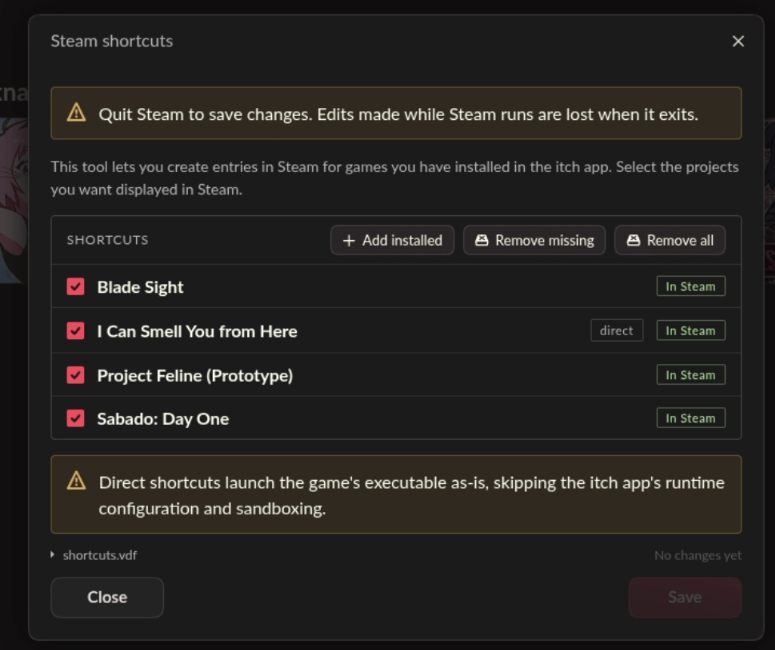
Through Proton: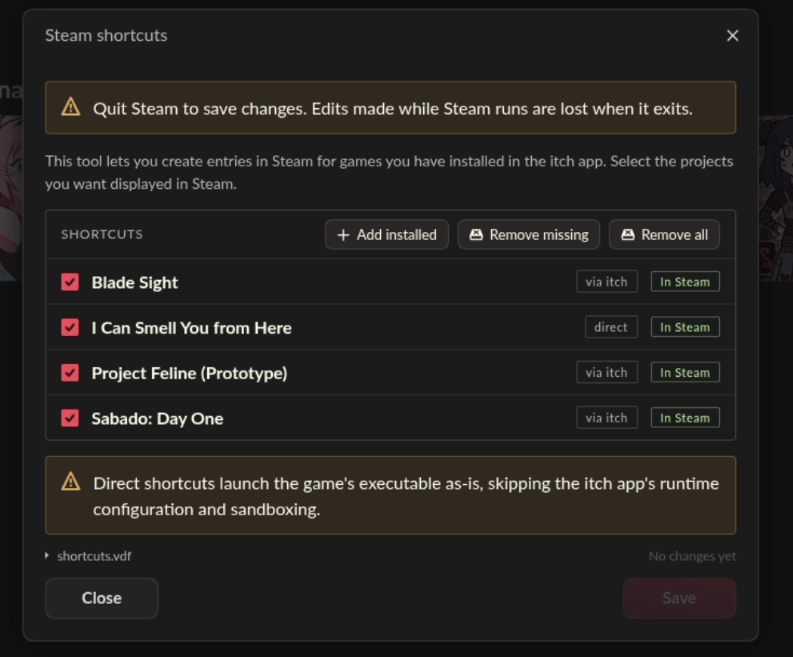
However I can't apply those changes since it requires exiting Steam which in turn exits Itch before it can do any changes.
I assume Itch app allows adding games directly only if it thinks it is fully compatible. And since those games are built for Windows, they can't run directly, therefore it does not show the "direct/via itch" switch. Maybe Proton makes it think it is on Windows and so it thinks it can run natively on the machine so it starts showing this option. Anyway its very confusing and probably should be changed to be less constrained. I wish the app would allow you to do more and just give you a banner like "it might not work" instead of fully disabling useful features.