Indie game storeFree gamesFun gamesHorror games
Game developmentAssetsComics
SalesBundles
Jobs
TagsGame Engines

CHIA8080

59
Posts
4
Topics
A member registered Feb 18, 2024

Recent community posts

MenuGraphicsControlMainMenu

◆Comment:=======================================

:       :VISUAL CONTROL

:       :=======================================

◆If:SelectedButtonMainMenu = 11

  ◆Tint Picture:#11, (68,68,68,0), 1 frame (Wait)

  ◆

:Else

  ◆Tint Picture:#11, (0,0,0,0), 1 frame (Wait)

  ◆

:End

◆If:SelectedButtonMainMenu = 12

  ◆Tint Picture:#12, (68,68,68,0), 1 frame (Wait)

  ◆

:Else

  ◆Tint Picture:#12, (0,0,0,0), 1 frame (Wait)

  ◆

:End

◆If:SelectedButtonMainMenu = 13

  ◆Tint Picture:#13, (68,68,68,0), 1 frame (Wait)

  ◆

:Else

  ◆Tint Picture:#13, (0,0,0,0), 1 frame (Wait)

  ◆

:End

◆If:SelectedButtonMainMenu = 14

  ◆Tint Picture:#14, (68,68,68,0), 1 frame (Wait)

  ◆

:Else

  ◆Tint Picture:#14, (0,0,0,0), 1 frame (Wait)

  ◆

:End

◆If:SelectedButtonMainMenu = 15

  ◆Tint Picture:#15, (68,68,68,0), 1 frame (Wait)

  ◆

:Else

  ◆Tint Picture:#15, (0,0,0,0), 1 frame (Wait)

  ◆

:End

◆If:SelectedButtonMainMenu = 16

  ◆Tint Picture:#16, (68,68,68,0), 1 frame (Wait)

  ◆

:Else

  ◆Tint Picture:#16, (0,0,0,0), 1 frame (Wait)

  ◆

:End

◆If:SelectedButtonMainMenu = 17

  ◆Tint Picture:#17, (68,68,68,0), 1 frame (Wait)

  ◆

:Else

  ◆Tint Picture:#17, (0,0,0,0), 1 frame (Wait)

  ◆

:End

◆If:SelectedButtonMainMenu = 18

  ◆Tint Picture:#18, (68,68,68,0), 1 frame (Wait)

  ◆

:Else

  ◆Tint Picture:#18, (0,0,0,0), 1 frame (Wait)

  ◆

:End
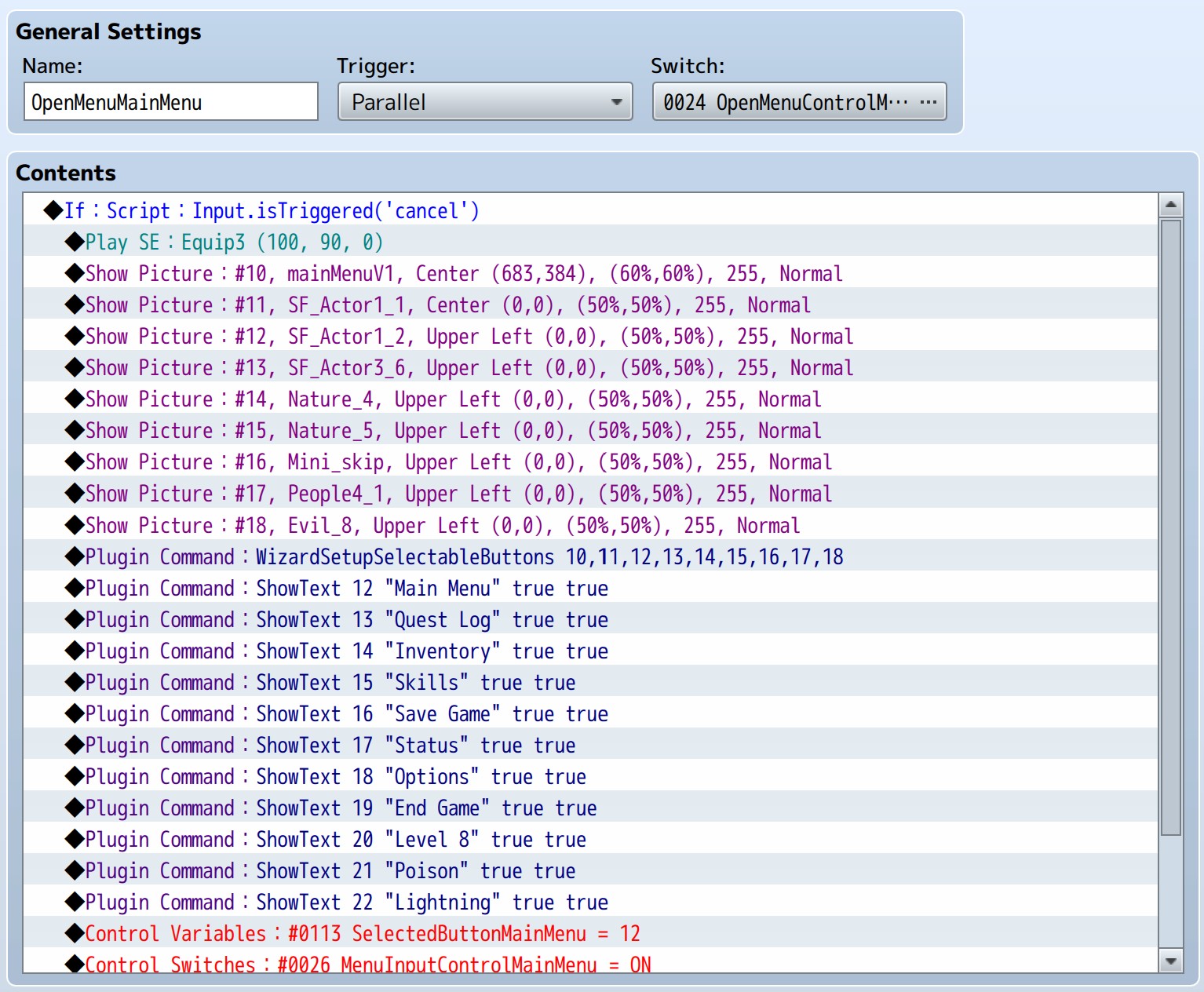
OpenMenuMainMenu

◆If:Script:Input.isTriggered('t')

  ◆Play SE:Equip3 (100, 90, 0)

  ◆Show Picture:#10, mainMenuV1, Center (683,384), (60%,60%), 255, Normal

  ◆Show Picture:#11, SF_Actor1_1, Center (0,0), (50%,50%), 255, Normal

  ◆Show Picture:#12, SF_Actor1_2, Upper Left (0,0), (50%,50%), 255, Normal

  ◆Show Picture:#13, SF_Actor3_6, Upper Left (0,0), (50%,50%), 255, Normal

  ◆Show Picture:#14, Nature_4, Upper Left (0,0), (50%,50%), 255, Normal

  ◆Show Picture:#15, Nature_5, Upper Left (0,0), (50%,50%), 255, Normal

  ◆Show Picture:#16, Mini_skip, Upper Left (0,0), (50%,50%), 255, Normal

  ◆Show Picture:#17, People4_1, Upper Left (0,0), (50%,50%), 255, Normal

  ◆Show Picture:#18, Evil_8, Upper Left (0,0), (50%,50%), 255, Normal

  ◆Plugin Command:WizardSetupSelectableButtons 10,11,12,13,14,15,16,17,18

  ◆Plugin Command:ShowText 12 "Main Menu" true true

  ◆Plugin Command:ShowText 13 "Quest Log" true true

  ◆Plugin Command:ShowText 14 "Inventory" true true

  ◆Plugin Command:ShowText 15 "Skills" true true

  ◆Plugin Command:ShowText 16 "Save Game" true true

  ◆Plugin Command:ShowText 17 "Status" true true

  ◆Plugin Command:ShowText 18 "Options" true true

  ◆Plugin Command:ShowText 19 "End Game" true true

  ◆Plugin Command:ShowText 20 "Level 8" true true

  ◆Plugin Command:ShowText 21 "Poison" true true

  ◆Plugin Command:ShowText 22 "Lightning" true true

  ◆Control Variables:#0113 SelectedButtonMainMenu = 12

  ◆Control Switches:#0026 MenuInputControlMainMenu = ON

  ◆Control Switches:#0024 OpenMenuControlMainMenu = OFF

  ◆

:End

MenuInputControlMainMenu

◆Comment:=======================================

:       :MOUSE INPUT

:       :=======================================

◆If:Script:pictureAction(11, 'hover')

  ◆Control Variables:#0113 SelectedButtonMainMenu = 11

  ◆

:End

◆If:Script:pictureAction(12, 'hover')

  ◆Control Variables:#0113 SelectedButtonMainMenu = 12

  ◆

:End

◆If:Script:pictureAction(13, 'hover')

  ◆Control Variables:#0113 SelectedButtonMainMenu = 13

  ◆

:End

◆If:Script:pictureAction(14, 'hover')

  ◆Control Variables:#0113 SelectedButtonMainMenu = 14

  ◆

:End

◆If:Script:pictureAction(15, 'hover')

  ◆Control Variables:#0113 SelectedButtonMainMenu = 15

  ◆

:End

◆If:Script:pictureAction(16, 'hover')

  ◆Control Variables:#0113 SelectedButtonMainMenu = 16

  ◆

:End

◆If:Script:pictureAction(17, 'hover')

  ◆Control Variables:#0113 SelectedButtonMainMenu = 17

  ◆

:End

◆If:Script:pictureAction(18, 'hover')

  ◆Control Variables:#0113 SelectedButtonMainMenu = 18

  ◆

:End

◆Comment:=======================================

:       :KEYBOARD GAMEPAD INPUT

:       :=======================================

◆If:Script:Input.isTriggered('down')

  ◆Control Variables:#0113 SelectedButtonMainMenu += 1

  ◆

:Else

  ◆If:Script:Input.isTriggered('up')

    ◆Control Variables:#0113 SelectedButtonMainMenu -= 1

    ◆

  :End

  ◆

:End

◆If:SelectedButtonMainMenu < 11

  ◆Comment:use 2 so that the background picture num1 is not selected

  ◆Control Variables:#0113 SelectedButtonMainMenu = 11

  ◆

:End

◆Comment:As there is maximum 9 icons

◆If:SelectedButtonMainMenu > 18

  ◆Control Variables:#0113 SelectedButtonMainMenu = 11

  ◆

:End

◆Comment:=======================================

:       :TRIGGER CONTROL MOUSE

:       :=======================================

◆If:Script:pictureAction(11, 'click')

  ◆Play SE:Cancel1 (60, 100, 0)

  ◆Plugin Command:CallScene Item

  ◆

:End

◆If:Script:pictureAction(12, 'click')

  ◆Play SE:Cancel1 (60, 100, 0)

  ◆Plugin Command:CallScene Save

  ◆

:End

◆If:Script:pictureAction(13, 'click')

  ◆Play SE:Cancel1 (60, 100, 0)

  ◆Plugin Command:CallScene Options

  ◆

:End

◆If:Script:pictureAction(14, 'click')

  ◆Play SE:Cancel1 (60, 100, 0)

  ◆Plugin Command:CallScene Status

  ◆

:End

◆If:Script:pictureAction(15, 'click')

  ◆Play SE:Cancel1 (60, 100, 0)

  ◆Plugin Command:CallScene Scene_Skill

  ◆Script:Scene_MenuBase.prototype.nextActor

  :      :SceneManager.push(Scene_Skill)

  ◆

:End

◆If:Script:pictureAction(16, 'click')

  ◆Play SE:Cancel1 (60, 100, 0)

  ◆Plugin Command:CallScene Scene_Quest

  ◆Script:SceneManager.push(Scene_Quest)

  ◆

:End

◆If:Script:pictureAction(17, 'click')

  ◆Play SE:Cancel1 (60, 100, 0)

  ◆Plugin Command:CallScene GameEnd

  ◆

:End

◆If:Script:pictureAction(18, 'click')

  ◆Play SE:Cancel1 (60, 100, 0)

  ◆Plugin Command:CallScene Skill

  ◆

:End

◆Comment:=======================================

:       :TRIGGER CONTROL KEYBOARD GAMEPAD

:       :=======================================

◆If:Button [OK] is pressed down

  ◆If:SelectedButtonMainMenu = 11

    ◆Play SE:Cancel1 (60, 100, 0)

    ◆Plugin Command:CallScene Item

    ◆Wait:10 frames

    ◆

  :End

  ◆If:SelectedButtonMainMenu = 12

    ◆Play SE:Cancel1 (60, 100, 0)

    ◆Plugin Command:CallScene Save

    ◆Wait:10 frames

    ◆

  :End

  ◆If:SelectedButtonMainMenu = 13

    ◆Play SE:Cancel1 (60, 100, 0)

    ◆Plugin Command:CallScene Options

    ◆Wait:10 frames

    ◆

  :End

  ◆If:SelectedButtonMainMenu = 14

    ◆Play SE:Cancel1 (60, 100, 0)

    ◆Plugin Command:CallScene Status

    ◆Wait:10 frames

    ◆

  :End

  ◆If:SelectedButtonMainMenu = 15

    ◆Play SE:Cancel1 (60, 100, 0)

    ◆Plugin Command:CallScene Scene_Skill

    ◆Script:Scene_MenuBase.prototype.nextActor

    :      :SceneManager.push(Scene_Skill)

    ◆Wait:10 frames

    ◆

  :End

  ◆If:SelectedButtonMainMenu = 16

    ◆Play SE:Cancel1 (60, 100, 0)

    ◆Plugin Command:CallScene Scene_Quest

    ◆Script:SceneManager.push(Scene_Quest)

    ◆Wait:10 frames

    ◆

  :End

  ◆If:SelectedButtonMainMenu = 17

    ◆Play SE:Cancel1 (60, 100, 0)

    ◆Plugin Command:CallScene GameEnd

    ◆Wait:10 frames

    ◆

  :End

  ◆If:SelectedButtonMainMenu = 18

    ◆Play SE:Cancel1 (60, 100, 0)

    ◆Plugin Command:CallScene Skill

    ◆Wait:10 frames

    ◆

  :End

  ◆

:End

◆Comment:=======================================

:       :CLOSE MENU

:       :=======================================

◆If:Script:Input.isTriggered('t')

  ◆Play SE:Equip2 (100, 90, 0)

  ◆Plugin Command:EraseAllText 0

  ◆Plugin Command:DeleteAllPictures

  ◆Wait:7 frames

  ◆Control Switches:#0024 OpenMenuControlMainMenu = ON

  ◆Control Switches:#0026 MenuInputControlMainMenu = OFF

  ◆

:End

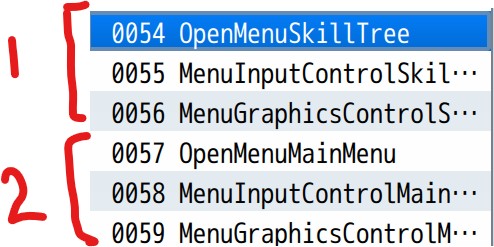
Ok the strange thing is even if i change the cancel to t for the first OpenMenu , it can work. but for the second OpenMenu i tried using cancel, tab and other MV triggers eg pageup etc it just dont run

Pls advice how to run two different OpenMenu using two different triggers "cancel" and "t" or other trigger eg pageup or tab also can

if-Script-Input.isTriggered('cancel') 

if-Script-Input.isTriggered('t')

I use all the same 3x "common events" in the demo MV version demo and created two OpenMenus using "if-Script-Input.isTriggered('t')" and "if-Script-Input.isTriggered('cancel')" BUT only the first OpenMenu is able to work. when i play the game, the second OpenMenu2 does not show the pictures and i am not able to create or see the second menu's list of pictures

Hi Synrec,

Please advice what error is below? fyi i dont have any actor id 3001 , i only has 12x actors. 

Error: 

                Actor 3001 is not configured for TBS battle.

                Please re-check plugin parameters

    at Game_Map.createActor (chrome-extension://odlameecjipmbmbejkplpemijjgpljce/js/plugins/Synrec_TBS.js:7591:15)

    at Scene_Map.placeActor (chrome-extension://odlameecjipmbmbejkplpemijjgpljce/js/plugins/Synrec_TBS.js:20809:18)

    at Window_ActorPosition.Window_Selectable.callHandler (chrome-extension://odlameecjipmbmbejkplpemijjgpljce/js/rpg_windows.js:902:31)

    at Window_ActorPosition.Window_Selectable.callOkHandler (chrome-extension://odlameecjipmbmbejkplpemijjgpljce/js/rpg_windows.js:1171:10)

    at Window_ActorPosition.Window_Selectable.processOk (chrome-extension://odlameecjipmbmbejkplpemijjgpljce/js/rpg_windows.js:1156:14)

    at Window_ActorPosition.Window_Selectable.onTouch (chrome-extension://odlameecjipmbmbejkplpemijjgpljce/js/rpg_windows.js:1086:22)

    at Window_ActorPosition.Window_Selectable.processTouch (chrome-extension://odlameecjipmbmbejkplpemijjgpljce/js/rpg_windows.js:1054:18)

    at Window_ActorPosition.Window_Selectable.update (chrome-extension://odlameecjipmbmbejkplpemijjgpljce/js/rpg_windows.js:986:10)

    at Window_ActorPosition.Window_Selectable.update (chrome-extension://odlameecjipmbmbejkplpemijjgpljce/js/plugins/TDDP_MouseSystemEx.js:596:39)

    at Window_ActorPosition.update (chrome-extension://odlameecjipmbmbejkplpemijjgpljce/js/plugins/Synrec_TBS.js:18634:40)

dont think can change the faces via events, cause i dont think the SRD Character Creator EX plugin store its custom faces, battlers sprites in the actor images files, so i was thinking changing the code eg from standard this.drawActorCharacter to --> this.drawCustomCharacter

in the Synrec plugin code where can i change it so that it will display the custom faces, battler sprite instead of the default sprites?

Ok how can i do what you advice, pls provide steps

(1 edit)

Ok but the  SRD Character Creator EX plugin lets the player himself/herself to customize a random face or battler sprite, how to put it into Synrec TBS plugin and when battling the battler sprite seems to be using the old sprite instead of the new custom battler sprites

Hi Synrec,  i create d a custom character using SRD Character Creator EX plugin however when going into party battle with Synrec TBS plugin on the  Synrec plugin seems to still use the old actor face , battler sprites instead of the new custom actor face , battler sprites create using SRD Character Creator EX plugin, please help how to let Synrec TBS plugin use SRD Character Creator EX plugin's created new face, battler actor sprites instead

let me check at abs side as well thanks Synrec

hmm strange but why 1 player can transfer but 2 or more players cannot transfer to other map?

yes i tried that just now, seems cant, it will exit same for tbs to abs 

Ok this is strange Synrec but after i am able to transfer all my eg 4 players to a non alpha abs map but from there i still cannot transfer back to a alpha abs enabled map :(  for many actors transfer. but for 1x actor transfer from TBS to alpha map is ok?? a bug ? pls help

Good news Synrec it works i transfer to a non abs alpha map, and Works :D thks again for the good and fast support

let me try to transfer the 4x players to a non abs aplha map

I disabled almost all except the alpha abs plugin where i have settings there, alpha abs is not enabled or call pop up, but i tried still the same error 1 player after victory can transfer map but 2 or more players after victory cannot transfer map? 

Ok but 1 actor battle and 1 actor/player after victory is ok, it wont exit

cause if i disable my plugin then and error message will appear say err due to disabled plugin and i have to remove all the settings for that particular plugin which is difficult

(1 edit)

these

-- my plugin list

i am not sure but i just tested again for 1 actor ok to transfer map, but once i have more actors/players eg 4x actors in tbs map battle, after victory just exit game?

nothing else,


for 1 actor going into tbs map battle after victory can transfer 1x player to other map id

but if 4 actors going into tbs map battle after victory cannot transfer 4x players out to other map and game auto exit

(1 edit)

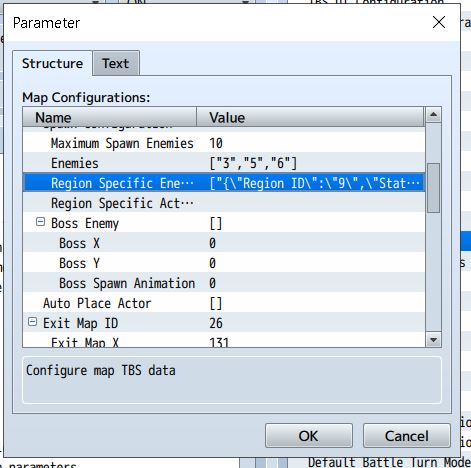
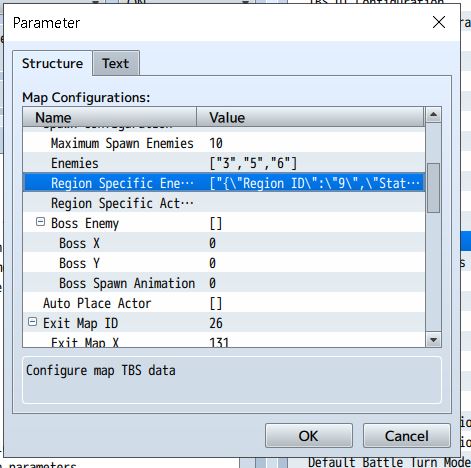
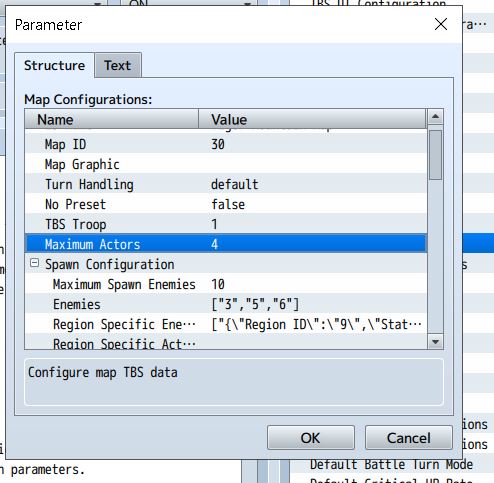
meaning i setup 4x actors to fight the TBS map in your plugin in the map configuration file. so once in the tbs map killed all enemies then should transfer these 4x actors to the map ID setup, but after that it just exit the game 

no event, just set to transfer all 4x actors to another map set

(1 edit)

ok seems if actor there are more eg 5 actors and 4x enemies in TBS map battle then  after victory will exit out of the game as well :( and wont transfer actors/players to the map id setup

later testing out adding more enemies and more actors into the TBS battle, previously test 1 Vs 1 ok, now test M Vs M, will keep you updated

thanks again Synrec, and keep up your fantastic plugin works :D

Coolest Synrec you rock ,it works now :D cheers , but just to report that if i transfer player to another different map i can see player sprite but if transfer to same map seems player become invisible (i tested this once only). thks again for the fast support

no event call, just the standard synrec plugin victory transfer to map and victory loot screens

(1 edit)

? not sure what you mean, please send to me the correct version to download, i purchase your plugin and downloaded from your download link

ok below,

yes current the bug is still there on the same map

(1 edit)

you can download the abs trial and test it actually? 

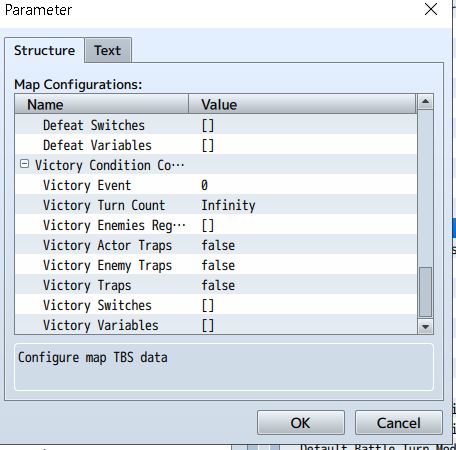
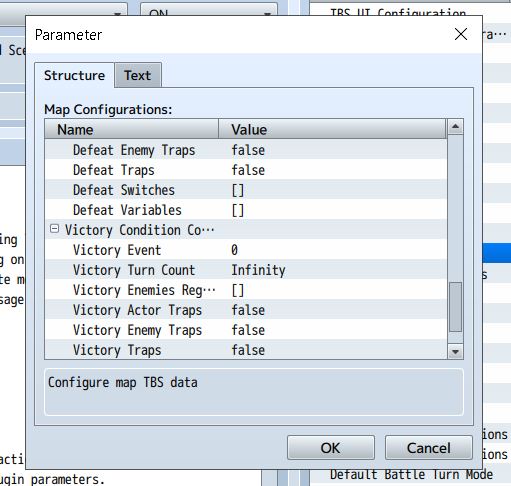
I just need to get the victory screen to appear and then transfer me to the map which i setup. current after i won the battle the game will just end and exit?

Any updates on this?

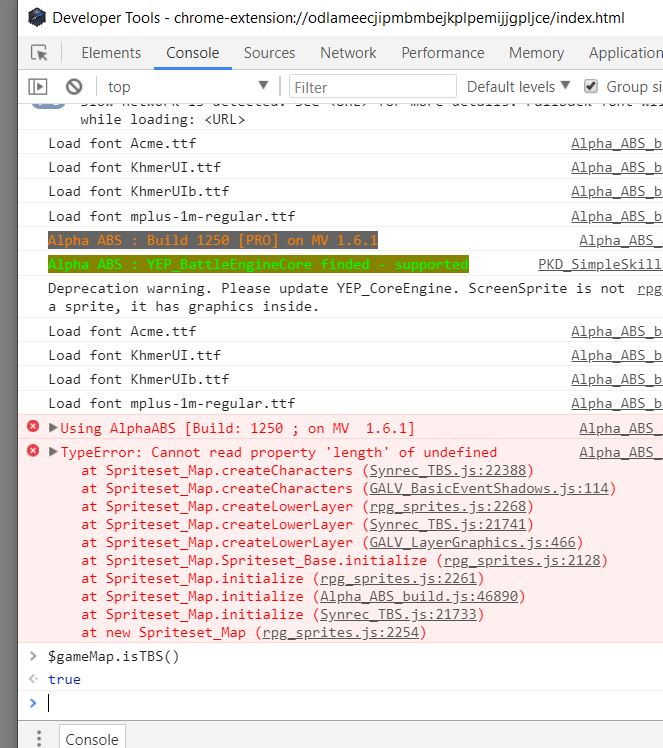
ok how do i use this ==> $gameMap.isTBS()  

Yes thats correct