that was quick, thank you very much :)
cemuka
Creator of
Recent community posts
Hey huge thanks for checking out and good catch on finding that shop bug!
-
It’s good to hear control felt smooth for you. I spent some time on it and getting positive feedback from folks using it, well worth it.
-
I started to work on tooltips. First implementation will be in the next demo.
-
That’s right, nothing tells or indicates to how to initiate to combat with enemy npc. Currently double click or R key starts the auto attack.
-
I got mixed feedbacks on camera angle. Some loved the top down feel but some feel the urge to look around. My take on this issue is letting player to explore around. Let’s give it some time and see how it evolves.
https://cemuka.itch.io/knightborn
Hi everyone! I make an open world rpg game. Most importantly, I make a world-editor to allow users to create new maps or modify easily.
I’m a huge fan of warcraft3 map editor and single player custom maps. My ultimate goal for this project to make a gameplay like Founders of Durotar map. I reckon that players that who enjoys playing warcrft3 single-player campaigns or custom maps would enjoys my game too, hopefully :)
So please give it a chance and let me know how it goes. I’d like hear your experience.
Be aware that I use placeholder assets to test the gameplay features.
Knightborn is an indie-rpg-game. It’s been 4 months since I started to develop this project and I’m so excited to share my progress, finally.
What makes knightborn special from most rpg games that you can edit the game world using built-in world editor. Also you can make your own maps and share with community. Currently world editor is barely usable but this demo made by using internal editor only!
Hey, thanks! You need to zoom in to see the shadows :) I built with default webgl graphic settings and my guess is shadow range is shorter than camera height over terrain. But screenshots are taken from the editor so hope that gives some idea.
Oh, currently the only way to zoom is the middle mouse, maybe I would add a keyboard shortcut too.
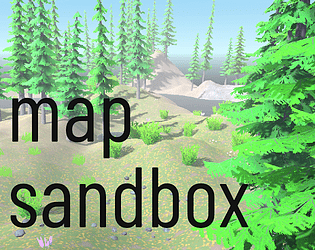
Map sandbox is a map creation and sandbox simulation game. It allows you to create beautiful looking maps in couple of minutes.
Features
- Different map sizes from 128 to 2048
- Easy navigation
- Modify terrain with different brushes
- Raise or lower, flatten and smooth modes
- Paint texture mode
- Tree placement
- Detail placement
- Ambient controls
- Undo/Redo
- Save and load
- Import and export maps