Hello! And thank you very much for your interest! However, I think I have all the pieces together and the release will probably happen soon the start of the new year. Thank you!
BlueMoon
Creator of
Recent community posts
Hello! I'm sorry that you're experiencing issues. However as stated in the "Tips and Suggestions" section of the product page the software works properly with fonts that can be correctly sized at 8px.
However, I'm not sure how refund policy works but I think you can follow the itch.io terms that can be found here: https://itch.io/docs/legal/terms#9-refunds
Thank you very much!
Hey! Sorry for the late reply!
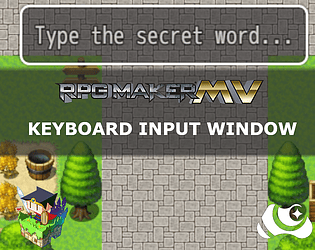
If I understand your question you want just to show the content of player's prompt into the text of message or choice windows.
You can just use escape codes with the variable ID used for registering the player's prompt.
Like:
"Hey! This is the text you have typed: \v[variableId]" where "variableId" is the ID you've used for saving player's input.
Good luck!
Buongiorno e ti ringrazio per aver scelto questo plugin!
Purtroppo il plugin non è dotato di un sistema di personalizzazione dell'UI. Però dovrebbe comunque essere compatibile con tutti i plugin che direttamente intervengono sulla Windowskin ed in generale sulla classe Window dal punto di vista stilistico. Non so perché nello specifico Galv_MessageStyles non sia compatibile (forse questo dipende dall'utilizzo di notetag? Non saprei). Comunque ti consiglio di spulciare il web e sono sicuro che potresti trovare plugin che permettono personalizzazioni ad-hoc.
Saluti!
Hey!
I'm sorry but currently there is not a feature that prevents the use of spaces :(
I know that is just a random suggestion but you can try to solve the problem in a design way like guiding your player in searching for keywords that are not separated by spaces. Or better you can use a trick but you have to be good with the organization of conditional branches.
Using the "Script" section of conditional branches you can check the variable used for registering player's inputs this way:
$gameVariables.value(variableId).contains(" ")
This way you'll check if the prompt of the player contains at least a space. If it happens you can like retrieve a "system message" (a simple show text or what you want considering your game) that warns the player that "Spaces are not allowed!"
Good luck!
You can do this using the "Conditional Branch" event command. I usually suggest to use the "Script" section and check the variable used for registering the input.
So you'll have:
$gameVariables.value(variable_id).toLowerCase() === "your word all lowercase".
This way you'll make the check not case sensitive. If you need a case sensitive check remove the "toLowerCase()" function.
Hello!
Thank you very much for your kind support 🙏. For Android, this is not really plugin related since it's a known limit of HTML5 technologies that are the base of RPG Maker exports. Indeed, VirtualKeyboard API would be the starting point of making Rpg Maker applications compatible with Android keyboard - because it allows control over the keyboard itself -. However this API was not available at the time of the plugin and today is still an experimental feature.
Unfortunately on my knowledge there is not too much that it's possible to do on the technical side.
However, some time ago a friend of mine surpassed this problem using plugins that allows to bind pictures on screen forcing the execution of a common event on touch (like VisuStella common events if I remember correctly).
In a few words, he created a board with key's pictures binding them to a common event that was adding a character (like result_string += "a") every time the pictures were pressed. This is a matter for expert eventers that has at least a little knowledge of JS too... but I think you can find your own way if you may be interested in this kind of systems :)
Thank you again!
Hello! I'm sorry for the late reply, I lost your comment.
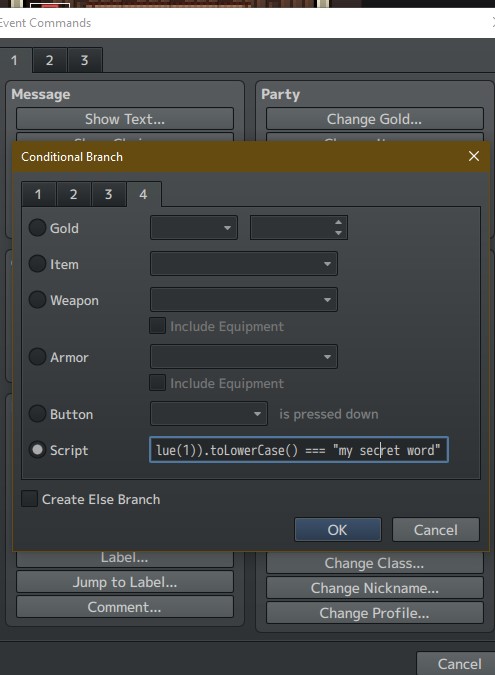
So, about your question. It's actually pretty simple because it's just a Conditional Branch using the Script field in the fourth page of branch configuration.

So, if the variable where you set the typed value is the variable of ID 1 you will have this script:
String($gameVariables.value(1)).toLowerCase() === "my secret word"
where:
- $gameVariables.value(variableId) is the variable where the typed text is stored;
- The String(value) constructor is needed for being sure that the content is considered a string;
- toLowerCase() is a method that is needed to lowercase all the typed text for avoiding that capitalized letters makes the check return false (if you need a case sensitive check, just remove .toLowerCase())
Finally, your secret word inside quotation marks :)
Cheers!
Heya! Thank you very much for using this plugin!
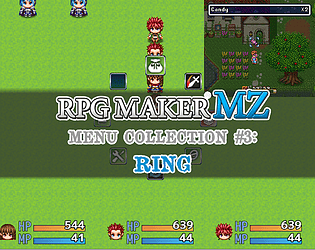
Well, it's possible to remove unused commands. However, it's not dependent by Ring Menu plugin directly. I elaborate. I think you've noticed you can customize command symbol and personal command symbols inside plugin parameters - I assume that you're knowing of what we're talking about since you already managed removing icons -.
However, Ring Menu command roster is taken by the reference window that is Window_MenuCommand itself. Take a look on this portion of code starting on line 302:
createMenuCommands() { this._referenceWindow = new Window_MenuCommand(new PIXI.Rectangle(0,0,1,1)); this._referenceWindow.refresh(); for(let i = 0; i < this._referenceWindow._list.length; i++) { const comm = this._referenceWindow._list[i] this._symbols.push(comm.symbol) this._names[comm.symbol] = comm.name let sp = new Sprite(); sp.alpha = this._globalAlpha let iconset = ImageManager.loadSystem("iconset"); iconset.addLoadListener(() => { sp.bitmap = iconset; sp.anchor.set(0.5) const iconIndex = !!_ring_menu_icons[comm.symbol] ? _ring_menu_icons[comm.symbol] : 16; const pw = ImageManager.iconWidth; const ph = ImageManager.iconHeight; const sx = (iconIndex % 16) * pw; const sy = Math.floor(iconIndex / 16) * ph; sp.setFrame(sx,sy,pw,ph) }) this.addChild(sp) } this._angleDistance = this.calculateAngleDistance() }
As you can see referenceWindow is Window_MenuCommand.
Said that, you have to apply your changes on Window_MenuCommand and then, eventually, mod the Ring Menu for your necessities. As far as I know this kind of interaction could be possible with some well-known plugins done by developers like VisuStella or if you're proficient in Javascript just editing the Window_MenuCommand class on your own in the part where commands are declared.
Hoping that this could help you at least a little,
Cheers!
Hi there!
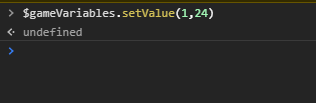
Mmm... That's quite strange. So, yes when you write the code $gameVariables.value(1) you print the current value set to Value having as ID 1. So, all variables have as default value 0, but assigning a value this should change - as you probably already know -. I've done a test on my end trying to set the value of Variable ID 1 by console to 24 and it seems to work properly:


The same thing should be if you set the value through event commands. Not sure why it do not update on your end. Have you tried to use the plugin in a void project?
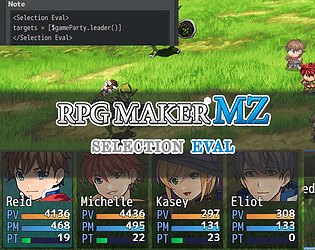
About your second question, you can show the money value just using this script call: $gameParty.gold() assigning it to the proper plugin parameter. 
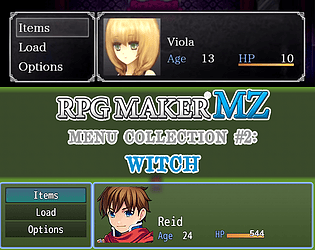
Furthermore you can change the Parameter Name from "Age" to what you prefer and you should have a similar result

Thank you for your support <3
Hello there!
Thank you so much for your feedback. About your question, currently, there Is not a feature of this sort. Actually, there could be a way if we try to combine eventing with Keyboard Windows inner methods (ex. Having an event in loop that checks for the Activity of the keyboard Window and then forces the "confirm" method of the Window After a Number of cycles).
However, it's a try and catch application and for a released game could not be as much as solid as needed. But, I take note of your idea and, when I'll get free from some job duties I Will push the update for this plugin including a system for interrupting typing :)
Thank you!
Hey there!
Sorry for the late reply, but I got mega-busy recently.
So, If I have understood correctly your question... Yes. Global Switches and Variables are indexed by the name you assign them into the configuration and not by their "id". Moreover, for making them interactive with the changes you do in game, the property "SAVABLE" must be set to true.
This mean that if you create a Global Switch named "FOO" and set the property "SAVABLE" to true and maybe edit them in game through one of the methods (plugin command or script call) the edit you do will be saved and accessible with the new value you assigned when you re-open again the game.
However, if you have a more specific issue that I have not satisfied with my answer, feel free to let me know :)
hello there!
Thank you for your interest! The plugin aims to replicate the same experience of IB (and similar kind of games). So, outside of checking (and enabling a feature for assigning an item to a variable for making item-check events), it's not possible to add other menu commands by default. Obviously, if you have JS knowledge, you can mod the plugin for your personal use to reach the result you want.
Hi there!
No problem, It's clear what you're saying! Thank you for your appreciation about the plugin. Currently, the plugin does not support natively touch interaction. However, this is something I have put in my notes to add in the future. Not sure when It will be released the update to this plugin, but I'll do it for sure. Thank you for your support!
Hi there!
Thank you very much for your interest! Actually, for this specific plugin there will not be a MZ compatibility.
However, I'm working on a collection of 3D-like plugins for MZ (still a lot in wip) using a different technology. There will be a plugin that will have similar features to this one!
Stay tuned!
Thank you very much for the appreciation! About the problem with the Duck model, not sure if this is related to the fact that the model has been updated by the source to a new standard. However, for real, this plugin (after a long time) has a planned update around April/May since I want to try to update Babylon's library and the original code for a better compatibility.
About sending you the common event - out of topic, I would suggest you to remove your email from the message for security reasons if this is your personal email :) -, I would like to send it to you but this is an old project and I have to find it on my old hard disk before. Inside the project page, there are screenshots how to setup the common event. If you're having issues with them, do you mind sending me a screenshot of them as well to give it a look? :)