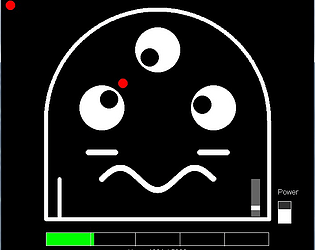
That sound is basically a musical note ! Eventually, I want to level it up so it can play actual melodies. Glad you're having fun with the game. Feel free to check the source code in the zip file if you want to dive in and tweak things to your liking. Enjoy !
Just wanted to say thank you for letting me join this game jam. I also really appreciate you taking the time to play Panda Monium and for sharing such thoughtful feedback. I'll definitely be using your notes to help shape and improve the game moving forward. Thanks again for being part of this !
I totally forgot I coded the red ball to auto-play while I'm making coffee.. guess, I accidentally programmed myself a coffee break :D
On that note, huge thanks for the gameplay suggestions. You're completely right about making it more beginner-friendly. I'm planning to add some light pop-up tutorials that walk players through the backstory and controls step-by-step. That way, they can ease into things and get comfortable before the difficulty ramps up with each level.
Anyway, thanks again for giving Panda Monium a try - I really appreciate you taking the time to share your feedback.
I'm thinking of keeping Level 1 pretty easy to ease players in, then slowly ramping up the difficulty. It'll start with just one paddle, and after a few levels, I might have it split into two. Thanks so much for the suggestion - it's actually helpful for shaping how the game plays.
I'm so glad you're having fun with Panda Monium. Regarding the red ball getting stuck in his eye and making him cry... I honestly don't remember programming him to be that dramatic. I swear I coded him to be a permanently happy little guy, but I guess even Panda have their off days. Life got its ups and downs, right ? I'll definitely look into why he's throwing a tearful tantrum over a stuck ball. Thanks for the heads-up, and for being patient with my 'experimental' programming :D
I'm still a beginner and program games purely as a hobby, so I'm always learning. Marcus, the creator of Naalaa programming language, has taught me a lot - especially through his particle effects, which really inpire my own project. I also picked up the fundamentals of pinball mechanics from my friend Kevin.
I recently downloaded the compatibility version of Contrast Words. I just wanted to share a quick note about something I noticed :
at the beginning, when it asks "How should I address you ?", I can easily fix typos using either Backspace key or the Left Key then Delete key.
But once I get to the "Write an antonym : " prompt later in the game, those same keys don't seem to work anymore.
It's totally possible this is just a little compatibility quirk with my older laptop Windows 7 setup, but I figured I'd mention it just in case it happens for anyone else. Thanks so much for making the game. Keep up the great work !
At first, I thought it was just a regular hangman game, but when I ran it, I realized it''s actually a game about finding antonyms. How did you create the ASCII art ? also do you have any tips for making the backspace key work smoothly when correcting typos ? Anyway, thank you for sharing the game. I like its simplicity.
It's awesome to hear directly from the creator ! It makes total sense that you'd prioritize the engine updates over the demo game. No worries at all about the game being incomplete - honestly, it's exciting to know there's a polished version coming. Wishing you smooth sailing with the final touches.
It's such a fun little project. Someday, if I get the chance, I'd love to port it over to Naalaa programming language. Would you be open to me giving that a try ? Just wanted to ask first since I think your game is really cool !
Thanks for giving Panda Monium a try ! Just a heads-up : it's a pinball-style game, but instead of flippers, you control two paddles.
The game runs in its own 700x600 window. For the controls to work, you need to make sure the game window is active. If pressing ENTER(to revive the ball) and SPACE (to restart) doesn't do anything, just click inside the game window to 'focus' it. Hope that helps !