

by request,
The Chat Contraption:
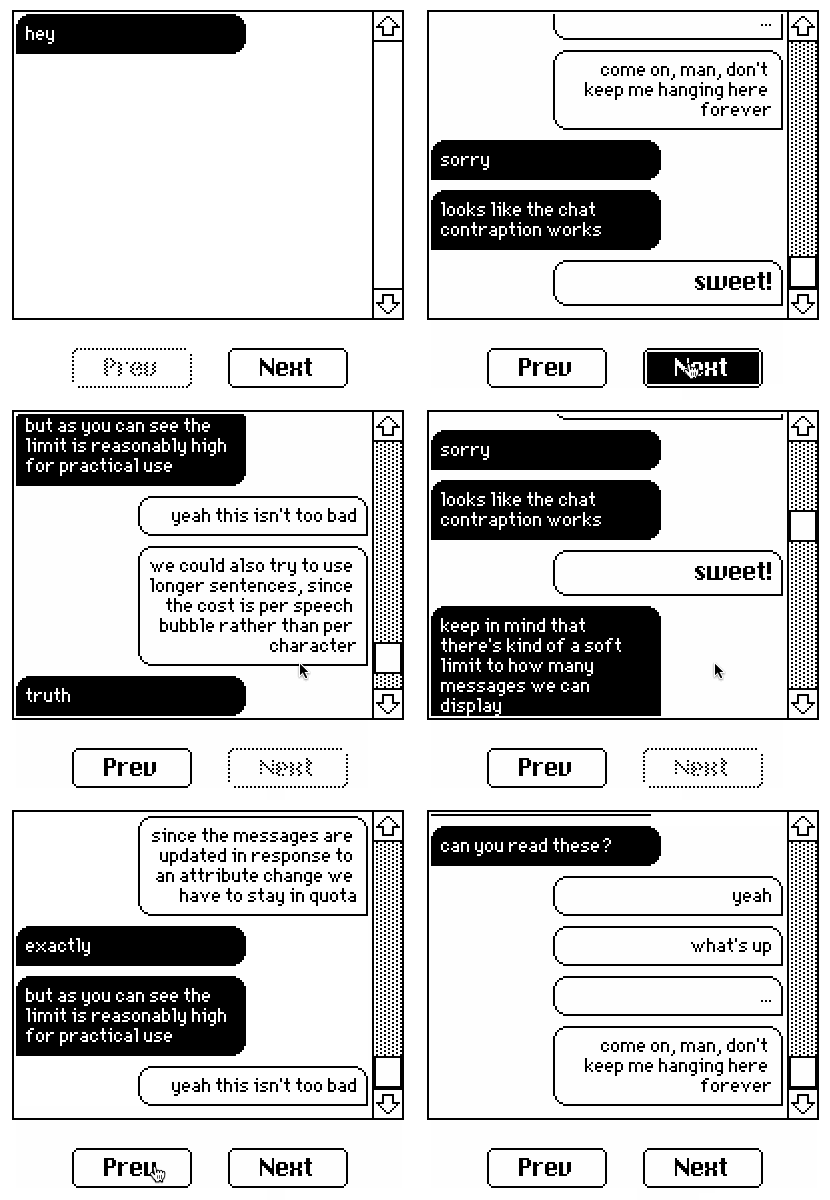
The chat contraption provides a scrolling view of static text clustered into "speech bubbles" as in the text messaging UIs of most phones which can be advanced or retracted one bubble at a time.
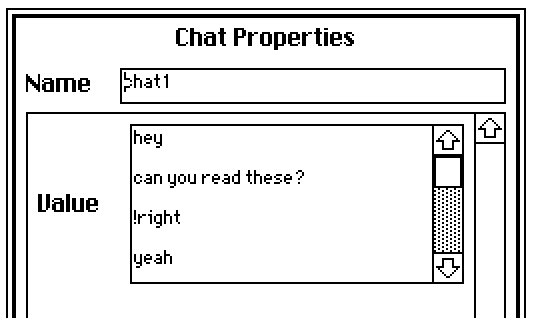
The .value attribute contains rich text describing the chat log. Messages should be separated by a blank line (i.e. two newlines; \n\n). If a message is "!left" or "!right", it will switch which side of the conversation ensuing messages appear on instead of being displayed. Remember, you can use any other rich text formatting you like, including fonts and inline images!
The contraption exposes read-only .hasnext and .hasprev attributes indicating whether there are previous messages or next messages to show, respectively. It also exposes functions .next[] and .prev[] for stepping through message history. Any time you change the contraption's .value attribute the history will be reset to show only the first message.
The contraption respects the standard .show and .font attributes to control the transparency mode and default font of the chat log.
This contraption is provided below along with an enclosing card and prev/next buttons for paging through messages, to demonstrate how to use .hasprev/.hasnext/.prev[]/.next[]; these buttons are not part of the contraption itself and therefore can be freely customized or replaced to suit the needs of a particular application:
%%CRD0{"c":{"name":"card1","script":"on view do\n prev.locked:!chat1.hasprev\n next.locked:!chat1.hasnext\nend","widgets":{"chat1":{"type":"contraption","size":[196,155],"pos":[176,77],"font":"menu","show":"transparent","def":"chat","widgets":{"f":{"size":[196,155],"show":"transparent","value":{"text":["i"],"font":[""],"arg":["%%IMG2ALAAHAAFAWkARQFtAEIBbwBAAXEAPwFxAD4BcwA9AQUgAgFsAD0BBSACAWwAPQEFIAUBAyAEAQIgAgECIAIBWgA9AQUgAgECIAIBASACAQIgAgEBIAIBAiACAVoAPQEFIAIBAiACAQEgAgECIAIBASACAQIgAgFaAD0BBSACAQIgAgEBIAYBASACAQIgAgFaAD0BBSACAQIgAgEBIAIBBSACAQIgAgFaAD0BBSACAQIgAgEBIAIBAyABAQEgAgECIAIBWgA9AQUgAgECIAIBAiAEAQMgBQFaAD0BFyACAVoAPQETIAEBAyACAVoAPQEUIAQBWwA9AXIAPgFyAD4BcQA/AXAAQAFuAP8A/wD/ALU="]}},"msg":{"size":[100,31],"pos":[225,11],"value":{"text":["hey\n\ncan you read these?\n\n!right\n\nyeah\n\nwhat's up\n\n...\n\ncome on, man, don't keep me hanging here forever\n\n!left\n\nsorry\n\nlooks like the chat contraption works\n\n!right\n\n","sweet!","\n\n!left\n\nkeep in mind that there's kind of a soft limit to how many messages we can display\n\n!right\n\ngot it\n\nsince the messages are updated in response to an attribute change we have to stay in quota\n\n!left\n\nexactly\n\nbut as you can see the limit is reasonably high for practical use\n\n!right\n\nyeah this isn't too bad\n\nwe could also try to use longer sentences, since the cost is per speech bubble rather than per character\n\n!left\n\ntruth\n\nanyway, hopefully this contraption is handy!"],"font":["","menu",""],"arg":["","",""]}},"idx":{"size":[100,31],"pos":[225,53]},"tmp":{"pos":[225,91],"font":"menu"},"cnt":{"size":[100,31],"pos":[225,110],"value":"18"}}},"next":{"type":"button","size":[60,20],"pos":[280,260],"script":"on click do\n chat1.next[]\n view[]\nend","text":"Next"},"prev":{"type":"button","size":[60,20],"pos":[202,260],"locked":1,"script":"on click do\n chat1.prev[]\n view[]\nend","text":"Prev"}}},"d":{"chat":{"name":"chat","size":[100,100],"resizable":1,"margin":[5,5,5,5],"description":"a semi-interactive scrollable chat log.","script":"on get_value do msg.value end\non set_value x do msg.value:x idx.text:0 view[] end\n\non view do\n f.show:card.show\n tmp.font:card.font\n tw:(first f.size)-20\n mw:floor .6*tw\n d :0\n r :rtext.cat[]\n margin:4 take 5\n lborder:image[\"%%IMG0AAwADAYAH4A/wH/gf+D/8P/w/+D/4P/A/4D+AA==\"]\n rborder:image[\"%%IMG2AAwADAAFAQIACAECIAIBAgAFAQEgBgEBAAMBASAIAQEAAgEBIAgBAQABAQEgCgECIAoBAQABAQEgCQEBAAEBASAJAQEAAgEBIAgBAQADAQIgBgEBAAUBBw==\"]\n \n each chunk in rtext.split[\"\\n\\n\" msg.value]\n str:rtext.string[chunk]\n if \"!left\" ~str d:0\n elseif \"!right\"~str d:1\n else\n mh:last tmp.textsize[chunk mw]\n sz:mw,mh\n tmp.size:tw,mh+15\n tmp.clear[]\n if d # right-half\n tmp.segment[rborder ((tw-mw+10),0),(10+sz) margin]\n tmp.pattern:1\n tmp.text[chunk ((tw-mw+5),5),sz \"top_right\"]\n else # left-half\n tmp.segment[lborder (0,0,10+sz) margin]\n tmp.pattern:32\n tmp.text[chunk (5,5,sz) \"top_left\"]\n end\n r:r,rtext.cat[tmp.copy[]]\n end\n end\n tmp.size:1,1\n cnt.text:count r\n i:1+0|idx.text\n r:i limit r\n f.value:r\nend\n\non get_animate do view end\non get_hasprev do (0+idx.text)>0 end\non get_hasnext do (0+cnt.text)>1+idx.text end\non get_prev do\n on prev do\n if get_hasprev[] idx.text:idx.text-1 view[] f.scroll:9999999 end\n end\nend\non get_next do\n on next do\n if get_hasnext[] idx.text:idx.text+1 view[] f.scroll:9999999 end\n end\nend\n","attributes":{"name":["value"],"label":["Value"],"type":["rich"]},"widgets":{"f":{"type":"field","size":[100,100],"pos":[0,0],"locked":1,"scrollbar":1},"msg":{"type":"field","size":[100,20],"pos":[129,7],"locked":1,"show":"none"},"idx":{"type":"field","size":[100,20],"pos":[129,34],"locked":1,"show":"none","value":"0"},"tmp":{"type":"canvas","size":[1,1],"pos":[129,59],"locked":1,"image":"%%IMG0AAEAAQA=","pattern":32,"scale":1},"cnt":{"type":"field","size":[100,20],"pos":[129,71],"locked":1,"show":"none","value":"1"}}}}}