

Hello, im trying to learn how to make mods, but i dont understand how to add item to tenten's shop i know about guide on wiki but it dont helps too, i need to know where must be rpym file, and know mod folder structure for adding items in tenten's shop
Hello. Just download some free mod with outfit and check the sources.
.rpym file could be anywhere inside mod's folder.
Mod folder structure from the wiki:
mods
└───mod-id
│   │   manifest.json
│   │   item.rpym
│   └───merge_folder
│       └───images
│           └───characters
│               └───ino
│                   └───costume
│                       └───my_new_costume.webp
item.rpym file
init python:
  item_ino_my_new_costume = Outfit(
    name=__("New costume for Ino"),
    cost=100,
    descr=__("Item description"),
    char="Ino",
    lust=10,
    layer="costume",
    val="my_new_costume",
    shop="tenten",
    ptr=False,
    icon=KTCharInventoryPreview(
      char_name="ino",
      layers=ino_preview_layers + [("costume", "my_new_costume")],
      crop=ino_costume_inv_preview
    ),
  )
  class MyNewCostumeModule(Module):
    subscribe_on_events = ["game_loaded"]
    def on_event(self, event):
      if not inv_shop.has_item(item_ino_my_new_costume):
inv_shop.add(item)To make basic item just use Item class instead of the Outfit. To add this item to the shop use same module code as I sent in the previous message.
If you want to remove other layers from the preview, just don't add it to the preview layers.
For example, completly naked ino for preview:
KTCharInventoryPreview(
  char_name="ino",
  layers=[
    ('base', 'default'),
    ('boobs', 'default'),
    ('left_hand', 'default'),
    ('right_hand', 'default'),
    ('eyes', 'default'),
    ('mouth', 'default'),
  ],
  crop=(0, 336, 600, 600),
)
If you want your item on preview, add the layer and value to the bottom of the list.
If your outfit conflicts with some other layers, you can fix it with a .json file. A .json file name should be the same as the image name and the files should be in the same folder.
For example, Ino's eva outfit.
ino/costume/eva.webp - outfit
ino/costume/eva.json - outfit settings, that will hide top and skirt when Ino wears the outfit
{
  "set": {
    "top": "None",
    "bottom": "None"
  }
}Use https://grviewer.com/ to check the game sources (inside scripts.rpa archive). Basically all scripts inside events folder are make like mods.
init python:
  item_pen = Item(
    name=__("Pen"),
    cost=100,
    descr=__("Basic pen"),
    shop="tenten",
    icon="my_mod_folder/pen.webp",
    ),
  )
  class Pen(Module):
    subscribe_on_events = ["game_loaded"]
    def on_event(self, event):
      if not inv_shop.has_item(item_pen):
        inv_shop.add(item_pen)
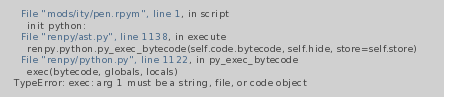 got that problem, whats wrong?(switched render, renamed mod doesnt help, no ignore button)
Thank you for your help, understanding and patience
And sorry for the large number of questions
Folder name is correct in icon