
Indie game storeFree gamesFun gamesHorror games
Game developmentAssetsComics
SalesBundles
Jobs
TagsGame Engines

Just wanted to say big ups for your product. Honestly been a game changer for me. I have been highly recommending it to all my other fellow producers. really looking forward to what you bring to V1. Glad to have a notification with lots of updates. 

I have a small request, not sure if this is possible in your current version. But It would be nice to be able to see a clear distinction to M/S. For example please see the attached screenshot of Span for an example Purple for Mid and pink for Side
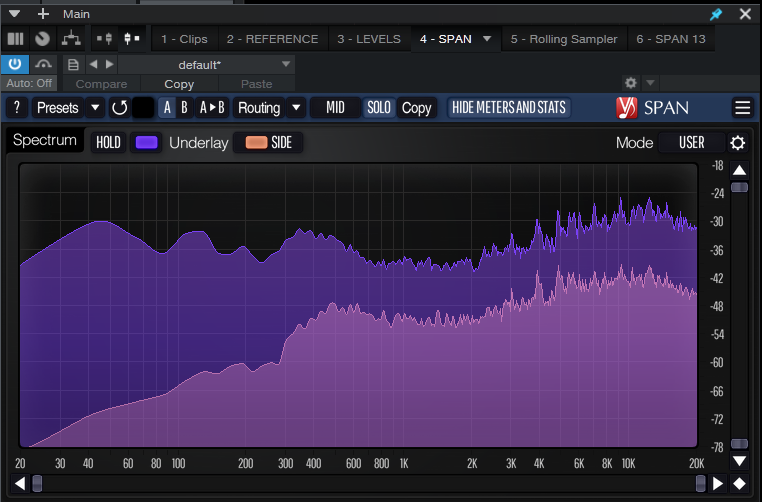


Thanks again for your work and I look forward to your future updates.  BeNNs. 
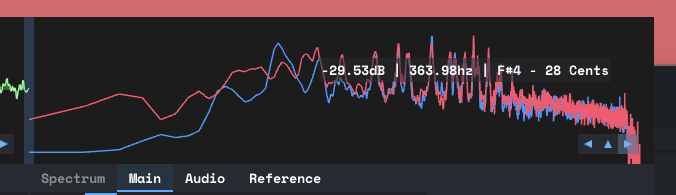
Hey! You can definitely edit the color of each line but there is not an option for backgrounds that match at the moment. Take a look at the Light_Shard theme. It looks like the following:


You can also create your own theme: https://minimeters.app/help/theming/

Hello,

Can you please show instructions on changing the colors like in the Image above? I just downloaded the last version, and I don't have the option to change the colors like in the Image. And I want to stay on direct theme while doing it.

Hey! You can change the colors by copying the Direct.txt theme file to a new file like HzHz.txt and adding the following lines:

spectrum_analyzer_main: 255,90,120
spectrum_analyzer_secondary: 70, 160, 255

You an access the file by following the directions here: https://minimeters.app/help/theming/ Make sure to rename the file as Direct.txt gets overwritten at launch.

Much appreciated!