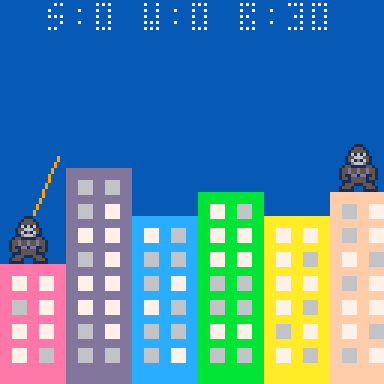
Good job on this, it looks and plays really nice!
I noticed you used 2-color sprites for the gorillas, and I initially thought this was a stylistic choice because of the way the original game looked, but reading below I saw that you had originally wanted to use 4-color sprites but ran out of chars, so I looked into it and found a fix if you're interested.
You'd need to replace 2 bits of code to make it work. The first is the sprite decoder, which you could replace with this, which is set to 3 4-color pixels per character and includes a color lookup string:
for i=0,128do v=ord('456',(ord("",i\3+1)-35)\4^(i%3)%4)sset(i%7,i\7,v)sset(12-i%7,i\7,v)end
You only actually need 7 pixels in width for the sprites, but I'm thinking maybe you used 8 to avoid a graphical glitch? Assuming you're using the full range of 221 chars, you could use up to 6 colors for each gorilla sprite if you wanted to, you'd just need to change the 4's there to 6's, and add a couple extra entries in the lookup string.
This would take you to 1026 or 1028 chars, but I noticed you're using binary AND operators for the button controls, and a combo of modulo and floor divide is slightly more compact, so you could replace those with this:
b=btn()z-=(b\2%2-b%2)/800f-=(b\8%2-b\4%2)/8
This saves 8 chars and gets you down to 1018 or 1020. =)
Here's a pic of a little test I made with 5-color sprites and a lighter blue background in 1024 chars.