Hi! Thanks a lot for playing my old Cornflakestein!
Of course, I can tell you what kind of tricks I used to modify RGM!
Every sprite in GameBitmaps folder has a correspondent file in the rgmys folder. You can change the position of buttons in a menu and the position of a weapon on the screen by modifying these files.
For example, in the rgmys folder, you can change the name of "weapon1bitmap1" to "weapon1bitmap1.png" to open it as a png file. Then change its resolution from standard 64x74 to 192x74, close it, remove "png" from its name, open "weapon1_1" sprite in the GameBitmaps folder and draw a weapon in the right corner of the screen if you want, instead of a weapon in the center.
The same thing with buttons in the menu, just change the resolution of a button in the rgmys and then draw what you want in the GameBitmaps.
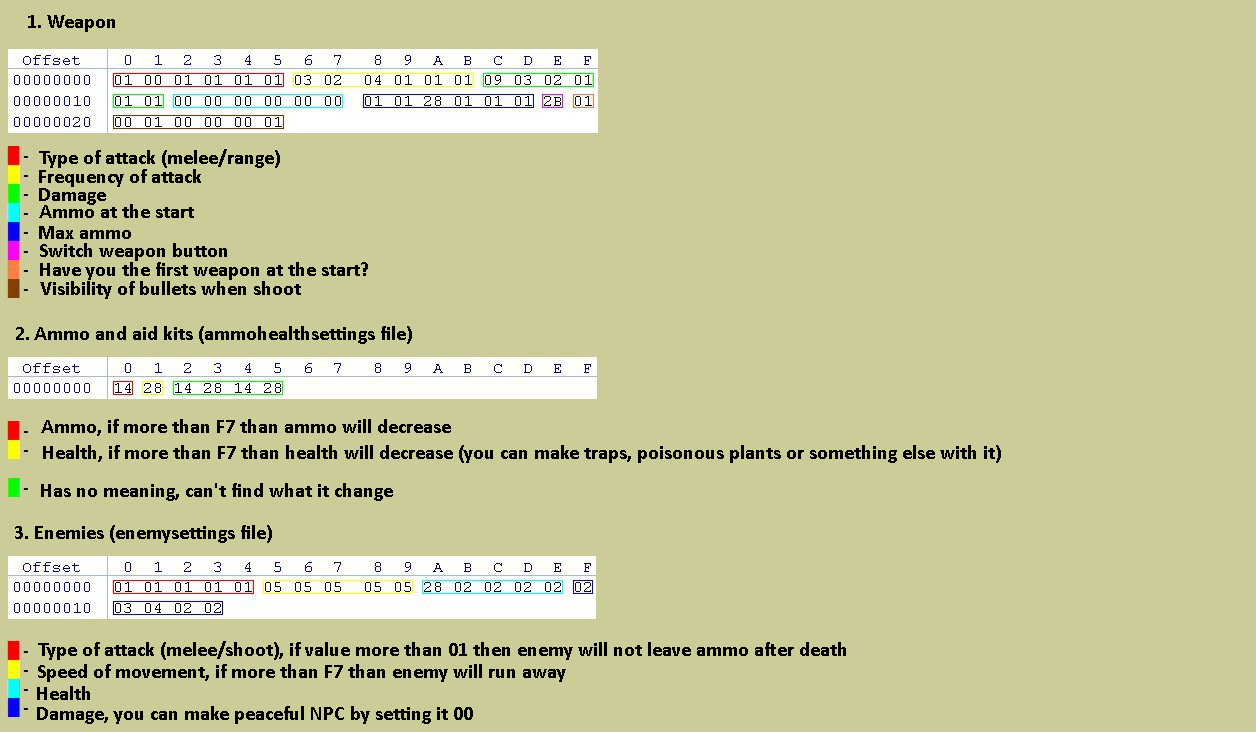
Also, you can change the behavior of enemies and set parameters of some stuff beyond boundaries permittable in the RGM by opening some rgmys files by any HEX editor (HxD, for example). I made a list with files and characteristics which you can change.
Also, highly recommend you to use RGM 4.62 it is the best version in my opinion.