
Indie game storeFree gamesFun gamesHorror games
Game developmentAssetsComics
SalesBundles
Jobs
TagsGame Engines

Arabic Support

A topic by Guilherme Oliveira created 38 days ago Views: 104 Replies: 7
Viewing posts 1 to 8

Hi, is there a working support for Arabic (RTL text)? I'm using the latest package version (and Unity 6.0).
I followed the recommended ArabicFixer script using ArabicSupport package. It works flawless for single line text. However multi-line text (aka Dialogues) it breaks completely.
Developer

Hi!


Just to confirm, this may be an outdated version of the package you're talking about? The newest version is this:  https://pastebin.com/h9fyzJcq Which has a few other adjustments in it that work for other RTL languages and fixing ligatures in general, hence the rename. 

Additionally, there is an "RTL" boolean under the "Beta" foldout in the Super Text Mesh inspector that can be used in tandem (or not, based on usage) with this component.


If multiline text (as in, multiple lines in a single text box, not a chain of dialogue) continues to be a problem, I'll give this a closer look! Make sure "break text" is disabled as that will make text split when a space is encountered. I might need to add specific Arabic punctuation to the internal punctuation list if I haven't done so already to keep line breaks happening at good times, or adjust the fixer script to accommodate for this. 

A screenshot of your Super Text Mesh object's inspector and appearance in the scene view and some sample text for me to use would be a massive help for this!

Hi @Kai, thanks for the reply. Sorry for the delay. I did a ton of checking and testing.

To clear something: When I mentioned latest package I meant that I have the latest SuperTextMesh on Asset Store. The project was using some older version to stability (and safety) reasons, but I upgraded to the latest, to see if that made Arabic work properly.
--
So a quick rundown of what I tried on the last weeks: I tried said pastebin code from the beginning. It worked fine for single line text, and texts without tags.
To try to fix it, with help of an external developer* tried rewriting the whole FixText function to fix tags (and icons/quads) and multi-line text. I got quads somewhat working, but it is hit or miss. Multi-line text still completely broken.
--
Current state:
I tried again the pastebin code after your reply, and did a lot of testing and checking on the Super Text Mesh settings on the inspector. I got multi-line to work on dialogue box, yay. It needed rtl = true, and right alignment. For this specific piece of UI, this combo can work. But I can't support every text to be right alignment unfortunately, but I don't think it will be an issue for UI, single work texts.
But tags (color, bold, etc) and icons (quads) are still very broken. I think this is the last stuff that I  need to have a complete working solution.

Fully broken text when using color and bold tags. Bold only in a piece of text is broken too.

Expected (imagine that lorem ipsum = arabic text):

Welcome, lorem, ipsum ipsum <f=bold><c=teachers>LOREM IPSUM</c></f>.

Result:

Complete gibberish characters. Broken characters, on top of eachother. (See last text on the images

Fix Tags = true, Flip Curly Braces = false: text icon (quad) don't render at all

Fix Tags = true, Flip Curly Braces = true: text icon (quad) don't render at all

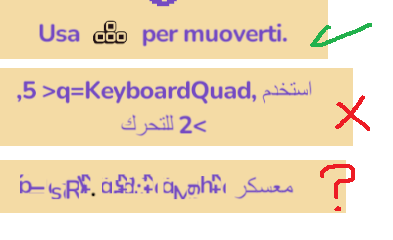
Fix Tags = false, Flip Curly Braces = false: استخدم <q=KeyboardQuad, 5, 2> للتحرك    (Tag/Quad render as text, with < > inverted ">q=KeyboardQuad, ,5,2<")

Fix Tags = false, Flip Curly Braces = true: استخدم <q=KeyboardQuad, 5, 2> للتحرك    (Tag/Quad render as text, with < > inverted ">q=KeyboardQuad, ,5,2<")

{Tried with either rtl true/false. Tried with all text alignments}

Part 2 (Message too long for forum?)

Here are some visual examples:

Examples

visal examples

(Top: working example of quad working in latin languages. Middle: Same example on Arabic. Bottom: bold/color tags in the text.)

Is there I way I can DM or e-mail you privately to share more info/resources? For example I could share the semi-Fix for quad rendering in RTL, but it uses a completely different logic than the original FixTest function. I can't make that work on the pastebin code at all.

Thanks in advance!

Developer

Sure, you can send me an email with my address on this page: https://kaiclavier.com/docs/

Some sample text to work with would be fantastic, and a screenshot of your inspector setup so I can copy that.


I just wanted to make sure the support script was the most recent version so I can work from that! There was a chance you were using the outdated version. I'm interested in the changes you made, but I'll see what I can do with the latest code first!

Hm, it looks like it's not properly flipping tags around to work right with this setup for whatever reason. I remember having that work before so I wonder what the issue is... I'll be able to give this a closer look later this week if that's okay! It's been a while since I edited it, so it may just be some configuration isn't set up.

The third visual example there is an error I haven't seen in a long time, but I think something is getting confused with the font... Hopefully it'll resolve itself with this other issue fixed, otherwise I have a few ideas on what the cause could be. (Note for future me: internal/external material batcher being confused by helper script moving indices around? Might have to change uv3.x value retroactively.) It could also just be that the font doesn't properly support bold text or something.


Another note I'll quickly say about Arabic text, usually it's the Unity inspector that breaks a lot of it in the first place by displaying things left-to-right and generally just not having proper support for it. (But a fixer is still needed since the tag system and display system goes left-to-right right now. Maybe an alt fix could be if I edit code to be properly flippable to be right-to-left only when rendering, instead of shifting around character order? Not sure how difficult this would actually be, but it would probably take a fair amount of time.) Anyway, if you can have a script that reads your language file directly from a txt or another non-unity format and prints that directly to a text mesh object, ligatures can be imported without needing to be fixed, if I remember correctly. (I could also not be remembering correctly.) I think the same was also true for the emoji support script.


Anyway sorry that's a bit rambling, I included a few notes for myself too... Hopefully I can get this working for you soon! With any luck it'll just be a configuration issue and if not I can edit the support script soon.

Developer

Just letting you know, I replied to your email and I believe I fixed it!

Just updating it: Yes, the issue is fixed. Thanks!

Developer

Oh, great! I'll update the asset with the fix shortly, then.