Just updating it: Yes, the issue is fixed. Thanks!
Guilherme Oliveira
Recent community posts
Part 2 (Message too long for forum?)
Here are some visual examples:
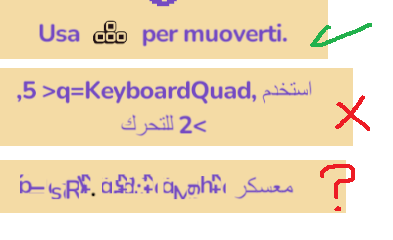
(Top: working example of quad working in latin languages. Middle: Same example on Arabic. Bottom: bold/color tags in the text.)
Is there I way I can DM or e-mail you privately to share more info/resources? For example I could share the semi-Fix for quad rendering in RTL, but it uses a completely different logic than the original FixTest function. I can't make that work on the pastebin code at all.
Thanks in advance!
Hi @Kai, thanks for the reply. Sorry for the delay. I did a ton of checking and testing.
To clear something: When I mentioned latest package I meant that I have the latest SuperTextMesh on Asset Store. The project was using some older version to stability (and safety) reasons, but I upgraded to the latest, to see if that made Arabic work properly.
--
So a quick rundown of what I tried on the last weeks: I tried said pastebin code from the beginning. It worked fine for single line text, and texts without tags.
To try to fix it, with help of an external developer* tried rewriting the whole FixText function to fix tags (and icons/quads) and multi-line text. I got quads somewhat working, but it is hit or miss. Multi-line text still completely broken.
--
Current state:
I tried again the pastebin code after your reply, and did a lot of testing and checking on the Super Text Mesh settings on the inspector. I got multi-line to work on dialogue box, yay. It needed rtl = true, and right alignment. For this specific piece of UI, this combo can work. But I can't support every text to be right alignment unfortunately, but I don't think it will be an issue for UI, single work texts.
But tags (color, bold, etc) and icons (quads) are still very broken. I think this is the last stuff that I need to have a complete working solution.
Fully broken text when using color and bold tags. Bold only in a piece of text is broken too.
Expected (imagine that lorem ipsum = arabic text):
Welcome, lorem, ipsum ipsum <f=bold><c=teachers>LOREM IPSUM</c></f>.
Result:
Complete gibberish characters. Broken characters, on top of eachother. (See last text on the images
Fix Tags = true, Flip Curly Braces = false: text icon (quad) don't render at all
Fix Tags = true, Flip Curly Braces = true: text icon (quad) don't render at all
Fix Tags = false, Flip Curly Braces = false: استخدم <q=KeyboardQuad, 5, 2> للتحرك (Tag/Quad render as text, with < > inverted ">q=KeyboardQuad, ,5,2<")
Fix Tags = false, Flip Curly Braces = true: استخدم <q=KeyboardQuad, 5, 2> للتحرك (Tag/Quad render as text, with < > inverted ">q=KeyboardQuad, ,5,2<")
{Tried with either rtl true/false. Tried with all text alignments}