

They're pretty easy and reliably reproducable, actually.
In the Studio, create a new duelist and assign a deck to them. Even if you save the project, the Studio will show that there is an issue (no deck assigned), and if going into playtest and battling that duelist, they have no cards. It can be fixed by creating another duelist, then immediately deleting them.
The process for the card artwork crop is basically the same. Create a new card, assign it an image for the artwork and adjust the crop, for example to Manual Frame and cvhange the values. Press "Apply Image Fit", but it doesn't actually get applied even if you save the project. Only after creating another new card, he changes from the previous card get actually applied.
The local variables on the effects of magic and trap cards seem a little more tricky. I don't know if other effects are also affected, but with the local variables it's very obvious because I can inspect that in the console while the game runs. The localValues object on one of my magic cards has these entries at runtime:
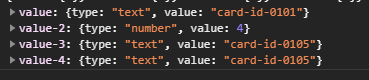
But in the Studio, these "value", "value-2", and so on, have actual names. It became apparent when the Studio showed me an error that I couldn't assign the variable "value-2" twice. The process is the same, create a new magic card, give it the effect "Save Local Value", and give the variable a name and a value. The value will be saved, but the name isn't. In this case, creating another new card and deleting it doesn't work to solve the problem. I didn't have this particular problem in a previous version of the Studio, though, so it must have been either this or the previous version before it that caused this bug.
Oh and one more thing I noticed about the Studio: If you delete or rename the Monster class "Warrior" and the monster sub class "Neutral", the Studio will display errors about magic and trap cards referring to them (even if they don't).