Just gave it a try, and seems to work now! No more crash and the switches get turned on/off as they should as far as I can tell.
stahl-tier
Creator of
Recent community posts
Hmm, I think Level arrangement might be good, but also take it with a grain of salt because I'm not a native english speaker! I think my main confusion came from the way exits are used both as "real" exits from the dungeon and at the same time exits between the grid elements. (Plus the plugin parameters have "main exits" in the Region Id settings but those aren't explained anywhere on the blog as far as I can find.) The role of the different types of snippets and snippet maps is not super well explained on the blog, so in combination with the exits setup, that's where a lot of the guessing comes from I think.
I figured out how it works now, but I'm also not really sure how I would go about explaining it to someone else in a way that's easier to understand...
Oh I see! That makes sense, thanks for clearing up my confusion. I understood the 5x5 maps grid thing, but I think I got confused about the way exits work exactly. Having "internal" exits always be available for grids wider than 1 map totally makes sense though now that you put it this way. The asset is very complicated to tackle at first, but the more I find out by reading through the different blog sections and by experimenting, the more impressed I am about all the possibilities.
Hey, sorry it's me again! I've been messing with the plugin some more and tried to follow the blog's steps for setting up a "dungeon with large areas". I followed the steps closely but maybe I'm doing something wrong.
I set the exits to north & south, but when trying to enter the dungeon via the plugin command, I get the following two popup warnings: "Unable to find spots for left Exit. Try to make it easier for the Plugin to find spots. The plugin tries to resume map generation." and "Wanted to spawn from direction top, but the plugin cannot find a good position. The plugin tries to resume generation." Sometimes, instead of left Exit it says right Exit, but the second message is the same everytime.
Afterwards I get teleported to the dungeon map, but nothing from the Assets map gets spawned, just the empty rooms and (sometimes) one northern exit.
Only when I add regions to the Snippets map and the Assets map for the left and right exits (despite deactivating those), the generation properly finishes. Could it be an oversight in the code? I use Cave (with snippets) for the template and "5x5 Grid" for the room layout. To make sure it wasn't an incompatibility, I recreated the setup on a new blank project (no other plugins).
If needed for testing, I could try to send over this minimal setup project somehow.
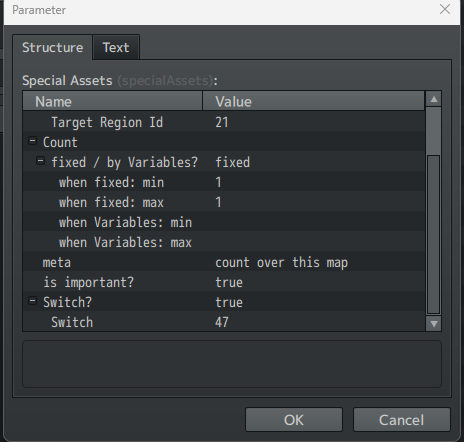
Hey, I run into an error when I try to use the Special Assets with Switches. When I turn "Switch?" to true and set a Switch ID like in the picture, the game shows a plugin error the moment I enter the first room of the dungeon: "Uncaught ReferenceError: switchId is not defined". When I set "Switch?" to false, special assets work normally. I use version 3.2.0 of the Core and snippets plugins.
I'm so glad to hear that this worked for you! I'm able to somewhat consistently reproduce the issue now on my laptop (it only seems to happen extremely rarely on my main PC that I use for developing the game mostly but on my laptop I can get the bug to trigger about half of the time), and it's actually really strange behavior as even in my debug/playtesting mode, there are no errors or logs when it happens. It seems the game doesn't even properly start loading when it happens.
I've been looking around and asking around with other RPG Maker devs, and the reasons why it happened to them seem to vary (and not all of them were able to fix it) but I have some ideas of things I can try to find the reason. Since I'm focusing heavily on technical issues and behind-the-scenes optimizations for the next update, this is something I'm definitely going to try to get to the bottom of again.
I had hoped changing the preloading of assets would have fixed it, but that doesn't seem to have been the problem. I'll have to really comb through the game's assets and custom code thoroughly to see if anything failing to load silently is holding up the process so extremely. I'm also looking into upgrading/downgrading to a different version of NW.js and pixi.js, since those came up as possible causes a couple times in other devs' cases.
For now I really appreciate your reporting, maybe one more thing that could help me pinpoint why different PCs are affected so differently: Could you share your hardware specs? Specifically this info, which you can access from the system settings (my system is in German, but we have the same Windows version so your menu entries should be about the same regardless of language)
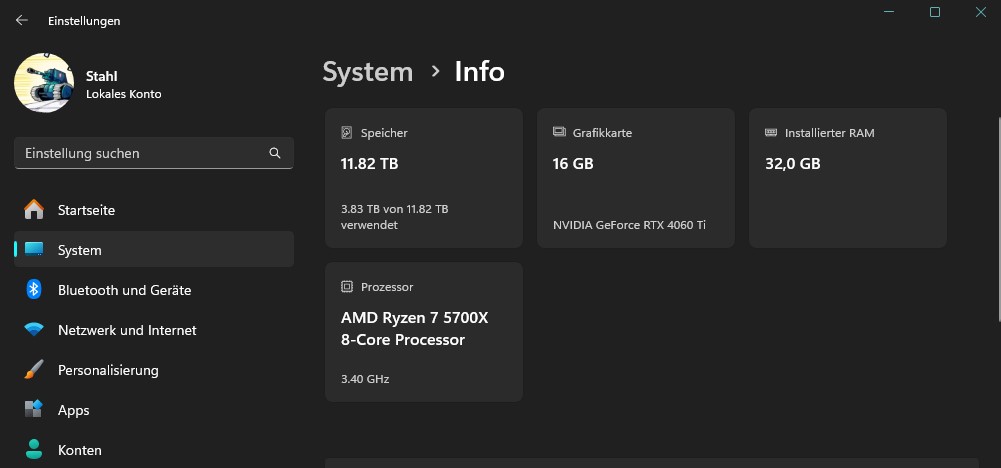
Quick note: In the near future I will swap the comment section of this page over to be a discussion board, to make the reporting of bugs and asking questions or giving suggestions more organized.
That's unfortunate! I was trying to find the cause of the issue but it's really hard to pin down, and I only found some info about it possibly being a bug with RPG Maker itself. It happens sometimes on my end too now, though it seems that resizing the window to fullscreen and back to normal window makes it not-stuck most of the time. Can you try that?
I tested the plugin and it seems to work fine! But I'm wondering if there is some way to make events be able to travel between the sub-maps with this plugin active that doesn't require manually transfering them?
If I set up a large map to have submaps and an event would cross the "border" between two of those maps via move route for example, it instead bumps into the edge and can't move any further. If it was possible for events to move between the submaps freely that would make this plugin perfect, but I understand if it's not possible. It's a useful plugin either way.
Hey, I just started using the Event Spawner but it seems when spawning an event, it won't run its Autorun/Parallel triggers. Instead it just sits there, doing nothing. Is that intended or a bug?
Edit: It seems this only happens when using it together with VisuMZ's Events and Movement Core plugin. When both plugins are enabled, the events spawned through your plugin break completely.
Hey, I can only see the map scene and an action combat being shown in the screenshots and videos, but I'm wondering how difficult it would be to replace the standard HP bar in menus and the default battle scenes as well. Or if the plugin has any easily accessible functions that could be used in those other scenes to draw the hearts if I hide the default HP bar.
Das Tool sieht echt genial aus, hab schon oft und gerne euren Plugin Builder verwendet, weil es beim Pluginschreiben eine Menge Kopierarbeit erspart. Erst vor ein paar Tagen hab ich mir gedacht es wäre echt toll, wenn ich die Datenbank auch außerhalb von RPG Maker MZ's Interface bearbeiten könnte, um mir das ständige hin-und-her Klicken im Editor zu ersparen. Ich hab zwar schon einige Tools gesehen die dies oder das machen, aber dann hat man erst recht wieder fünf Fenster offen... Das Feature-Set hier wirkt so als ob es genau für meine Projekte passen würde.
Ist gekauft, danke!
Eine Frage hätte ich noch, wäre es möglich oder geplant, in einem zukünftigen Update eine durchsuchbare Referenz-Ansicht für die Help-Sektionen von Plugins hinzuzufügen? Derzeit verwende ich dafür MVDoc (https://starlit.itch.io/mvdoc) aber es wäre toll, so etwas in der Art auch im AssetStudio integriert zu haben.
Hi! Thanks for reporting the issue, I've run into this occasionally while playtesting the currently available version on my laptop. While I couldn't reproduce it on my desktop PC, it seems to be related to the asset pre-loading process crashing. Usually, trying again to run the game would fix it (but sometimes it took another try).
In the new version that we're currently working on (which should have been labeled 0.3.0 in the devlog as I've just noticed, not 0.2.0 since that's the currently available version, oops) the issue doesn't seem to happen anymore, or at least much less frequently, after I made some changes to the pre-loading process.
I've noticed an issue when enemies use the same (charged) skills as player actors - the way the "canPaySkillCost" function is overwritten by this plugin will always return false for enemies. So they will only be able to sit around and do nothing. This can work for some games (where the enemies use different skills from actors) but for others, where enemies and actors use the same database skills, an easy bandaid solution is to change the line inside the function from "if (!this.isActor()) return false;" to "if (!this.isActor()) return true;". It means that enemies will have infinite charges on their skills, but for a future update of this plugin I think it would be awesome if there was some way to use the charges for enemies too in the same way that actors do.
Really cute game! The picking up felt a little fiddly (it was difficult to find the exact spot to stand to be able to pick up the stars), and I think having a sort of indicator on the edges of the screen about the approximate locations of the remaining stars would really help finding all of them. I loved the intro with the comic-book style by the way!