
Indie game storeFree gamesFun gamesHorror games
Game developmentAssetsComics
SalesBundles
Jobs
TagsGame Engines
(12 edits)

As of Update 2.1.0, even if custom-cursor is set to ON, its invisible. Furthermore, the selection rectangle—if the cursor setting is set to OFF—is invisible as well. I've tested this by deleting all other plugins, except your own, on a copy of my project. 

If I revert back to 2.0.2, it works again. Seems like you updated bunch at once (in secret!) Ill go test that again later then (in case). Ill edit this comment with my findings.

EDIT: Same thing. Mouse cursor is completely gone.

Also, Ive noticed something... whenever you have an update to the status screen plugin, it reshuffles some elemental resistance icons (happened last time too, but I forgot to tell you). Weird! I guess its reverting back to some defaults set on your end? Its not hard to set back to place. Just an easy-to-miss oddity that others should be weary about.
(+1)

That was fast, I haven't even finalized the changelog yet!

Anyway, thanks for reporting the cursor issue. It should work now (version 2.1.1).

Yes, the elemental icons are now set in the toolbox for the main menu. Unfortunately, my plugin cannot transfer user settings defined in the plugin manager into its new design, so I regret that you need to set them up again. But it should be way easier than before!

(2 edits)

Still no cursor on my end... TwT 

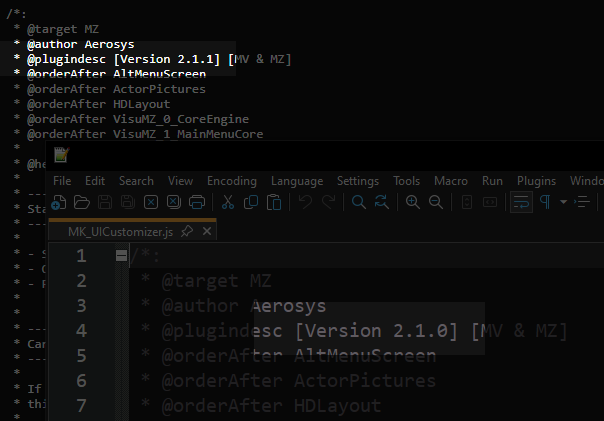
Also, what sort of SORCERY is this? On the plugin download page, it says 2.1.1. Once downloaded, THE CODE CHANGES BACK to 2.1.0. Furthermore, if I edit the version number, its still counted as '2.1.0' once inside the F9 menu (so not even the engine counts it as 'true' 2.1.1). Just to be sure, like last time, I did a project duplicate, erasing ALL but your plugins. 


(+1)

It could be due to browser caching. Try force-reloading the browser tab when you are about to download the plugin.

The version number appears twice. First, in the plugin header (as seen in your screenshot) but this info is only for you to read it in the plugin manager. Second, the version number also appears just below the plugin header:

var Imported = Imported || { };
Imported.MK_UICustomizer = '2.1.1';

This is where the code actually reads the current version number.