

Ahmwma's suggestions offer one possible approach; here's another idea.
Let's say you have a widget on every card of your deck in the same position named "inventory". It could be a button set to "Show None", for example. Draggable canvases on each card will be considered "items", and any of those items that overlap the "inventory" bounding box are treated as being in the inventory and moved automatically as you go from card to card.
In the deck-level script (File -> Properties... -> Script... from the menu), we'll define a function named "organize[]" which removes any items in the inventory area of a destination card (!) and then copies over the items in the inventory of the card we're currently on:
on organize there do
 on overlaps a b do min(a.pos<b.pos+b.size),b.pos<a.pos+a.size end
 on items card do
  extract value
  where each v in value overlaps[v card.widgets.inventory] end
  where value..draggable
  where value..type="canvas"
  from card.widgets
 end
 there.remove[items[there]]
 there.paste[deck.card.copy[items[deck.card]]]
end
Previously, when we moved from card to card in our game our scripts might look something like:
on click do
 go["SomeCard" "BoxOpen"]
end
Now we need to call organize[] on the destination card before we go[] to it, like so:
on click do
 organize[SomeCard]
 go["SomeCard" "BoxOpen"]
end
Normally, pressing the left and right arrow keys will flip Decker between cards; this could break our inventory system. To prevent that problem, we can define a navigate[] function in the deck-level script as well which does nothing, like so:
on navigate dir do
 # this space intentionally left blank
end
Here's what the whole thing looks like together:
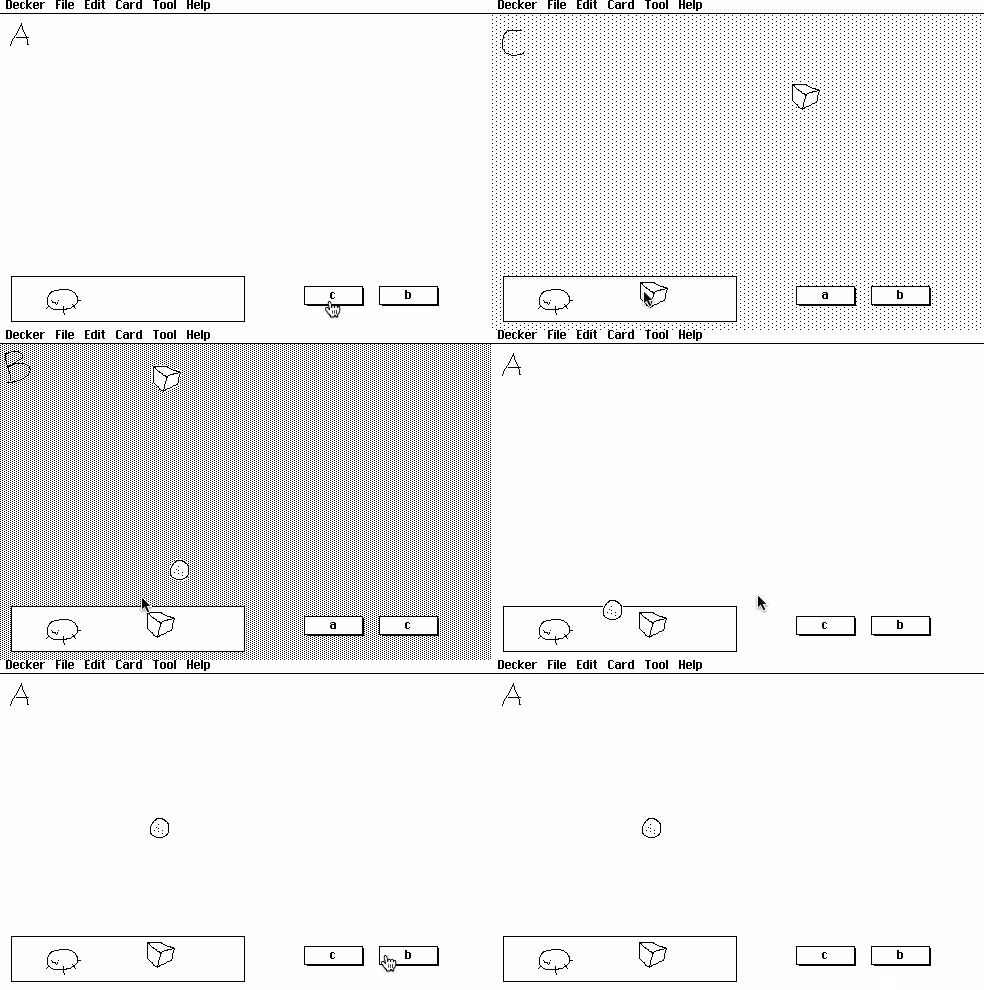
With a little extra animation for card transitions this could look a lot like the truck-bed inventory system of Horsey Game, for example.