
Indie game storeFree gamesFun gamesHorror games
Game developmentAssetsComics
SalesBundles
Jobs
TagsGame Engines
(2 edits)

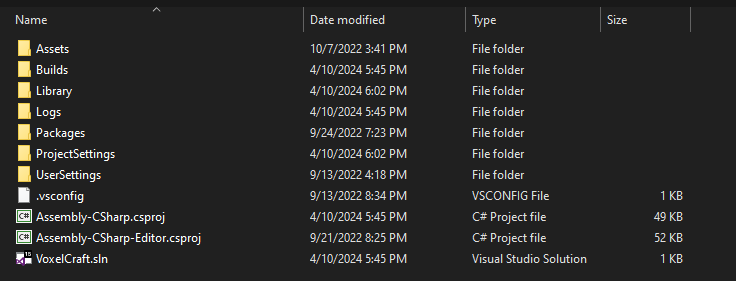
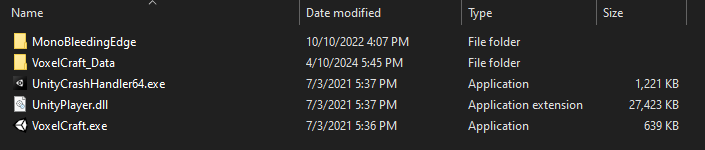
Runnable files will usually have a file with an extension such as .exe (for Windows executables) or .html (web player builds). You may need to enable “Show file extensions” in File Explorer if you’re on Windows. For game engines like Unity and Godot, you’ll only get runnable files once you Export the game. All the other files are project files, or the raw assets used to make your game. Spare Gadgets is saying to make sure you don’t upload these project files, and instead Export the game and upload the runnable files.

This is an example of project files (do not upload these):
This is an example of runnable files for Windows (zip and upload these! Users can then download them to play on their PC):

ok ok I will try to fallow this and a video and hopefully I can get it up also do you have any idea how to fix these errors I fixed the other ones but these dont want to be fixed I guess

I’m not knowledgeable in Godot, but I’ll try to help. Are these errors stopping the game from running, or causing anything to become messed up in-game?

For the top error (_load), you might have moved files used for game assets. Apparently restarting the editor can help. Or you can try closing Godot, opening another project, then opening the project with the errors, and hopefully then that error will be gone.

I’m not sure about the one below (start), seems to be an issue with autoload stuff.

For the last two, I think it’s throwing that error because you’re trying to remove a CollisionObject at a time when the engine is still handling physics, meaning that undesired behavior can arise. In short, I think you need to use call_deferred() and pass in the function you want to run (e.g. a function that removes a CollisionObject) as a parameter. Not sure if that’s how it actually works though. https://www.reddit.com/r/godot/comments/1cp8zln/need_some_help_understanding_a_code_error_i_got/ https://docs.godotengine.org/en/stable/classes/class_object.html#class-object-method-call-deferred

ok this gave me some ideas and I will say what confused me is the game still seems to run fine with the errors so idk just want to make sure they dont cause issues for others loading the game. Thanks for your help man God bless and Jesus loves you