All of his font download pages say “free to use with attribution” or some variant of that, so as long as you credit Daniel Linssen for the fonts you should be fine :) I’d credit both on the game page and in-game if possible.
Programming Protogen
Creator of
Recent community posts
Rule 3 of the jam rules: “3. Please don’t use generative AI or assets that don’t belong to you. You can use any asset packs that are free or ones that you have the right to use.” So if you find a free/public domain asset pack, or if you bought an asset pack and have the license to use it, then that’s fine. But don’t reuse content from other peoples’/companies’ games unless you’re absolutely positive it’s legal (e.g. the game uses asset packs itself; even still, you should download the assets from the original source.)
Examples of asset resources/sites that would be allowed include Kenney Assets, Pixabay, or most assets packs available on this page: https://itch.io/game-assets Examples of assets that would not be allowed include music you ripped from your favorite game, sprite rips of an NES game from Spriter’s Resource (not endorsed), sound effects ripped from Skyrim etc.
For that, I’d recommend using any drawing program that has separate layers, like GIMP or Krita. I’d avoid Microsoft Paint since everything is on one layer. The reason you want layers is so that you can separate different elements of your image, and more easily swap out individual elements to see how they look.
I’m not an expert, but if you’re aiming for a good-looking thumbnail, I think there are two key elements that are vital to a good thumbnail: your title, and the background art. First up with the title, you want it to be fairly large and easy to see at a glance. If you have the time, make it something unique and stylized. No matter what though, you should make sure it’s easily readable at a glance. Next with the background art, you can either just take a screenshot of your game and crop it, or you can make a special illustration specifically for the thumbnail. Either way, it should represent the game. If the main character of your game is a cute little kitty, for example, then you better show that cat on the cover. Better yet, if your game is also a platformer, you can show that by making it so the cat is jumping from one platform to another. This communicates to the viewer the theme and genre of your game.
These tips aren’t absolutely necessary for your first game, but if you’re really wanting people to click on it and check it out, then it’s a good idea to have a thumbnail that shows off your game in some capacity.
(Disclaimer: I’m not a fan of using GenAI, so I may be biased lol) I’d say it’s okay only if the AI part of it is detecting the background boundaries, and not regenerating part of the image. For example, if you’re removing the background of a picture of a house, the AI algorithm should only be finding what parts of the image are the background, and turning those parts transparent. But if the program regenerates any part of the actual image content itself (e.g. if it modifies the house in the image), then I’d say that enters disallowed territory. The best way to tell if the background remover altered the actual image is to zoom in on the same spot in both the original and modified image, and look for weird artifacts or differences in the modified one. If they look exactly the same, you’re in the clear, but if you find artifacts, then it’s been regenerated and would certainly count as an AI-generated image.
If you’re worried about AI, I personally used GIMP’s magic wand tool to select parts of the background and delete them, then touched up anything that I missed with the eraser tool. It’s more tedious, but works well if you want to avoid using GenAI, and allows you to have more control over how the final result appears.
I’m not knowledgeable in Godot, but I’ll try to help. Are these errors stopping the game from running, or causing anything to become messed up in-game?
For the top error (_load), you might have moved files used for game assets. Apparently restarting the editor can help. Or you can try closing Godot, opening another project, then opening the project with the errors, and hopefully then that error will be gone.
I’m not sure about the one below (start), seems to be an issue with autoload stuff.
For the last two, I think it’s throwing that error because you’re trying to remove a CollisionObject at a time when the engine is still handling physics, meaning that undesired behavior can arise. In short, I think you need to use call_deferred() and pass in the function you want to run (e.g. a function that removes a CollisionObject) as a parameter. Not sure if that’s how it actually works though. https://www.reddit.com/r/godot/comments/1cp8zln/need_some_help_understanding_a_code_error_i_got/ https://docs.godotengine.org/en/stable/classes/class_object.html#class-object-method-call-deferred
Yeah, I’d say it’s chill, but only if you’re using tutorials for smaller things and not using a tutorial as a template for your entire game. For example, I think it’d be fair to look up tutorials on how to program collisions, and follow that tutorial to implement it into your game, so long as you aren’t just looking for a GitHub link and copy-pasting code from there. But I’d say a tutorial guiding you through every step to create a specific game wouldn’t be great.
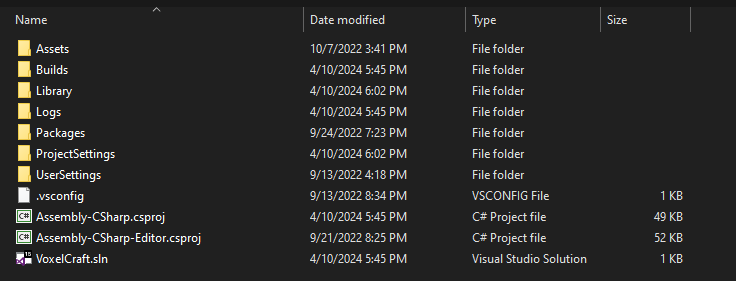
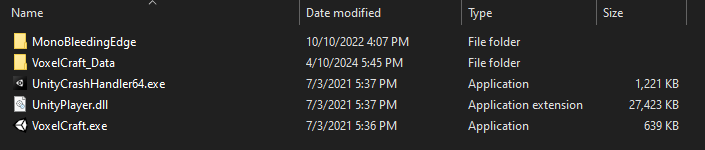
Runnable files will usually have a file with an extension such as .exe (for Windows executables) or .html (web player builds). You may need to enable “Show file extensions” in File Explorer if you’re on Windows. For game engines like Unity and Godot, you’ll only get runnable files once you Export the game. All the other files are project files, or the raw assets used to make your game. Spare Gadgets is saying to make sure you don’t upload these project files, and instead Export the game and upload the runnable files.
This is an example of project files (do not upload these):
This is an example of runnable files for Windows (zip and upload these! Users can then download them to play on their PC):
To submit your game to the jam, first make sure you’ve created the page for your game, entered in all the relevant information and uploaded the game files, and set the Visibility & access setting to Public. Note that this will make your project visible to all of itch.io, including other jam participants once you submit it, so this is best done later in the jam once you have a fully playable build of your game. Then go to the overview page at https://itch.io/jam/brainless-game-jam and click “Submit your project”. (If you don’t see that button, make sure you’ve joined the jam.) Then you can choose your game from the “Existing games” dropdown, enter in the rest of the information, and submit! Good luck in the jam! :)
Wow, this had me engaged for a pretty long time! It was extremely satisfying to figure out the various little puzzles, and there were some moments where I felt very clever for figuring out the solution. Unfortunately, I haven’t beaten it yet, due to some trouble figuring out the secret safe’s password and the chemical mixing. But I’m already itching to try again! It’s impressive how much story and lore there is, too. Also, very nice use of RPG Maker, I love when people think outside of the box like that! I’ve never thought of making a point-and-click game with it before.
Thank you so much! I’m glad you enjoyed it! I was worried that it wouldn’t work too well, but I decided to try it anyway and found that it was better than I expected. Oh, I never explained it in-game or even on the main page, but yeah, you are supposed to get a slight extension every time you level up. This is to help counter-act the time lost grinding to regain levels. I’ll probably add a note to the game page explaining that. I also assume you managed to fully complete the game and beat the Demon Lord? As silly as this is, I actually wasn’t sure if it was reasonable to beat him since he was pretty much a last-moment addition, haha! And if you did beat him, around what level was everybody at?
Thank you! The original Dragon Quest was definitely one of my biggest inspirations for the style and feel :) I’ll look into adding an options menu that includes the option of tweaking the battle speed. I’ll probably also add in something that slows down the timer while in battle to reflect your changes to battle speed, e.g. in a half speed battle, the timer takes twice as long to tick down, that way there’s no disadvantage to any players who slow down the battle.
By the time loop not working, do you mean when the time loop reset happens, you’re still in the town menu until you move? I’ll have to look into that, I’m pretty sure I know what’s causing that. And I’ll also balance out the encounter rates if I can :) Thank you for the feedback, I’ll be sure to check out your game later!
Ah, yeah, the encounter rate can be a bit much (or too little) at times; if I continue to work on this, I’ll definitely add something to balance it out and make it feel fair and well-paced. Ah, that’s a good point about the cacti. I should probably just make them walkable tiles, and maybe see if I can make it clearer that trees can be walked through. Thank you so much!