Indie game storeFree gamesFun gamesHorror games
Game developmentAssetsComics
SalesBundles
Jobs
TagsGame Engines

Asset Forge

Create your own 3D models and 2D sprites! · By Kenney

importing .obj files on asset forge doesnt work

A topic by Angie64 created 88 days ago Views: 298 Replies: 6
Viewing posts 1 to 3
(1 edit)


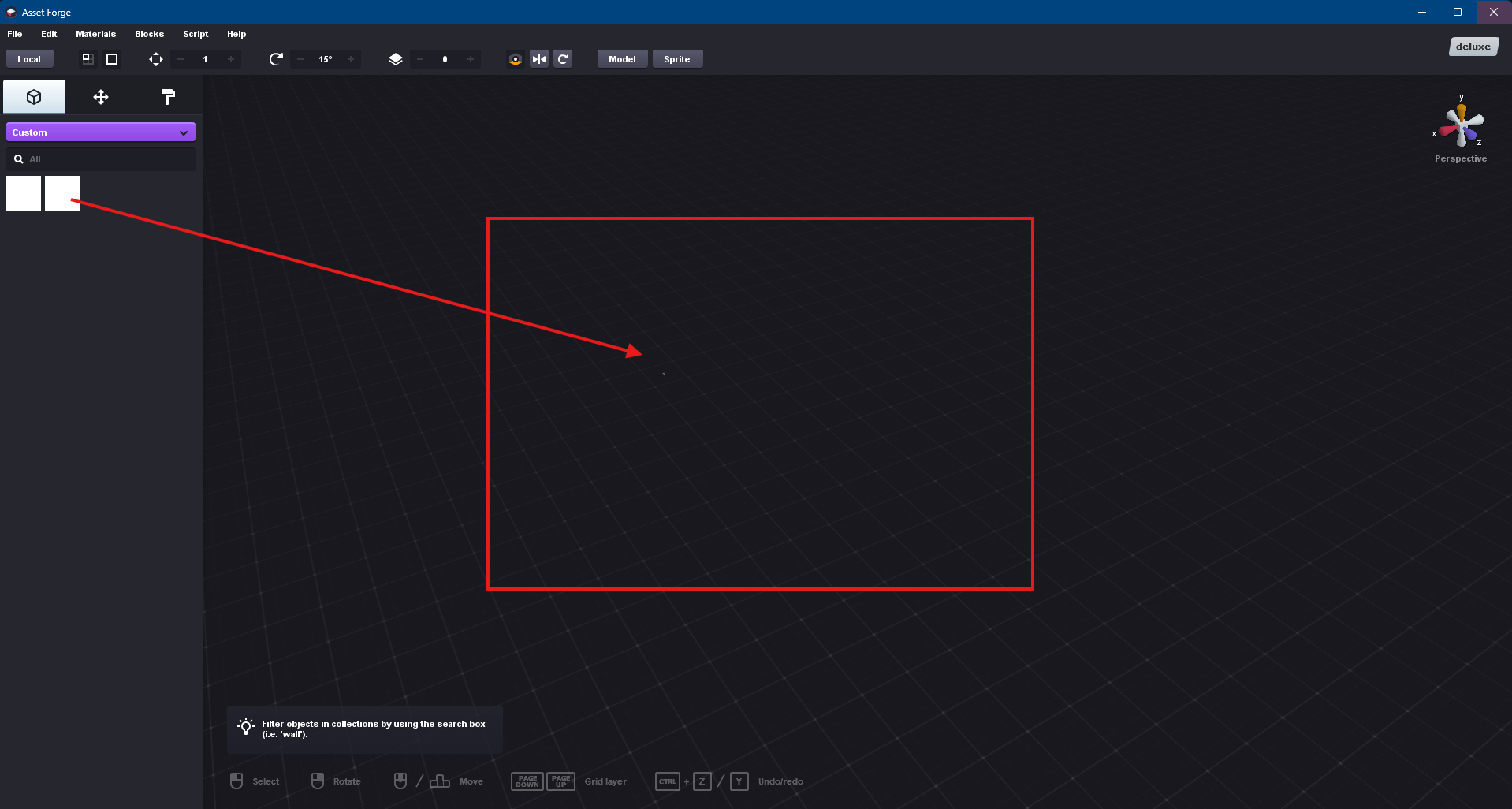
I tried importing new .obj files and can't seem to put them in my scene when I tried clicking on it, tried looking for a solution in the community, didn't find it unless if i'm not looking in the right place, did follow the tutorial here.

https://kenney.nl/knowledge-base/asset-forge/importing-custom-blocks-in-asset-forge#Custom+properties

I am running Windows 11.

Any help or insight on how i could fix this issue would be greatly appreciated!

Thanks!

It imported just fine. You made it the wrong size.

what do you mean by that ? 

Also, asset forge fails to load OBJ files if they’re missing a newline at the end of the file.

This happens when exporting OBJ models from Block bench, for example.

Manually adding a newline will fix it.

This has been fixed in the upcoming 2.6.0 version, thanks for reporting!

I had a feeling you’d be updating Asset Forge after seeing you’re using it to build your city!

I can’t wait!

I'm guessing that the bug fixed in 2.6.0 is specifically the one about objs with a missing newline at the end?

I'm seeing the same problem as the OP (objects appear in the collection list, but it just shows a white background and they can't be added to the scene), and I have verified that the .obj and .mfl files have newlines at the end. I'm wondering if the bug I'm seeing will also be fixed as part of 2.6.0, or if this is caused by something else.

If it helps, I got this software to experiment with taking simple premade 3D assets and exporting them as 2D in isometric perspective. To test things out, I'm using this asset pack: https://kaylousberg.itch.io/restaurant-bits. I have mostly worked with 2D and so I will admit to not knowing how to check if the assets in this pack meet all the criteria for import, so apologies if I'm trying to do something unsupported. Also, to make things worse, I am on Mac and using the Mac version, sorry... ^_^; (I would much prefer to work on Mac, but do have the ability to try it on Windows if a Mac issue might be the culprit.)

One last piece of info in case it provides any clues on the problem. After trying the latest version (2.5.2), I tried 2.4.1 to see if that would fare any better. After I added the assets to that version, it hangs during startup in the "caching thumbnails" step. I left it for quite some time (at least 5 mins) before quitting.