

I'm sorry it isn't working for you. That's weird... You shouldn't need python to run it. The app is wrapped in a python wrapper but it should work because everything it needs is bundled into the exe to run the wrapper. I'll do some testing and see if I can figure it out. I'll let you know if I figure anything out. If you don't want to wait and see, feel free to get a refund. Thanks for the report, either way.
I just did some testing on a couple of clean PCs with NO PYTHON installed and the app ran fine (Windows 11). I did have to turn off the smart app control to allow windows to run the exe, because it has no reputation, yet. But then the app ran, no problem. I don't know if it's the same issue that is causing it to not work for you, but I was getting a smart screen blocking the app from running at all, but no errors.
Can you try to run the app on another machine to verify the app actually runs? Maybe you got a corrupted download, I don't know, just guessing. I even just tried downloading the zip from itch to make sure nothing was messed up with it after I uploaded it, and it ran too. It may just be an edge case with your machine.
Sorry, again. I hope you can get it working. If not, again, feel free to get a refund. And thanks for giving it a try!
26 days ago(+1)
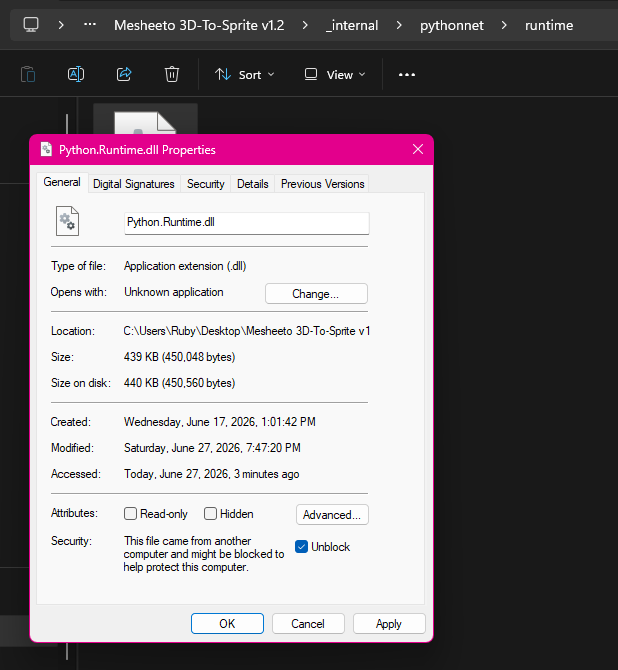
AHA! Ok, so it WAS the Security feature. For most apps I just tell it to run anyway and it works, but apparently this issue occurs if you copy the virtual environment files from one system to other. So if anyone else is having this issue I took a screenshot of the 'properties' tab that was suggested to me that I apply 'unblock' to the Python.Runtime.dll file and the Microsoft.Web.WebView2.dll files. the program opens perfectly after that!
26 days ago (+1)
thank you for looking into it! I got that pop up as well but I just told it to run anyway and it never came back after the first time. Let me try your suggestions
26 days ago (+1)
I may have found a fix for you. Before you unzip the files, open the properties on the zip and look at the bottom where it says "This file came from another computer and might be blocked to help protect this computer." and tick the "Unblock" checkbox.
If you don't do that before you unzip the files, every file in the zip gets flagged and a dll file can be blocked, "Python.Runtime.dll".
I hope that helps!