Indie game storeFree gamesFun gamesHorror games
Game developmentAssetsComics
SalesBundles
Jobs
TagsGame Engines

Hello DanClypse.
I see the issue... PixZels cannot find hidden extrusions correctly.
As with the inside of the fridge, I need to work out the geometry manually because I can only determine the depth of orthogonal views, not hidden geometry... Not sure If I can add a colour detection to fix that missing geometry.

My workaround is to work on these issues after model creation using selections. It is what works best for me so far. :/

Really cute house :) ... Also need to find a way to fix these slopes, like the roof, to be more pleasant to see.

Many Thanks for your feedback; it helps me a lot in finding issues. :)


(+1)

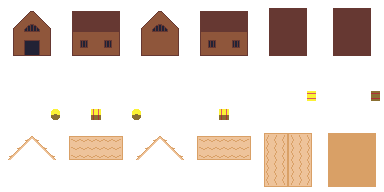
Thank you for the quick response! I believe I have found an idea that could possibly solve this problem without the need for complex color analysis, through the use of multiple voxel layers. I separated the house in three different Z-Ortho files: one for the base, one for the roofing, and another one for the hay bale, like so:

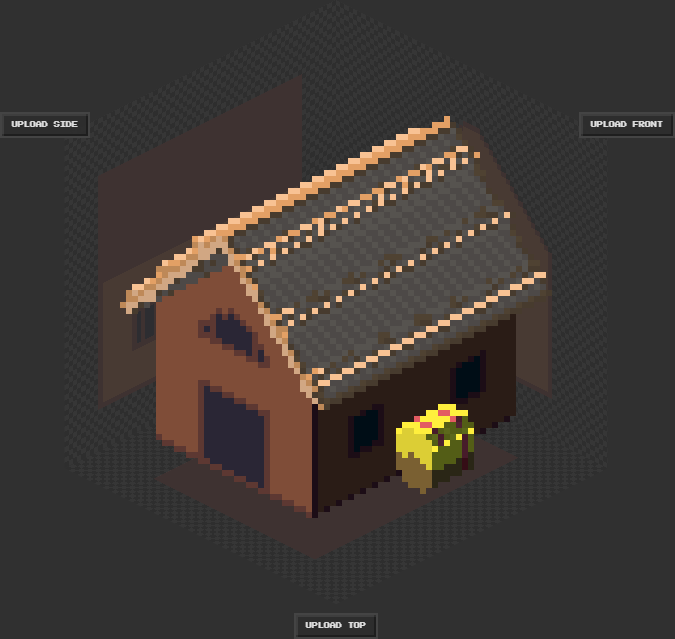
I loaded each of them individually in Pixzels, and then combined them in Photopea to demonstrate the shape I originally intended to make:


However, it would be amazing to have all shapes loaded at the same time in the program, so that they can cast shadows on one another, and to easily export several angles. Thanks again for your time and effort!